May 16, 2020
Solved

Is there a way to show reconciled transactions on the check register? Matched synced transactions could have a check mark or dot in my register. That would be handy!

  • May 16, 2020
  • 1 reply
  • 0 views
Original commenter did not share additional details

Best answer by JonpriL

Hello there, @LRBCORP!


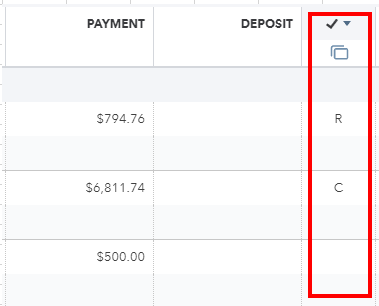
You can also identify if your transactions have been cleared or reconciled base on their status under the Checkmark column in your account register.

  • - Reconciled
  • - Cleared

Reconcile.PNG

Lastly, here's an article you can read for ideas about the transactions you can add directly in your account register: Add transactions to account registers in QuickBooks Online.


If there's anything else that I can help you with, let me know in the comments. I'll be here to help.

1 reply

May 16, 2020

Yes, let's filter the Reconcile status to show the reconciled transactions on your check register, @LRBCORP. This way, you'll be able to identify the check marks for your matched synced transactions. Please first make sure to log into your QuickBooks Online (QBO) account as an admin. Once done, perform the handy steps below.

  1. Go to Accounting from the left menu.
  2. Select Chart of Accounts.
  3. Locate your account. 
  4. Click View register from the Action column.
  5. Tick the Filter icon. 
  6. Choose Reconciled in the Reconcile status drop-down. 
  7. Set the date range. 
  8. Hit Apply


The screenshot below shows you the last four steps. It also displays how the Square icon indicates whether your transactions are added or matched in the account's bank feeds. For the detailed instructions, see Filter your transactions under Step 1 through this article: Find, Review, And Edit Transactions In Account Registers


As always, I'd suggest running the reconciliation report since you've already reconciled your account. It helps you review your beginning, ending balances, cleared, and uncleared transactions during that period. You can also print, export, and send it to your accountant to verify the transactions. Doing so will help ensure the account in QBO matches your bank statement monthly. 


I'll be right here to help if you need anything else. Enjoy the rest of your day, @LRBCORP

LRBCORPAuthor
May 18, 2020

This is certainly helpful and it will do what I want.  I just wish there was a symbol or dot similar to the reconcile page that would show if the transaction had cleared or not.  I still would like to see everything at once but be able to differentiate.  Thanks for your help.

JonpriLAnswer
May 18, 2020

Hello there, @LRBCORP!


You can also identify if your transactions have been cleared or reconciled base on their status under the Checkmark column in your account register.

  • - Reconciled
  • - Cleared

Reconcile.PNG

Lastly, here's an article you can read for ideas about the transactions you can add directly in your account register: Add transactions to account registers in QuickBooks Online.


If there's anything else that I can help you with, let me know in the comments. I'll be here to help.