July 4, 2024
Solved

Link my bank account to MORE THAN ONE QBO account

  • July 4, 2024
  • 2 replies
  • 0 views

I would like to have a bank account (mine) which is linked to more than one QBO subscription...

is that possible?

I'm not asking about linking multiple bank accounts to one subscription; I'm asking about linking one bank account to multiple subscriptions... is that possible?

The QBO subscriptions are a basic subscription and my QB Accountant Online practice

Thanks in advance!

Jen


Best answer by CamelleT

Yes, it's possible, Jen. The banking connectivity features in QuickBooks Online (QBO) represent a significant advancement in financial management technology. By automating transaction syncing, ensuring data accuracy, enhancing security measures, and supporting a variety of banking institutions, QBO empowers businesses to manage their finances more effectively and focus on growth and success.


In QBO, you can connect one bank account to multiple subscriptions. However, when you do this, the same bank transactions will be automatically imported into all linked companies.


Most banks allow numerous connections. I recommend reaching out to your financial institution to confirm that they permit this. Then, please refer to the steps below in connecting your bank to QBO:


  1. Go to Transactions and choose Bank Transactions.
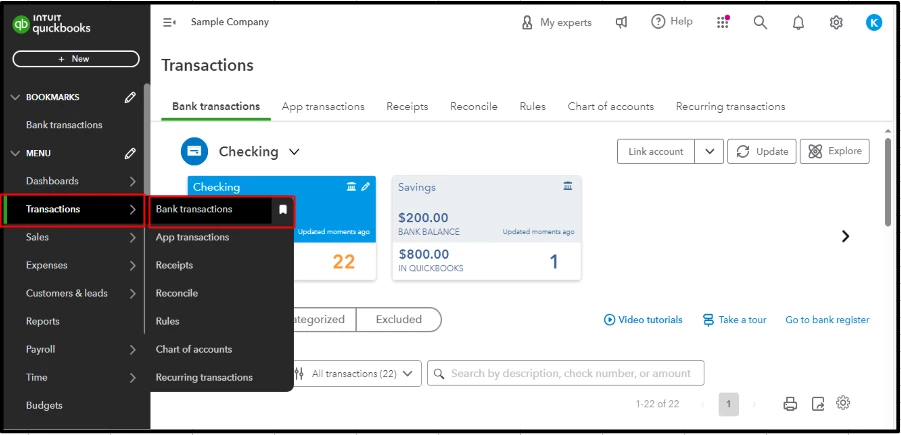


  2. Click Connect Account.


  3. Enter the URL or name of your bank in the Search field, then select the bank.
  4. Enter your Sign info in the Login and Password fields, then select Continue
  5. Select the account that you want to connect and date to pull transactions from the dropdown. Then, select Next.
  6. Select your account type on the Account type dropdown, then select Next.
  7. Map the bank account in the Existing accounts dropdown, then select Next.
  8. Select Connect, then select Done.


For more information, check out this article: Connect bank and credit card accounts to QuickBooks Online.


If you encounter challenges or have specific queries about navigating QBO's banking features, just add a reply below. I'm here to help clarify and guide you through the process. Whether it's configuring bank rules to automate categorization, troubleshooting synchronization issues, or optimizing your setup for smoother financial operations, my goal is to ensure you harness the full potential of QBO to streamline your business finances, Jen. 

2 replies

CamelleTAnswer
July 4, 2024

Yes, it's possible, Jen. The banking connectivity features in QuickBooks Online (QBO) represent a significant advancement in financial management technology. By automating transaction syncing, ensuring data accuracy, enhancing security measures, and supporting a variety of banking institutions, QBO empowers businesses to manage their finances more effectively and focus on growth and success.


In QBO, you can connect one bank account to multiple subscriptions. However, when you do this, the same bank transactions will be automatically imported into all linked companies.


Most banks allow numerous connections. I recommend reaching out to your financial institution to confirm that they permit this. Then, please refer to the steps below in connecting your bank to QBO:


  1. Go to Transactions and choose Bank Transactions.


  2. Click Connect Account.


  3. Enter the URL or name of your bank in the Search field, then select the bank.
  4. Enter your Sign info in the Login and Password fields, then select Continue
  5. Select the account that you want to connect and date to pull transactions from the dropdown. Then, select Next.
  6. Select your account type on the Account type dropdown, then select Next.
  7. Map the bank account in the Existing accounts dropdown, then select Next.
  8. Select Connect, then select Done.


For more information, check out this article: Connect bank and credit card accounts to QuickBooks Online.


If you encounter challenges or have specific queries about navigating QBO's banking features, just add a reply below. I'm here to help clarify and guide you through the process. Whether it's configuring bank rules to automate categorization, troubleshooting synchronization issues, or optimizing your setup for smoother financial operations, my goal is to ensure you harness the full potential of QBO to streamline your business finances, Jen. 

January 1, 2025

I have a chase bank account trying to connect 2 different QuickBooks online logins. However when i sign into one it disconnects the other one and vice versa, basically it is only allowing me to be connected to my chase bank in one QB account. Please help!

January 2, 2025

You're right, @QuantumExplorer. Connecting a single bank account to two different QuickBooks Online (QBO) logins will lead to a disconnection from one of those logins. Let's explore some alternative solutions that will allow you to handle your financial transactions simultaneously without any interruptions.


When you connect the same bank account to multiple QBO accounts, it can lead to disconnections due to security measures implemented by your bank and QuickBooks. This is to protect your financial information, as banks may restrict access to prevent conflicts in transaction management and unauthorized connections.


If you need to manage one Chase bank account across multiple QBO subscriptions, consider opening different types of accounts, such as a Savings account and a Checking account. You can connect the Savings account to one subscription and the Checking account to another. This approach enables you to maintain separate financial records and manage transactions more effectively within each QuickBooks account.


To begin the process of linking your bank account, please review this article that outlines all the necessary steps in detail: Connect bank and credit card accounts to QBO.


After you connect your bank account to QBO, it's important to review the categories assigned to the automatically downloaded transactions. This feature helps streamline your bookkeeping process by ensuring that your transactions are organized correctly.


If you find yourself uncertain about whether you are categorizing your transactions correctly in QBO, feel free to get in touch with our QuickBooks Live Expert Assisted. They can help clarify any questions you may have about transaction categorization, offer best practices, and ensure that your financial records are accurate.


By connecting your bank account to QuickBooks, you can enhance your financial management processes and gain valuable insights into your business. If you require additional questions during the process, I'll be available anytime.

January 7, 2025

Is there any fix or way around it?? Its really annoying. Will using the same login on QBO (but different companies) help??

(Vs currently I'm using 2 separate email logins)