

August 24, 2023
Question

Memo is no longer populating with the Bank detail

  • August 24, 2023
  • 3 replies
  • 0 views

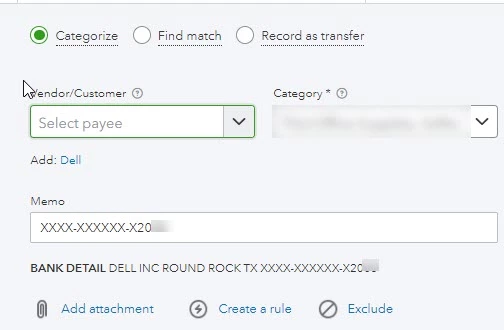
When using QBO the bank detail previously imported into the memo field.  Starting this week the process only imports the last part of the bank detail into the memo field. Now I have to manually enter the information in the memo field.   
3 replies

Bryan_M
August 24, 2023

Thanks for raising your concern here, @VTOH. We'll gladly help you enter the bank details in the memo field.


On the Banking section, there's an icon that you can click where the Copy bank detail to memo option is there. Let's ensure that it has a checkmark. Here's how: 


  1. From the Banking section, choose Banking.
  2. Click the Gear icon on the lower right.
  3. Scroll down and ensure the Copy bank detail to memo field is checked. If not, tick the box beside it


However, if the field is checked, we recommend contacting your bank. Please know that QuickBooks will depend on the details provided by your bank, and reaching out to them is our best resort to clear things up if there are changes.

 Additionally, we have articles here that can help you manage your banking transactions:


The Community is always here to lend a hand whenever you need help navigating your banking page. Just click the Reply button below. Take care, and have a good day.

VTOHAuthor
August 24, 2023

The setting states that it will copy the bank detail into the memo field.  that is not happening.  If you look at my screen shot you can see that the bank provided all of the details i need in the feed.  The system is no longer copying the data into the memo.  

August 24, 2023

Hello there, @VTOH.


My colleague Bryan_M provided the steps to set the Memo to populate bank details.


Have you tried the resolution provided? I hope his response resolves your issue.


If you have tried the above mentioned and have the same issue, I recommend contacting your bank. You can ask if there are any updates about the details they can share with QuickBooks. You can also ask if there are changes with some formats since QuickBooks depends on the information you bank shares.


For future reference, I'm adding this article about categorizing transactions in QuickBooks Online: Categorize online bank transactions in QuickBooks Online.


Let me know if you need further assistance with your transactions. I'm always here to help. Have a great day.

August 24, 2023

I am having the same issue and similar to the OP, the option is already selected to copy the bank detail to the memo line so that is not the solution.

February 20, 2024

This is happening to me, too. It started a few months ago. I’ve been trying to work around it by doing a 4 digit match, but now the issue is changing. Instead of only revealing the last four digits of the account id in the memo (which is tied to Google ads account id), it’s randomly showing four digits. In some cases, the random four digits match multiple accounts and is causing issues with my rules.


I saw another one today from a vendor charge called 4over, and QBO changed it to Xover. I wasted a lot of time to discover that it had done this.


Please fix this issue. It’s not with my browser, cache, or anything else client side. I can’t stand it when Intuit wastes my time trying to blame me for their bugs.  

February 20, 2024

I understand the urgency of resolving this issue, Andrew NA. 


We understand the challenges you've been through to get this sorted out, and I know you have already tried some troubleshooting to resolve the issue. Since the problem persists, I suggest reaching out to our customer support team.
 

Our support team is equipped with the necessary tools and access levels to handle customer accounts, and they can trace what the vendor charged called 4over, and QBO changed it to Xover. They have been trained to provide expert assistance to our customers and are available to help you resolve this issue efficiently and effectively. 


To contact our support, here's how: 


  1. Go to Help (?).
  2. Enter talk to a human, then tap Continue.
  3. Choose which way you want to connect with us.
    • Have us call you - Get a call from a support expert.
    • Chat with us - Start a conversation with a support expert. 


Our customer support is available for Plus, Essentials, and Simple Start from M-F 6 AM to 6 PM PT, and Saturday, 6 AM to 3 PM PT Advanced, any time, any day, to assist you and ensure that your experience with our service is as smooth and hassle-free as possible.  


To ensure your data is accurate, you can check this article. It will guide you in ensuring that your QBO matches your real-life bank statement: Reconcile an account in QuickBooks Online.


If you have other questions regarding multiple charges in QBO, please don't hesitate to leave a reply below. Have a great day, and take care!