March 27, 2023
Solved

QB Enterprise - Chart of Accounts Bank balance totally different than correlating bank register balance

  • March 27, 2023
  • 3 replies
  • 0 views

Is anyone dealing with Chart of Accounts Balances showing completely different balances than actual register balances in QB Enterprise?


Best answer by LieraMarie_A

Hi there, @cf29.


We can perform basic troubleshooting to figure out why the balances in your Chart of Accounts differ from those in the registers.


Let's run the Verify/Rebuild tool. Verify will find any corrupted data and Rebuild  will attempt to fix them. It also allows your QuickBooks software to refresh the data inside the company file. Make sure to create a backup copy of your company file before doing the process. Having a backup copy allows you to restore it to undo the changes.


Follow the steps below on how to verify data:
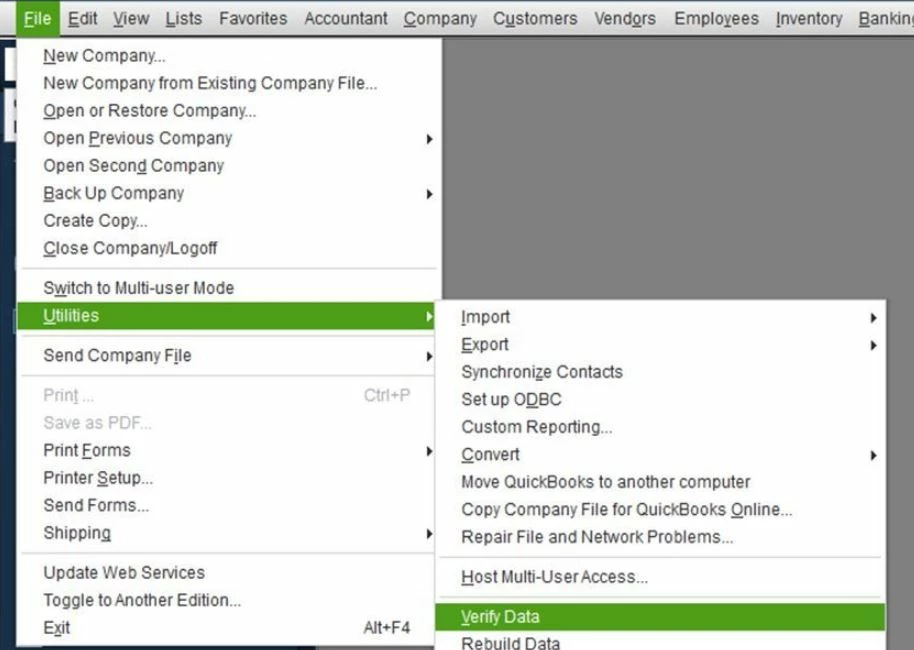
 

  1. On the top menu, click File.
  2. Choose Utilities.
  3. Select Verify Data.
  4. Click OK when you see the message, QuickBooks detected no problem with your data.
  5. If Verify finds an issue with your data, you'll be prompted to Rebuild Now or View Errors.
  6. Click Close or View Errors and take note of the specific error message.


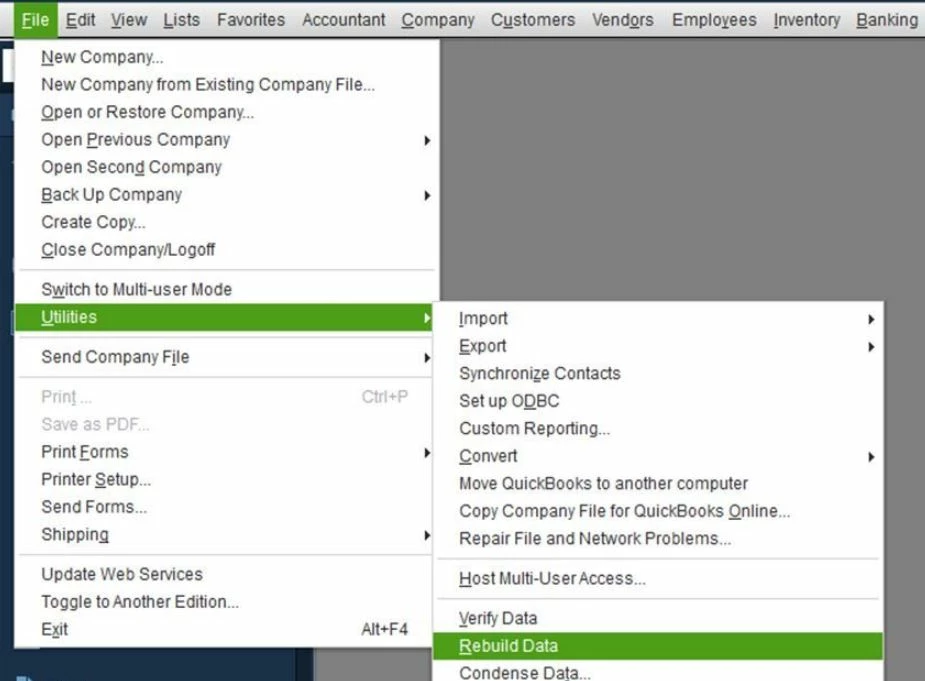
Next, here's how to rebuild data:


  1. On the top menu, click File.
  2. Choose Utilities.
  3. Select Rebuild Data.
  4. Click OK if you receive a prompt to back up your company file.
  5. Click OK when you get the message, Rebuild has completed and proceed to the next step.
  6. Run Rebuild Data again to make sure there's no error.


Moreover, ensure your QBDT is up-to-date. This way, you always have the latest features and fixes. You can also visit this link for additional troubleshooting steps: Tool Hub.


Add a comment below if you have further concerns about receiving customer payments. I'll be happy to help you some more.

3 replies

LieraMarie_A
March 27, 2023

Hi there, @cf29.


We can perform basic troubleshooting to figure out why the balances in your Chart of Accounts differ from those in the registers.


Let's run the Verify/Rebuild tool. Verify will find any corrupted data and Rebuild  will attempt to fix them. It also allows your QuickBooks software to refresh the data inside the company file. Make sure to create a backup copy of your company file before doing the process. Having a backup copy allows you to restore it to undo the changes.


Follow the steps below on how to verify data:


  1. On the top menu, click File.
  2. Choose Utilities.
  3. Select Verify Data.
  4. Click OK when you see the message, QuickBooks detected no problem with your data.
  5. If Verify finds an issue with your data, you'll be prompted to Rebuild Now or View Errors.
  6. Click Close or View Errors and take note of the specific error message.


Next, here's how to rebuild data:


  1. On the top menu, click File.
  2. Choose Utilities.
  3. Select Rebuild Data.
  4. Click OK if you receive a prompt to back up your company file.
  5. Click OK when you get the message, Rebuild has completed and proceed to the next step.
  6. Run Rebuild Data again to make sure there's no error.


Moreover, ensure your QBDT is up-to-date. This way, you always have the latest features and fixes. You can also visit this link for additional troubleshooting steps: Tool Hub.


Add a comment below if you have further concerns about receiving customer payments. I'll be happy to help you some more.

cf29Author
March 28, 2023

Problem solved.  Thank you!

JaeAnnC
March 28, 2023

Thanks for the update, cf29.


We're delighted to hear that the steps mentioned above by my colleague were able to resolve your issue about the Chart of Accounts.


You can always drop by the Community if you have any other QuickBooks-related concerns. We're always available to assist you further. Keep safe, and have a great rest of the day!

August 1, 2024

Bank Balance & Quickbooks balances are different on Dashboard, why?


August 1, 2024

Hi there, syn4. I'm here to explain the difference between bank and QuickBooks balance in the QuickBooks Desktop (QBDT) dashboard.


The QuickBooks Balance represents the total balance of reviewed and unreconciled transactions, while the bank balance is the total amount in your bank account.


Please note that QuickBooks balance and bank balance aren't the same at all times.


In addition, you can refer to these articles to learn how to manage your transactions and match your balances in QBDT:


Comment on the post if you still have concerns about account balances in QBDT. I'm always here to help.