Thank you for your reply. I was trying to avoid having to reconcile the same account again.
What would cause an already reconciled account to become "unreconciled"?
If transactions have been unreconciled, why are there a reconciliation reports for the months that follows?
I'm readdressing this again because I like to know if there is anything I may have done to inadvertently "unreconciled" a transactions.
Thank you.
Thanks for getting back to this thread, @Woody0930.
Let me provide you answers to your reconciliation query in QuickBooks Online (QBO).
The most likely reason why a reconciled transaction becomes unreconciled is that someone undid the last reconciliation. They might also accidentally unchecked (uncleared) the cleared transactions in the account register.
Additionally, funds that were transferred from a previously reconciled bank account to a sub-account will trigger this issue. Or else, saving the changes in your edited reconciled transactions will also unbalance your account.
However, you can run a reconciliation report to check if there were changes made to them. Here's how:
- Go to Reports.
- Search for the Reconciliation report and open it.
- Select the account from the Account drop-down list.
- Click View Report to see the changes.
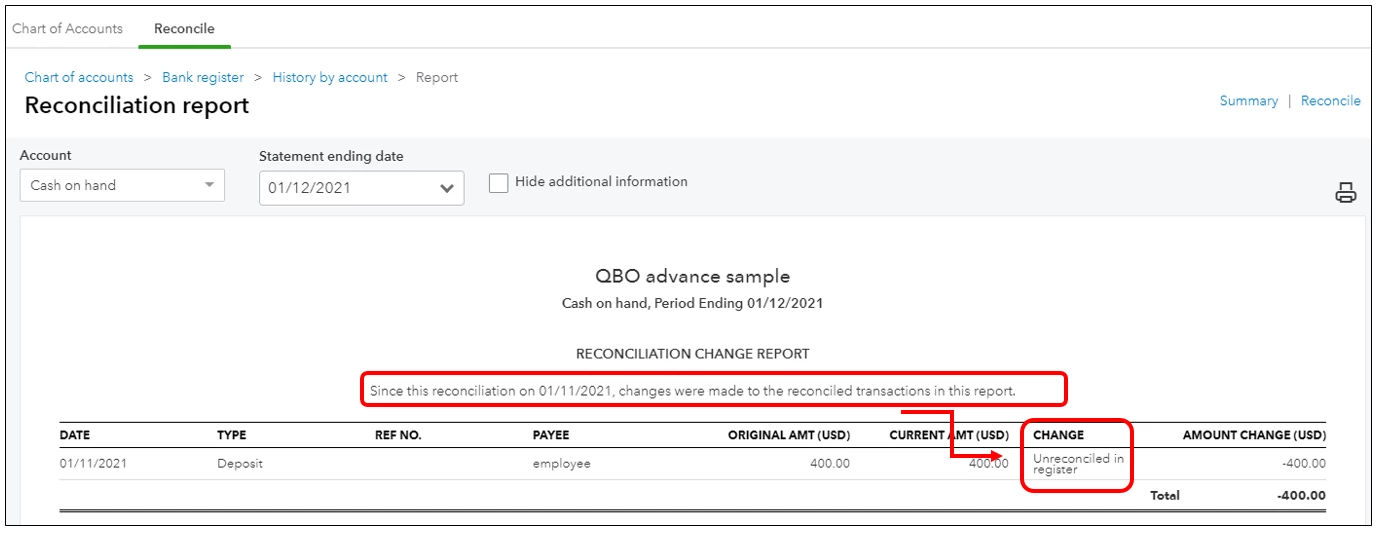
In case you encounter issues in your past reconciliation, follow the steps in this article on how to fix them: Fix issues for accounts You've Reconciled In The Past in QuickBooks Online
Should you have any follow-up questions or concerns, you can leave a comment on this thread. I'll take of you and help you in accomplishing your task in QuickBooks. Have a great day and stay safe.

