June 22, 2022
Solved

QBO when I try to find a match through bankfeed for exps for Amazon.com it only pulls up bills.

  • June 22, 2022
  • 1 reply
  • 0 views
Original commenter did not share additional details

Best answer by LieraMarie_A

Hi there, @MaryLou BRCS.

Welcome to the Community! You've come to the right place to find answers. I'm happy to help you match these expenses and clear them right away.


Have you tried using the filters available? You can use them to find what you're looking for. You have the option to select a specific transaction type and time period to narrow down the results. You may also use the Search field to locate transactions by amount, reference number, or memo. 


Here's how:
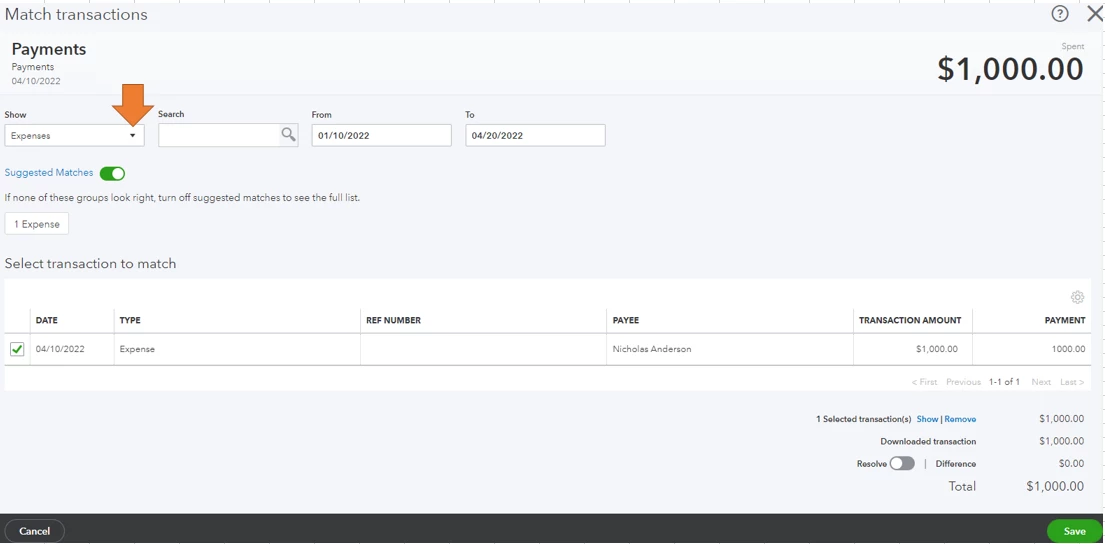
  1. Go to the Transaction menu and select Banking.
  2. Select the tile for the account you want to review and then the For Review tab to start your review.
  3. Click the expense transaction to expand the view.
  4. Choose Find match.
  5. Use filters/search to locate transactions.
      • Select Expenses under the Show drop-down.

      • When searching for dollar amounts, use a dollar sign or decimal point.
      • Specify the date range.
  6. When you find the correct match, put a checkmark in the box.
  7. Click Save.
  8.  

If you're still unable to find it, let's perform basic troubleshooting steps. Issues like this are usually the result of outdated or corrupt cache files in your web browser. Let's start by accessing your account through an incognito window to rule out the possibility of a webpage issue. You can refer to these shortcut keys to open an incognito window in all supported browsers:

  • Chrome: Ctrl+Shift+N
  • Firefox: Ctrl+Shift+P
  • Safari: Command+Shift+N


If it's responsive, I recommend that you clear your browser's cache. By clearing them, you can remove that historical data and access QuickBooks with a clean slate. You can also switch to a different supported browser to see if it has something to do with your browser.


Additionally, here are some resources that will help you in managing your bank feeds:

Please come back and post about your results after the troubleshooting. It's my priority that you find the success you need.

1 reply

LieraMarie_A
June 22, 2022

Hi there, @MaryLou BRCS.

Welcome to the Community! You've come to the right place to find answers. I'm happy to help you match these expenses and clear them right away.


Have you tried using the filters available? You can use them to find what you're looking for. You have the option to select a specific transaction type and time period to narrow down the results. You may also use the Search field to locate transactions by amount, reference number, or memo. 


Here's how:

  1. Go to the Transaction menu and select Banking.
  2. Select the tile for the account you want to review and then the For Review tab to start your review.
  3. Click the expense transaction to expand the view.
  4. Choose Find match.
  5. Use filters/search to locate transactions.
      • Select Expenses under the Show drop-down.

      • When searching for dollar amounts, use a dollar sign or decimal point.
      • Specify the date range.
  6. When you find the correct match, put a checkmark in the box.
  7. Click Save.
  8.  

If you're still unable to find it, let's perform basic troubleshooting steps. Issues like this are usually the result of outdated or corrupt cache files in your web browser. Let's start by accessing your account through an incognito window to rule out the possibility of a webpage issue. You can refer to these shortcut keys to open an incognito window in all supported browsers:

  • Chrome: Ctrl+Shift+N
  • Firefox: Ctrl+Shift+P
  • Safari: Command+Shift+N


If it's responsive, I recommend that you clear your browser's cache. By clearing them, you can remove that historical data and access QuickBooks with a clean slate. You can also switch to a different supported browser to see if it has something to do with your browser.


Additionally, here are some resources that will help you in managing your bank feeds:

Please come back and post about your results after the troubleshooting. It's my priority that you find the success you need.

June 27, 2022

Thank you for your detailed assistance. I so appreciate it. 

June 27, 2022

You are welcome MaryLou BRCS! If you have any diffulites, don't hesitate to reach out! We are here to help. Take care!
