

May 11, 2021
Question

QuickBooks Desktop, Bank feeds, Action, Match to existing action.

  • May 11, 2021
  • 1 reply
  • 0 views

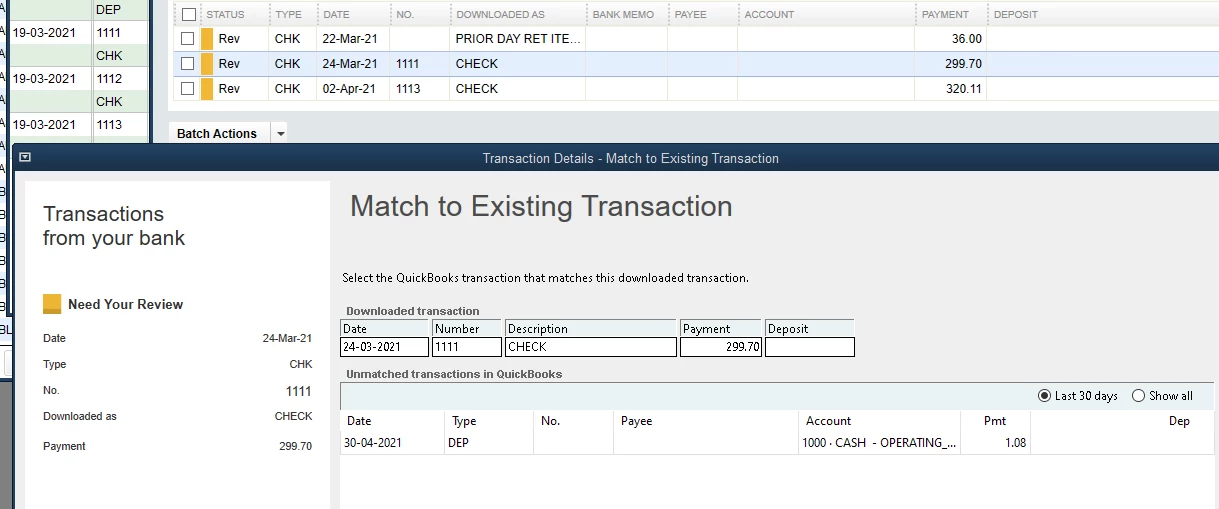
First time using bank feeds. Desktop Pro 2020.  I have transactions in my bank register that will not show up when I select "match to existing transaction" drop down in bank feed. Below is one of 80 transactions.
1 reply

May 11, 2021

I have some information to share with you, @Sem01.


There are several reasons why transactions doesn’t show up when you select Match to Existing Transaction in the bank feed. It could be because of the following reasons:


  • Details are different
  • Already reconciled
  • Data issues


You can check your entries if they’re entered using the same bank account. Make sure they’re not yet reconciled and haven’t been previously matched to another bank downloaded transaction.


Meanwhile, you can perform some troubleshooting steps here to resolved issues in your company file. You can follow the processes below:


  1. Update QuickBooks Desktop to the latest release. This keeps your software up-to-date, so you always have the latest features and fixes.
  2. Do the Verify and Rebuild Data method. This will fix any data integrity issues. Please know that you'll need to log in to your Desktop account using the single-user mode when performing this process.


Once done, you can try matching the transactions to the existing ones again. You can use this reference to add and match bank feed events in QBDT for complete instructions.


If you have additional banking questions or concerns, don’t hesitate to let me know. I’ll be here anytime. Take care!