

June 14, 2020
Solved

Quickbooks online bank account balance does not match

  • June 14, 2020
  • 2 replies
  • 0 views

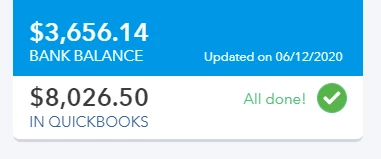
I use QB online and download my checking account transactions on a weekly basis and reconcile my account monthly.  For a long time now, my "bank balance" has not changed.  It has not matched my actual balance for quite some time.  Shouldn't the "bank balance" always update to the current balance that is actually in the bank account?  I understand that the "bank balance" and the "quickbooks balance" will probably never match, but why isn't the "bank balance" matching what's really in the bank??  
Best answer by Rejeil_O

Welcome to Community @JillCHal.


Let me help you with the bank balance in your QuickBooks Online account. The "Bank Balance" will only depend on the update on your financial bank institution while the "In QuickBooks" balance will change when you add transactions in your QuickBooks Online account.


If your "Bank Balance" is not automatically updating, you can manually update the bank balance to match it to your recent financial bank institution. Here's how:


  1. Go to the Banking menu or Transactions menu.
  2. Select Update. If you only want to update some accounts, select the unwanted ones, then select Update now.
  3. If asked, enter your Multi-Factor Authentication (MFA) credentials.
  4. Click the Continue update button.


For more detailed information about updating your bank balance, you can read this article: Manually download online bank transactions in QuickBooks Online.


You can also match and categorize your bank transactions to prevent duplicates activities.


If you have follow-up questions, feel free to leave a message in the comment section. I'll be around here in the Community to help. Take care and have a good one!

2 replies

Rejeil_O
Rejeil_OAnswer
June 14, 2020

Welcome to Community @JillCHal.


Let me help you with the bank balance in your QuickBooks Online account. The "Bank Balance" will only depend on the update on your financial bank institution while the "In QuickBooks" balance will change when you add transactions in your QuickBooks Online account.


If your "Bank Balance" is not automatically updating, you can manually update the bank balance to match it to your recent financial bank institution. Here's how:


  1. Go to the Banking menu or Transactions menu.
  2. Select Update. If you only want to update some accounts, select the unwanted ones, then select Update now.
  3. If asked, enter your Multi-Factor Authentication (MFA) credentials.
  4. Click the Continue update button.


For more detailed information about updating your bank balance, you can read this article: Manually download online bank transactions in QuickBooks Online.


You can also match and categorize your bank transactions to prevent duplicates activities.


If you have follow-up questions, feel free to leave a message in the comment section. I'll be around here in the Community to help. Take care and have a good one!

July 3, 2020
Hello!
 
QB shows on balance report not actual balance on account as on a bank statement,QB deducted unclear checks amount and payments that cleared next month, that`s why balances do not match. 
When I do a balance report - amount on my bank account from QB, not from bank, so reports are not very accurate.
 
Please advise.
June 25, 2023

This is happening to me also.

I just downloaded all my bank transactions, and opened the transaction download file. These transactions all show up in the QB banking window.

However, at the top of that window where it is supposed to show my bank balance, it seems to be frozen.

The date shown is in the past, and the bank balance didn't change when I input the new bank transactions.

i don't know what to do.

It used to work right and show the correct bank balance. But for quite a few months now it's been frozen showing the same date and same amount, no matter how many new transactions I enter.

Earlier the date shown at the top of that banking window was in the future. Now it's in the past. I have no idea what to do about it.


June 25, 2023

I know that this hasn't been easy for you. QuickBooks Online (QBO) always wants to make sure you can perform your banking tasks seamlessly.


The spinning wheel might be caused by a connection between your bank's website and QuickBooks Online. If you have noticed that you're no longer getting your latest transaction, you can perform a manual update to refresh your bank connection. Here's how:


  1. Go to the Banking menu.
  2. Select the Banking tab, then choose a bank account.
  3. Select Update.
     

Additionally, here's the article that compiles the solutions you can perform whenever transactions aren't downloading from your bank: What to do if you get a bank error or can't download transactions in QuickBooks Online.


I'm also adding this article to help review your downloaded online banking transactions in QBO: Categorize and match online bank transactions.


Just drop a comment below if you have any other concerns or follow-up questions. I'll be around to help.

June 26, 2023

Hi Deb,

Thanks for your reply! However I think I need to clarify my situation. I AM able to successfully download my bank transactions. I don't have any trouble doing this. Also I'm not seeing a spinning wheel. I used the word "frozen" but I just meant that the number for "current bank balance" that shows up at the top of the online banking window, always stays the same. It doesn't change. Also the date shown doesn't change.

So my transactions all download properly. But that line at the top that says something like "your bank balance on X date is Y dollars" never changes. It's been like this for a few months. I can always download my new transactions. But if I want to see my current bank balance, I have to go online outside of quickbooks to my bank's website for that. It's an extra step and isn't efficient use of my time. 

Hope I"m being clearer now.

Please tell me how I can get quickbooks to update that line. I already tried closing and opening quickbooks, and that didin't help.

Thanks!