

February 15, 2024
Question

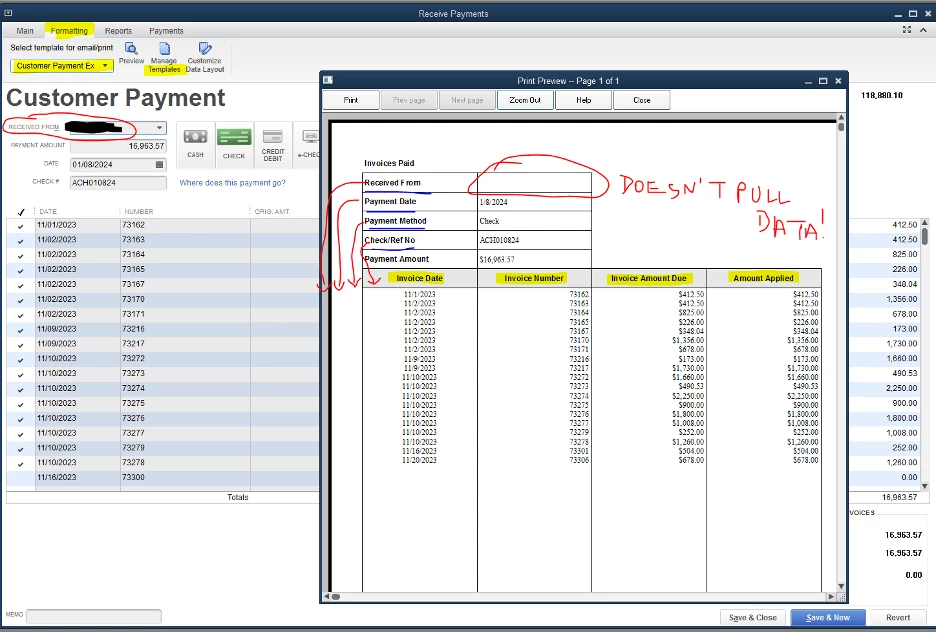
Received From field does not pull data

  • February 15, 2024
  • 1 reply
  • 0 views

Received From field does not pull any data. Within the template I've tried deleting and re-adding somewhere else and it's empty. Please fix ASAP!


See red circled items below. The other stuff I want to see created as well, but I have that within another thread.
 

1 reply

Candice C
February 15, 2024

Hey, @Teresa Smags


Thanks for stopping by the Community! 


I recommend using our Verify and Rebuild tool to help you get this information back. Here's how: 


Verify your company data


  1. Go to Window then select Close All.
  2. Go to File, then select Utilities.
  3. Select Verify Data. If you see: 


QuickBooks detected no problems with your data—your data is clean, and you don’t need to do anything else.
An error message—search for it on our QuickBooks Desktop support site for how to fix it.
Your data has lost integrity—Data damage was found in the file. Rebuild your data to fix it.
Note: If you use Assisted Payroll contact Assisted Payroll before you rebuild your data.


Rebuild your company file data


  1. Go to File, Utilities, and then select Rebuild Data.
  2. QuickBooks will ask to make a backup before it rebuilds your company file. Select OK. A backup is required before you can rebuild.
  3. Select where you want to save your backup, then OK. Don’t replace another backup file. Enter a new name in File name and select Save.
  4. Select OK when you get the message Rebuild has completed.
  5. Go to File, select Utilities then select Verify Data again to check for additional damage. 


If the verify finds more damage, you’ll need to fix it manually. Search for the error(s) in the qbwin.log on the QuickBooks Desktop support site for how to fix it.
If your error can't be found, you can restore a recent backup. Go to File then select Open or Restore Company.
Note: Don’t replace your existing company file. You’ll need to enter info into your company file again since the backup was created.


This should do the trick. Reach back out if you have any other questions. Have a great day!