

January 14, 2022
Solved

Refund from Vendor to Credit Card

  • January 14, 2022
  • 1 reply
  • 0 views

We made some purchase and paid through Credit Card. So we entered the bill in QBO and then we enter bill payment through CC.


Later we found some product is defective and we rejected them so the Vendor gave us a Credit Memo for that amount. Now we entered the Memo as "Vendor Credit" in QBO that gives as a negative balance in Vendor account.

As we do not want to buy anything from that vendor, He refunded our money directly to the credit card. so now when i am adding that in vendor account it is going through "Credit Card Credit" and giving negative balance.

So in the end QBO shows we have paid extra while in actual there should a zero balance.


Effective entries as per QBO:

1). Purchase Dr..... Vendor Cr... (entered bill)

2). Vendor Dr......   Credit card Cr.. (bill Payment)

3). Vendor Dr...... Purchase Cr.... (entered Credit Memo)

4). Vendor Dr...... Credit card Cr (This entry is showing in my Vendor account that is driving m crazy.)


Best answer by stackArmor

Thanks for keeping us posted, @stackArmor


Allow me to step in and provide you additional information to help you record a vendor refund. 


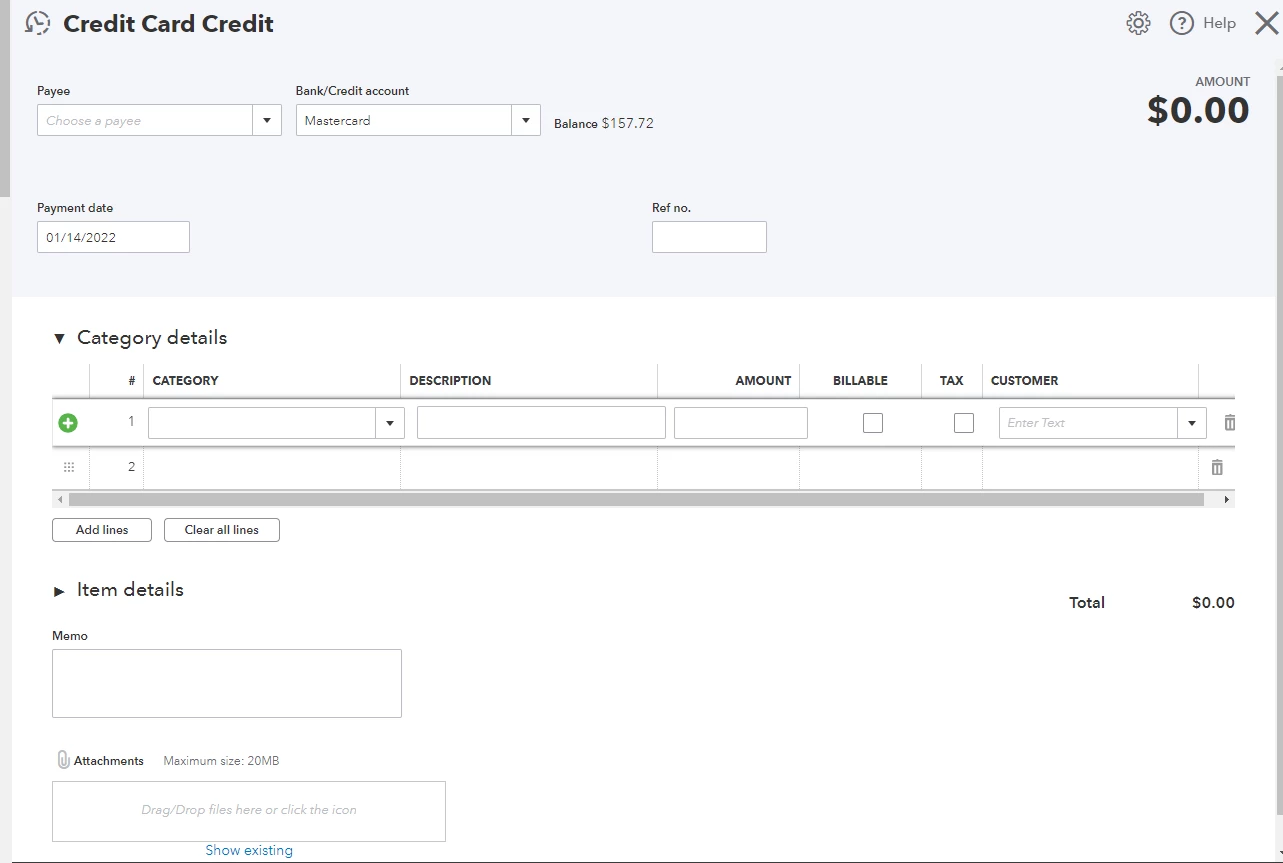
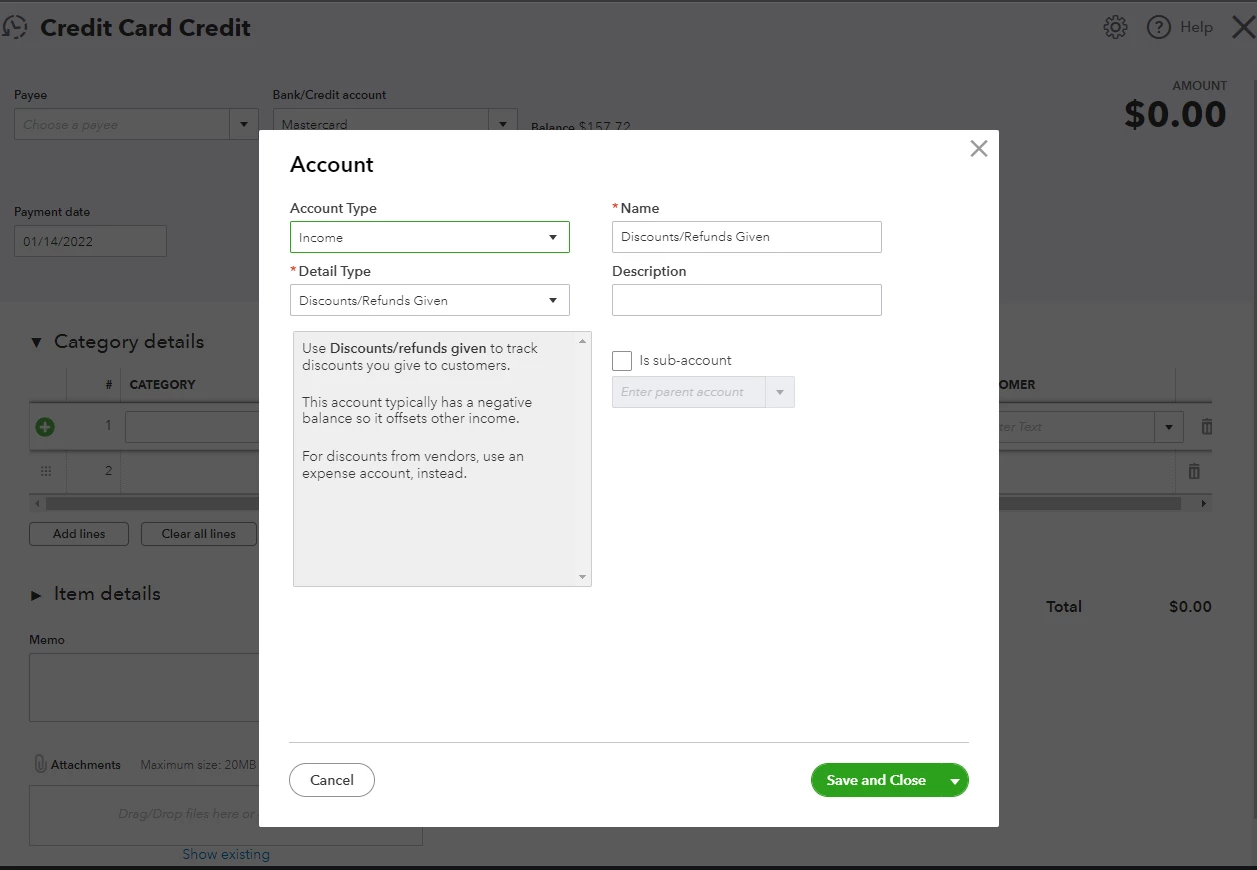
You can use a credit card credit with an income account called refund to clear the vendor's profile balance.


Here's how:

  1. Select + New.
  2. Choose Credit card credit.
  3. Find the appropriate account from the Bank/Credit Account drop-down box.
  4. Under the Category details, select add new.
  5. Choose an income account called refund. 
  6. Enter the other needed information.
  7. Click Save and close.

Please see the sample screenshot below for your reference: 


I'd also suggest seeking professional help from your accountant on what's the best way to handle the situation. 


I'm also adding these articles for reference:


Fill me in if you have additional questions about managing your credit cards in QBO. I'm always here to help. Take care always.


Thanks Abegail,


Your solution didn't help as i was still able to see a negative balance in AP report for that vendor.


The solution I re-searched is below:

1. I entered the credit Memo as vendor credit that was provided by vendor and chose the item returned.

2. I entered credit card credit and chose Accounts Payable (instead of income) under category.

3. I entered a bill payment of $0 and adjust CC credit to Vendor Credit.


Results are:

1. Purchase account is reduced

2. Credit Card is reconciled

3. AP report says Zero Balance


Let me know if this creates any problem in future.

and thanks everyone for your time..

1 reply

January 14, 2022

I recognize how important it is to flawlessly record the vendor refund, stackArmor. I'm here to assist you with that.


When you receive a refunded amount of the purchases made on your credit card, you'll only have to create a Credit card credit. This helps you easily record it to balance your transactions flow. With this, I'd suggest deleting the vendor credit that you've created.


Here's how:


  1. Go to the Expenses menu and then select Vendors.
  2. Locate the name of the vendor, then click to open it.
  3. Open the vendor credit you've created.
  4. Click the More button, then select Delete.


In case you'll want to know when to use a vendor credit, I'd suggest checking out this article: Enter a Refund from a Vendor.


Additionally, I've included an article that'll help you learn more about managing your vendor transactions in QuickBooks Online: Expenses and Suppliers.


I'm only a few clicks away if you need assistance with your other QuickBooks tasks, stackArmor. It's always my pleasure to help you out again.

January 14, 2022

Thanks Charlene for answering but the problem is again the same.


After deleting the VC, If I keep Credit card credit with the item details mentioned in it, It will not reduce my purchase because in CC credit transaction we can use category only not the item also vendor account will still have a negative balance.


The credit card entry should be adjusted against the VC because when we receive some amount the entry we do is:

Credit card (Dr)....... Vendor (Cr).....

while QBO is reversing this entry somehow and making a refund as a payment in Vendor account

January 14, 2022

Thanks for keeping us posted, @stackArmor


Allow me to step in and provide you additional information to help you record a vendor refund. 


You can use a credit card credit with an income account called refund to clear the vendor's profile balance.


Here's how:

  1. Select + New.
  2. Choose Credit card credit.
  3. Find the appropriate account from the Bank/Credit Account drop-down box.
  4. Under the Category details, select add new.
  5. Choose an income account called refund. 
  6. Enter the other needed information.
  7. Click Save and close.

Please see the sample screenshot below for your reference: 


I'd also suggest seeking professional help from your accountant on what's the best way to handle the situation. 


I'm also adding these articles for reference:


Fill me in if you have additional questions about managing your credit cards in QBO. I'm always here to help. Take care always.