January 15, 2024
Solved

Removing duplicate transactions after reconciliation

  • January 15, 2024
  • 1 reply
  • 0 views
Can you remove duplicate transactions after reconciling an account? I have duplicate transactions from bank and credit cards that I didn't notice before I completed the reconciliation. Can these safely be deleted without an issues
Best answer by MadelynC

Yes, you can delete duplicate transactions safely by removing them from your reconciliation manually, @user20432.


QuickBooks Online provides an easy way to remove duplicate entries and discrepancies from your company file, ensuring accurate bookkeeping figures.


If you get a difference due to these duplicates, simply follow the steps below to delete and fix the issue. 


  1. Select the Gear icon and then go to Chart of Accounts.
  2. Find the account with the duplicate transactions and click the View register option.
  3. Identify the entry you wish to delete.
  4. In the checkmark column, select the box with the “R” until it’s blank. This removes the transaction from the reconciliation.
  5. Select the Delete button after to remove.
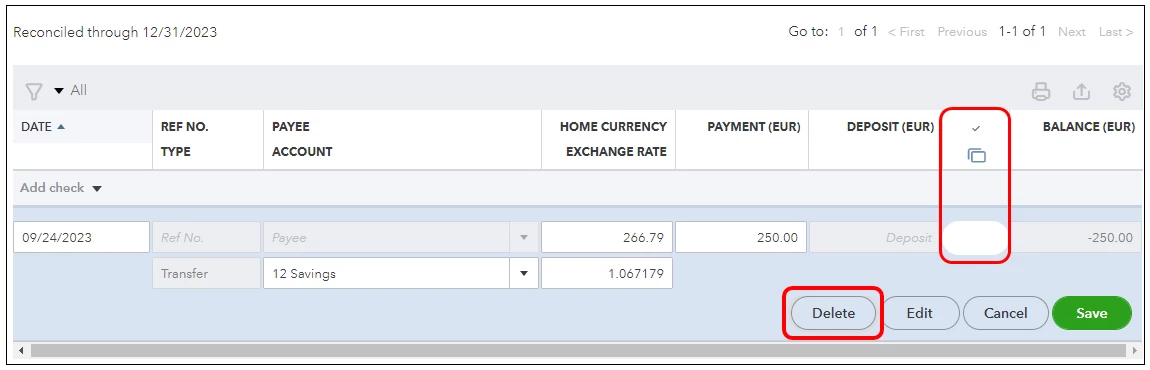

Here’s a comprehensive guide that provides information on how to resolve and adjust a reconciliation in the program: Learn the reconciliation workflow in QuickBooks.


My goal is to make sure your accounts are balanced and correct. If you still have further concerns with your accounts, please let me know by adding comments below. I’ll be here to assist you, @user20432.

1 reply

MadelynCAnswer
January 15, 2024

Yes, you can delete duplicate transactions safely by removing them from your reconciliation manually, @user20432.


QuickBooks Online provides an easy way to remove duplicate entries and discrepancies from your company file, ensuring accurate bookkeeping figures.


If you get a difference due to these duplicates, simply follow the steps below to delete and fix the issue. 


  1. Select the Gear icon and then go to Chart of Accounts.
  2. Find the account with the duplicate transactions and click the View register option.
  3. Identify the entry you wish to delete.
  4. In the checkmark column, select the box with the “R” until it’s blank. This removes the transaction from the reconciliation.
  5. Select the Delete button after to remove.


Here’s a comprehensive guide that provides information on how to resolve and adjust a reconciliation in the program: Learn the reconciliation workflow in QuickBooks.


My goal is to make sure your accounts are balanced and correct. If you still have further concerns with your accounts, please let me know by adding comments below. I’ll be here to assist you, @user20432.

April 10, 2024

But how do I indentify which is the duplicate? After I tried to reconcile things it basically makes it look like I made double the income I actually did (not good as i'm trying to finish my taxes). This is not the first time this has happened and I've seen other people complain about it. I'm assuming if I just undo all the transactions I manually matched, then it will take care of that. Is there a way to see that?   

JoesemM
April 10, 2024

You can go to your bank register to identify duplicates, nothingsimpleg1. Let's go over some details to help you reconcile your account in QuickBooks.


Your Chart of Accounts register shows all your transactions. Both are added manually and some come from your downloaded transactions in the Banking menu. To identify the duplicates, you can check your bank register and review transactions that are added twice. These transactions have the same date, amounts, and details.


In case, you'll undo all the transactions, it will double your income if you remove the manually matched ones. To remove duplicate transactions in the bank register, you can follow the steps shared by my colleague above.


After you remove the duplicates, you can reconcile your accounts by following this article: Reconcile an account in QuickBooks Online.


I'll include these resources as a guide. They will help you run a reconciliation report to review your reconciled transactions. You'll use it to fix issues for accounts you've reconciled in the past in QuickBooks Online:


If you need more help with account reconciliation, just comment below. I'll respond promptly. Take good care.