


HoodCleaningAndRepair
January 17, 2024
Question

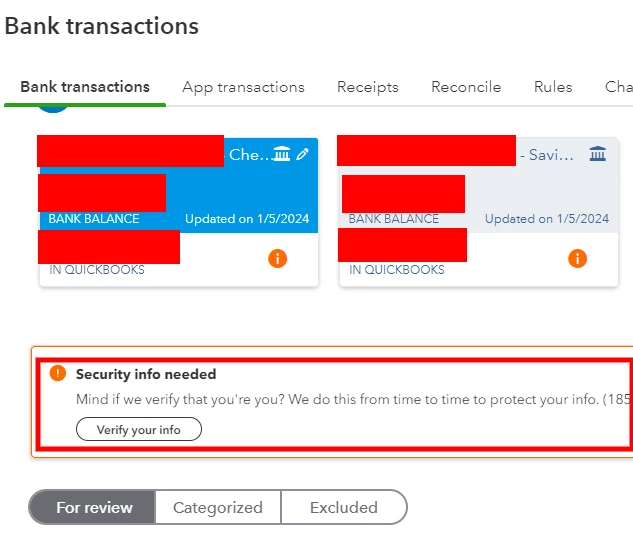
Security info needed

  • January 17, 2024
  • 1 reply
  • 0 views

QBO has been asking me to reconnect my bank after every few logins and it's very annoying.

Example: Everything is fine for 3 days after logging in and logging out a few times in one day but then I am met with a message code 185 asking me to reconnect my bank by verifying it's me by texting a code. I get the bank reconnected and start the process of everything being fine for a days before it asks me to reconnect again.


How do I make this stop and know that my bank has been connected by me and needs to further verification?


Update: It has actually made me verify twice in the span of 10 minutes. This is so unnecessary. This needs to stop.
 

1 reply

January 18, 2024

Hello there, HoodCleaningAndRepair.


I understand the frustration of constantly reconnecting your bank account in QuickBooks Online (QBO).


Bank error 185 in QBO signifies that your bank or financial institution needs more information from you after entering your credentials. In other words, it relates to the additional security requirements laid down by your financial institution. It can be a security question or a one-time password to address. 


We can fix this based on your bank's requirements. If they ask a security question, enter your answer. QuickBooks will then remember it for future use. If prompted for an OTP (One-Time Password), you can receive the code via text, call, or email.


Let's perform basic troubleshooting steps if the issue persists. You may have accumulated too much historical data. Whenever you visit a website, it saves some information from the web page in its cache. These files allow the websites you visit most often to load faster. Not to worry, clearing them will do the trick.


First, let's try accessing your account through an incognito window to rule out the possibility of a webpage issue. You can refer to these shortcut keys to open an incognito window in all supported browsers:


  • Chrome: Ctrl + Shift + N
  • Firefox: Ctrl + Shift + P
  • Safari: Command + Shift + N


If it works, switch back to your regular browser. Then, clear its cache. This way, you can access QuickBooks with a clean slate. You can also use a different supported one.


I've also added these references if you want to categorize your bank transactions: 


I'm just a post-away if you need more help working with your bank in QuickBooks. Take care.

HoodCleaningAndRepair
January 23, 2024

I tried it in an incognito tab on Chrome and it instead of just telling me it was going to text me a code, it gave me 3 options (an email code, a text code, or a push notification). That is new. It does not give me those 3 options when I reconnect the bank transactions on a regular tab. I take that a good sign so I'm going to clear the cache and now hope that stops it from asking me to reconnect the bank every 10 minutes.