August 17, 2017
Solved

Split Transfer for Chase Credit Card

  • August 17, 2017
  • 3 replies
  • 0 views

I have a Chase Ink Preferred Credit Card with two authorized users.  In QuickBooks the two cards are treated like separate accounts.  Is there a way I can merge the two accounts in QuickBooks?  If not can I split the transfer transaction as right now it shows the full credit going to one of the cards so that card has a negative (credit) balance but the other card still has a positive (debit) balance when they should both be zero. 


Thanks.

    Best answer by

    Hi KS-Man, 


    Would it work to use them as subaccounts of one?  In QuickBooks Online, you can create a single credit card account for the Chase Ink Preferred Credit Card and then list the two accounts that were previously created under it. 
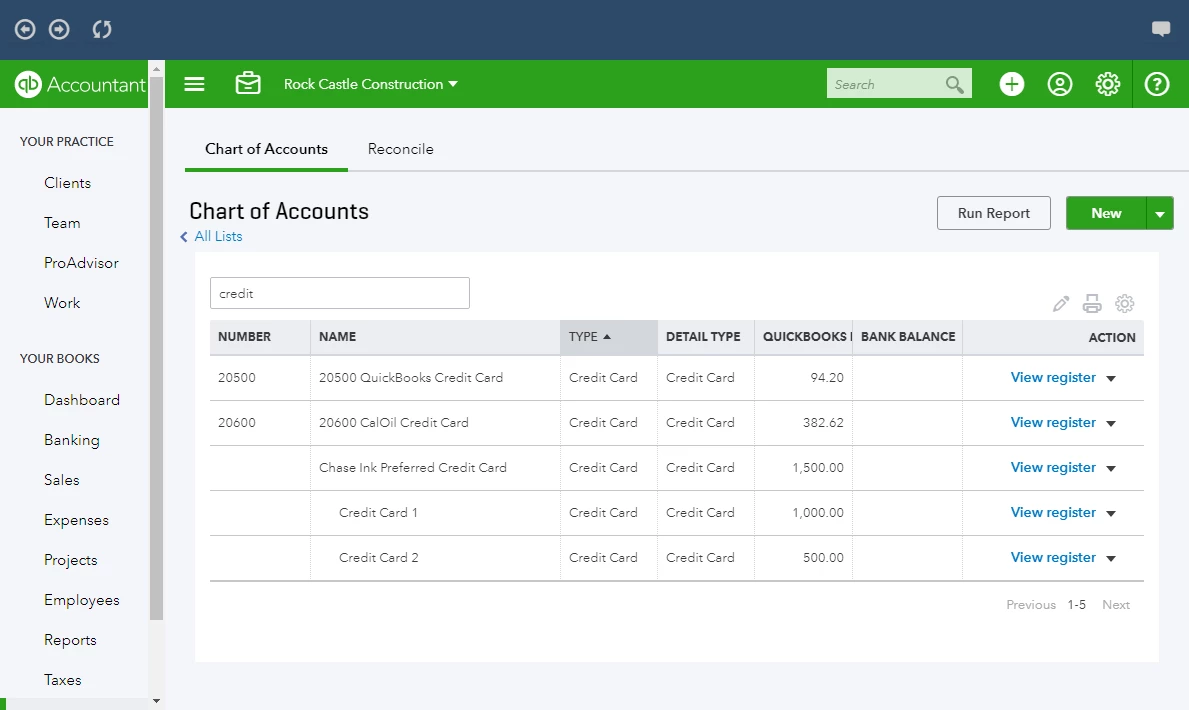


    In the example above, note that the sub-accounts are slightly indented and the sum of the sub-accounts is represented by the main account.  The desktop version would work the same way. 


    To create a parent account and change existing accounts to sub-accounts in QuickBooks Online:

    1. Access the Chart of Accounts

         a. Click the Gear

         b. Under Lists choose All Lists

         c. Choose Chart of Accounts


    2. Create the Parent account

         a. Click New at the top of the Chart of accounts

         b. Change the category type to Credit Card

         c. Change the Name field to something descriptive of the account. (my example has the name of the credit card)

         d. Click Save and Close


    3. Change the old accounts into Sub-accounts

         a. Locate one of the original accounts

         b. Click the arrow next to View Register for that account. 

         c. Choose Edit

         d. Click the is sub-account checkbox

         e. In the drop-down box, choose the parent account created in step 2. 

         f. Click Save and Close

        g. Repeat the process for the other credit card account. 


    I hope this helps, let me know if you get stuck at any point. 


    -John

    3 replies

    Answer
    August 17, 2017

    Hi KS-Man, 


    Would it work to use them as subaccounts of one?  In QuickBooks Online, you can create a single credit card account for the Chase Ink Preferred Credit Card and then list the two accounts that were previously created under it. 


    In the example above, note that the sub-accounts are slightly indented and the sum of the sub-accounts is represented by the main account.  The desktop version would work the same way. 


    To create a parent account and change existing accounts to sub-accounts in QuickBooks Online:

    1. Access the Chart of Accounts

         a. Click the Gear

         b. Under Lists choose All Lists

         c. Choose Chart of Accounts


    2. Create the Parent account

         a. Click New at the top of the Chart of accounts

         b. Change the category type to Credit Card

         c. Change the Name field to something descriptive of the account. (my example has the name of the credit card)

         d. Click Save and Close


    3. Change the old accounts into Sub-accounts

         a. Locate one of the original accounts

         b. Click the arrow next to View Register for that account. 

         c. Choose Edit

         d. Click the is sub-account checkbox

         e. In the drop-down box, choose the parent account created in step 2. 

         f. Click Save and Close

        g. Repeat the process for the other credit card account. 


    I hope this helps, let me know if you get stuck at any point. 


    -John

    ks-manAuthor
    August 17, 2017

    That worked great!  Thanks very much for the detailed instructions.

    ks-manAuthor
    August 18, 2017

    After further review I actually see that this didn't solve the problem the way I thought.  In the Chart of Accounts I can see that both are subaccounts but if I look at the Banking Tab it still shows each as having their own individual balance.  


    lynda11_2
    August 20, 2017

    I do what @19 does as described in this post.  Then when you pay it, split the payment so that all of the separate parts (sub accts) of the whole zero out.  You reconcile the parent acct.

    October 3, 2018

    Which @19 post are you referring to? He has a lot!

    March 6, 2019

    I'm going through this exact issue and I've scoured the internet all day looking for a better solution than creating sub accounts for all the users. It's a lot of work to make 1+1=2. Is there really no way to have one account that shows all transactions?

    March 6, 2019

    Hello litypark,


    At the moment, you'll need to create a sub-account to view the transaction.


    You might want to check out this article for details: About bank or credit card subaccount setup.


    If you need anything else, please let me know. 

    March 6, 2019

    Thank you!