November 8, 2022
Solved

Turn off QuickBooks Automatically Adding Vendors to my Vendor List with bank sync

  • November 8, 2022
  • 4 replies
  • 0 views

Hello All.  Hoping someone can help.  I am currently using QuickBooks Online Essentials.  I have my banking sync turned on, and I manually accept/apply these transactions to my register one at a time.  I noticed QuickBooks is automatically creating vendors for me with the sync, even prior to me accepting/applying the transactions.  Is there a way to stop QuickBooks from auto creating vendors and adding to my vendor list?  I would like to keep the bank sync on if possible.  Thank you in advance for your attention.

Best answer by RCV

Let me share some information about downloading bank transactions into your account, NikkiNik1.


I've checked here on our end and there's no reported case about this one. It's possible that the Remember category selection and Show suggested rules are turned on when downloading the bank data. You can turn off this option on the Banking page. Here's how:


  1. Click Banking on the left side menu.
  2. Choose Banking.
  3. Tick the Gear icon on the right side menu.
  4. Uncheck Remember category selection and Show suggested rules from the Transaction details section.


Please see the screenshot below:
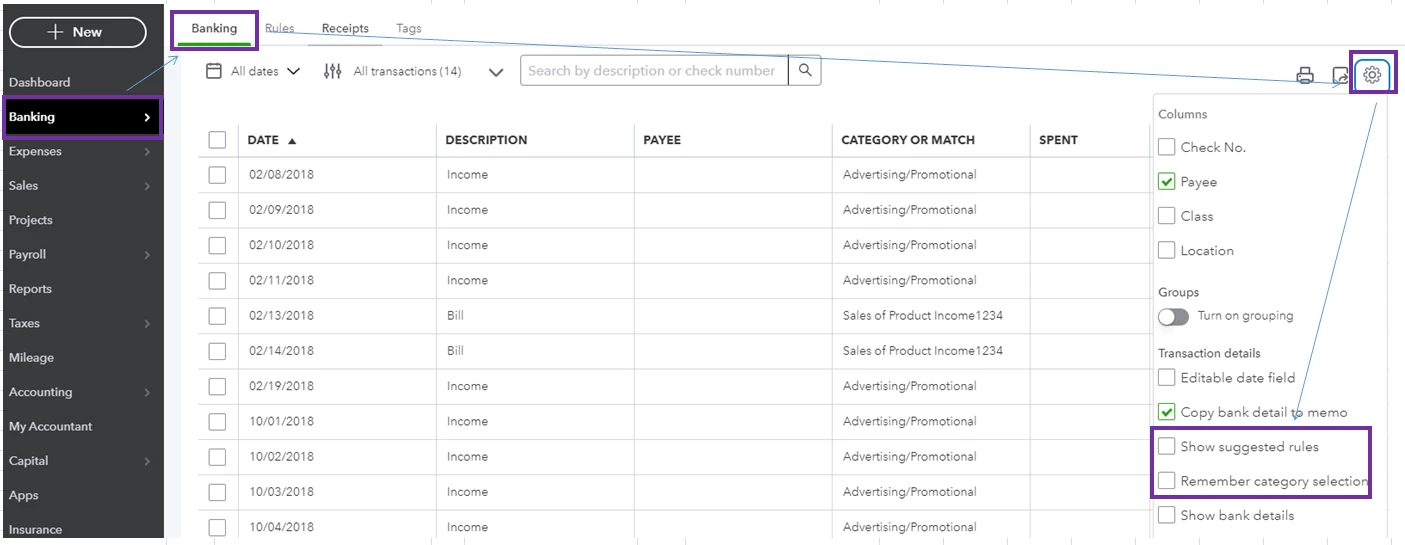


For future reference, read through our help article: Download, match and categorize your bank transactions in QuickBooks Online (QBO). It includes a quick video tutorial to guide you in organizing your bank feed transactions. If the same thing happens, let's sign in to QBO using a private or incognito window. This helps us confirm browser-related issues since this mode doesn't use the existing cache data. Here's how:


  • For Google Chrome browser: Ctrl + Shift + N
  • For Mozilla Firefox browser: Ctrl + Shift + P
  • For Safari browser: Command + Option + P


If it works, go back to your regular browser and clear the cache to delete those temporarily stored files and browsing history. Removing this should fix the issue since the overtime collection of data can create corruption. We can also use supported, up-to-date browsers to roll out the possibility of a browser-related issue. 


Once everything is in place, you'll want to check out this article that can aid you in reconciling your accounts seamlessly:


I'm only a few clicks away if you have further concerns about managing your bank transactions. I'll be here to help you out. Stay safe, and have a good one! 

4 replies

RCVAnswer
November 8, 2022

Let me share some information about downloading bank transactions into your account, NikkiNik1.


I've checked here on our end and there's no reported case about this one. It's possible that the Remember category selection and Show suggested rules are turned on when downloading the bank data. You can turn off this option on the Banking page. Here's how:


  1. Click Banking on the left side menu.
  2. Choose Banking.
  3. Tick the Gear icon on the right side menu.
  4. Uncheck Remember category selection and Show suggested rules from the Transaction details section.


Please see the screenshot below:


For future reference, read through our help article: Download, match and categorize your bank transactions in QuickBooks Online (QBO). It includes a quick video tutorial to guide you in organizing your bank feed transactions. If the same thing happens, let's sign in to QBO using a private or incognito window. This helps us confirm browser-related issues since this mode doesn't use the existing cache data. Here's how:


  • For Google Chrome browser: Ctrl + Shift + N
  • For Mozilla Firefox browser: Ctrl + Shift + P
  • For Safari browser: Command + Option + P


If it works, go back to your regular browser and clear the cache to delete those temporarily stored files and browsing history. Removing this should fix the issue since the overtime collection of data can create corruption. We can also use supported, up-to-date browsers to roll out the possibility of a browser-related issue. 


Once everything is in place, you'll want to check out this article that can aid you in reconciling your accounts seamlessly:


I'm only a few clicks away if you have further concerns about managing your bank transactions. I'll be here to help you out. Stay safe, and have a good one! 

NikkiNik1Author
November 10, 2022

RCV, I followed your instructions and unchecked the "Remember Category Selection" and also the "Show Suggested Rules", then pressed "update" on banking page to sync my banking transactions, and IT WORKED!!!!  The new vendors were NOT automatically added to my vendor list.  Mystery solved.  Thank you so much for you time and effort responding to my inquiry, I can't tell you how much I appreciate it.  Thanks again!!!

JaeAnnC
November 10, 2022

Hi, NikkiNik1!
 

I'm glad to hear that the resolution provided by my colleague was able to help you. Should you need further assistance with your banking, please feel free to post them here in the Community. We're always here to back you up. Have a nice day!

March 23, 2023

This is still happening as of yesterday. Can anyone from QBO give us an update on the status of this investigation? It's wild that this is taking so long to sort out. 

MaryLandT
March 23, 2023

I also want this issue fixed in no time, kirkjmiller.


Let me share an update about the ongoing investigation. After checking here, the INV-83565 is still in progress. 


However, there's a workaround you can follow at the moment while our Engineering Team continues to find a permanent fix.


  1. Go to the Banking page.
  2. Click the Gear icon on the right-side menu.
  3. Uncheck Enable suggested categorization and Show suggested rules from the Transactions details section.


I also suggest contacting our QuickBooks Online Service Team so they can add your account to the investigation. That way, you'll receive updates about the status of the issue via email.


Here's how to contact them.


  1. Sign in to your QuickBooks Online company.
  2. Select Help (?).
  3. Choose Search, then Contact Us.
  4. Enter a brief discussion of your issue, then hit Continue.
  5. Scroll down and choose how you want to connect with them.


If you prefer to call our line, please browse this article and dial the phone number provided at the Can't get signed in? section: QuickBooks Online Support.


I'm always  willing to assist you with other QuickBooks concerns you might encounter in the future. Assistance is a comment away. Take care and have a great weekend ahead!

March 25, 2023

Hey, sorry to be a downer but this is not a workaround for the problem and I wish QBO would stop suggesting it. Those two features have nothing to do with this issue. The vendors are being added via Online Banking Administration (check your audit logs to see the events as they occur). Can we please escalate this - it's been months of a pretty debilitating bug and there seems to be no urgency to fix something. Still have dozens upon dozens of unwanted vendors piled up in Inactive. Pretty disappointing support here.


My account opened the INV-83565 after countless days of trying to convince QBO support this was an issue. 

April 3, 2023

Same thing is happening to me. Vendors are being automatically created. I do not create or add them.  They show up already here from the bank feed.

August 28, 2024

I have the same issue with a twist...the vendors being added automatically by Quickbooks are NOT in my bank transactions and are NOT companies we do business with.  On with tech support now for the second time this year on this problem.


I have turned off the automatic add.

August 28, 2024

Did I miss a new setting where automatic supplier creation can be turned off?  


The first time I encountered it was a couple years ago, no setting existed, then it stopped happening.  I know you’re saying it’s even worse now for you (I’m still getting stupid suppliers in the system) but I haven’t dug in the settings for a while and have just grown numb to the nonsense even renaming the real suppliers I use to have a AAA prefix so I see them first.  


Imagine if we had the right to claim a right to a fees refund from them for all the time we spend clearing up these nonsense entries and dealing with support calls.  It’s infuriating.  Artificial Stupidity at it’s finest.