February 20, 2019
Solved

Turn off this annoying pop up question

  • February 20, 2019
  • 2 replies
  • 0 views

Please tell me I can turn off this annoying reminder, it really slows me down and I always say NO hoping it would stop...but...help


Best answer by

Hey there, @KURTKELLEY,


It's nice to see you here today. I can help you disable the alert you're getting when creating checks in QuickBooks Online.


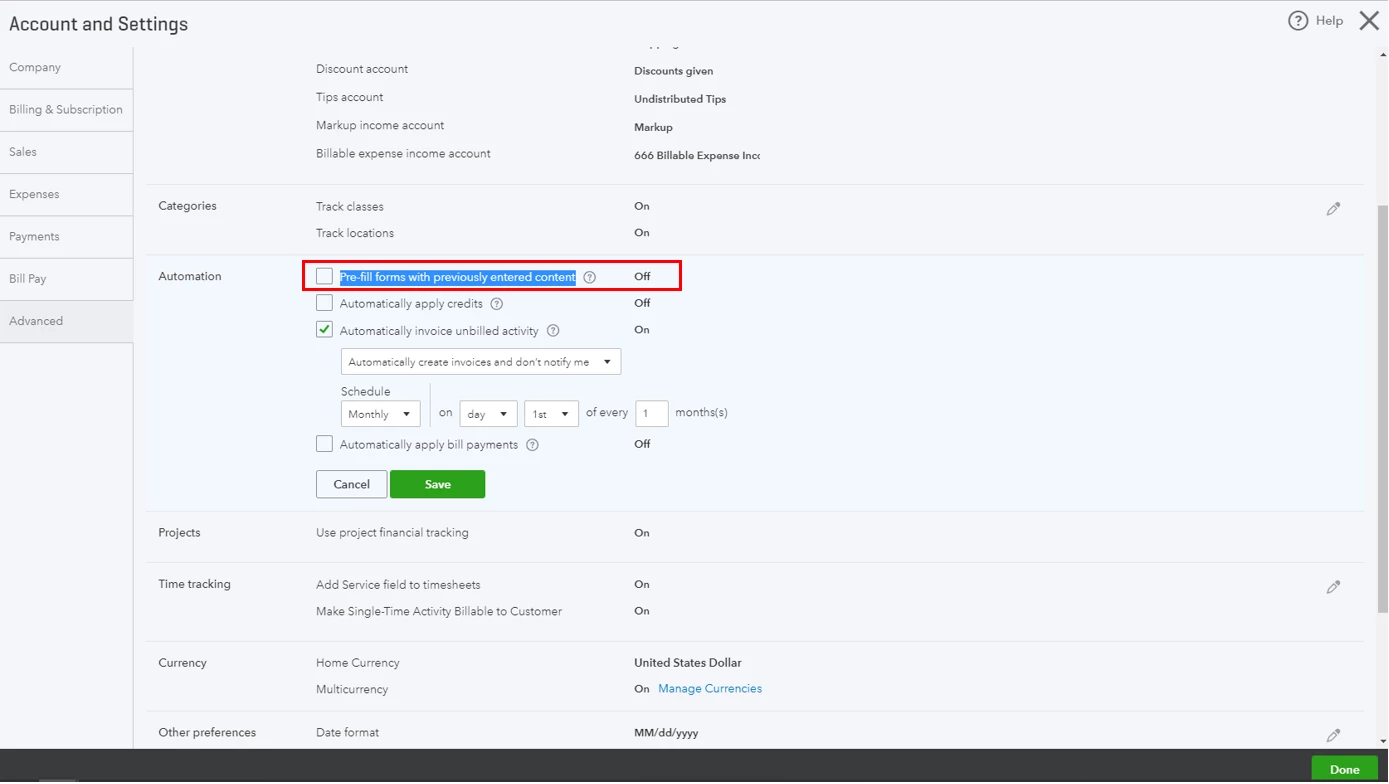
Since the system prompts you to pre-fill the information from the last transaction created in Quickbooks, it's possible that you have enabled the preference to auto-copy previously entered content. To check this, let's go to your Account and Settings page. Here's how:


  1. Click the Gear icon at the top-right of your QBO account.
  2. Choose Accounts and Settings.
  3. In the Account and Settings page, click on Advanced.
  4. Click the Automation section.
  5. Uncheck the Pre-fill forms with previously entered content box.
  6. Click Save then Done.

That should turn off the alert this time, @KURTKELLEY.


Do not hesitate to get back to me if you have any questions. I'll be your personal QuickBooks guide. Have a great day!

2 replies

Answer
February 20, 2019

Hey there, @KURTKELLEY,


It's nice to see you here today. I can help you disable the alert you're getting when creating checks in QuickBooks Online.


Since the system prompts you to pre-fill the information from the last transaction created in Quickbooks, it's possible that you have enabled the preference to auto-copy previously entered content. To check this, let's go to your Account and Settings page. Here's how:


  1. Click the Gear icon at the top-right of your QBO account.
  2. Choose Accounts and Settings.
  3. In the Account and Settings page, click on Advanced.
  4. Click the Automation section.
  5. Uncheck the Pre-fill forms with previously entered content box.
  6. Click Save then Done.

That should turn off the alert this time, @KURTKELLEY.


Do not hesitate to get back to me if you have any questions. I'll be your personal QuickBooks guide. Have a great day!

February 9, 2021

I literally opened the pdf you attached and its pretty much identical to the snippet I took of this annoying prompt XD