May 29, 2023
Solved

unable to add downloaded transaction

  • May 29, 2023
  • 2 replies
  • 0 views

When a refund transaction is received from my credit card I am unable to added it to my account and receive the following error: This account is set up as a liability account. To accept this transaction, either disconnect the account or change its category type to bank or credit card. Sometimes I am able to bypass this error by blanking out the payee and category and then readding the category. But sometimes this doesn't seem to work. How am I supposed to added downloaded refund transaction to my credit card account register?

Best answer by jakewho

Hi there, @DD Bookkeeping.


Currently, we have an ongoing investigation into the reason behind the error message you're getting. Rest assured that our engineers are doing their best to fix it as soon as possible.


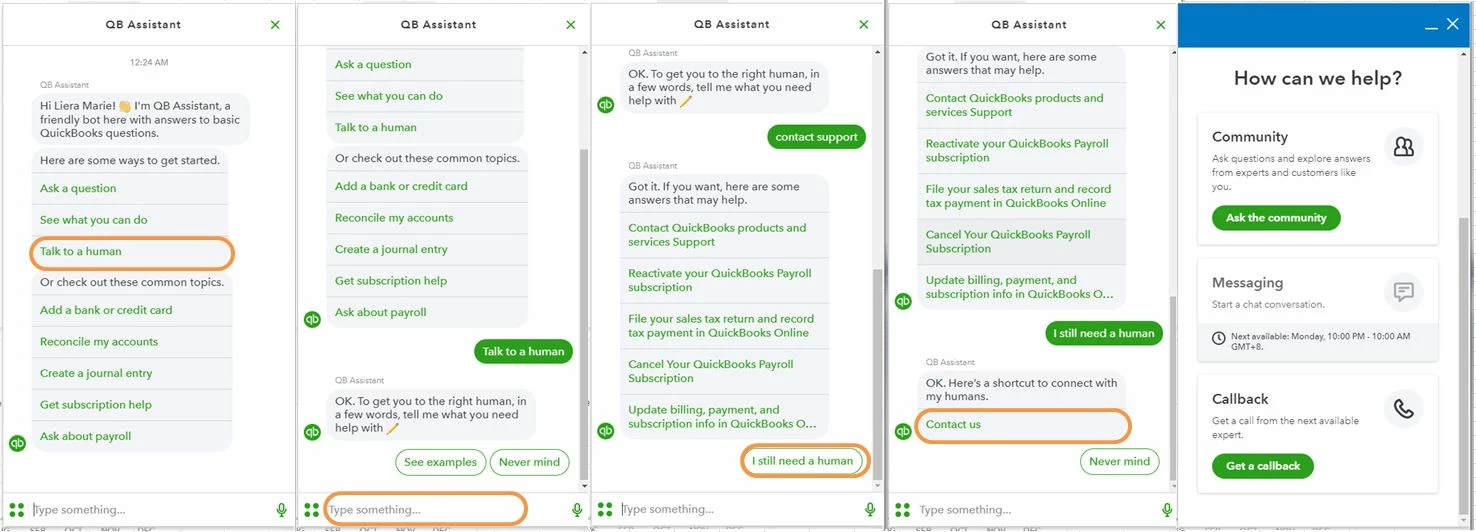
I recommend contacting our Customer Care Support team so you'll be added to the list of affected users. This way, you'll receive email updates on the investigation's status and be notified once it's been resolved. I've included the steps to contact support below. 


  1. Click the (?) Help icon in the upper right-hand corner of the dashboard.
  2. Select Talk to a Human.
  3. Enter a short description of your concern and press Enter.
  4. Click I still need a human.
  5. Select Contact Us to connect with our live support.
  6. Choose Get a Callback.


In the meantime, you can exclude the transaction and enter the refund manually.


I appreciate your patience as we work through this. If you have any other concerns, please don't hesitate to drop a comment below. Take care!


FYI, I found a good solution, for now, is to manually add the transaction into the credit card register and then the downloaded transaction will switch from an "add" to "match" status. At least for me, the match action works correctly


2 replies

Rubielyn_J
May 29, 2023

It's my priority to help you add downloaded transactions in QuickBooks, Jake.


In order to successfully add the refund transaction to your account, it's important to use the original expense account from the original bill as the category.


Apart from that, the error message suggests that you can either disconnect the account or modify its category type to either bank or credit card.


Moreover, I'll be sharing the following resources to help manage your bank transactions in QBO: 


Should you require additional support with adding downloaded transactions in QBO, please don't hesitate to get in touch. I'm here to help you.

jakewhoAuthor
May 29, 2023

I am attempting to use the original expense account from the original bill as the category. The category is an expense type. I don't want to change it to something else, because this is the correct type for this category

LieraMarie_A
May 29, 2023

Hi there, @DD Bookkeeping.


Currently, we have an ongoing investigation into the reason behind the error message you're getting. Rest assured that our engineers are doing their best to fix it as soon as possible.


I recommend contacting our Customer Care Support team so you'll be added to the list of affected users. This way, you'll receive email updates on the investigation's status and be notified once it's been resolved. I've included the steps to contact support below. 


  1. Click the (?) Help icon in the upper right-hand corner of the dashboard.
  2. Select Talk to a Human.
  3. Enter a short description of your concern and press Enter.
  4. Click I still need a human.
  5. Select Contact Us to connect with our live support.
  6. Choose Get a Callback.


In the meantime, you can exclude the transaction and enter the refund manually.


I appreciate your patience as we work through this. If you have any other concerns, please don't hesitate to drop a comment below. Take care!

March 12, 2024

I am so annoyed at this issue. Can't believe it has obviously been an issue for at least 12 months and QBO has not fixed it. My time is valuable and you are driving me crazy.

DivinaMercy_N
March 12, 2024

Hi there.


I understand how difficult it is to unable to add transactions in your account. This surely affect your working progress.

To further guide you resolve it, could you tell me additional details about your concern? Any information you can add such as your bank's name or any error message you encountered is a great help so I can provide an accurate and timely solution.

I'm just around the corner to help. Please don't hesitate to leave a reply below. Have a good one. 

March 24, 2024

Can't add expenses paid with CC. Below message pops up....


"This account is set up as a liability account. To accept this transaction, either disconnect the account or change its category type to bank or credit card."


What "hidden" update did this to the program? Please reverse this ASAP. Spent over an hour on the phone with customer service to no avail. Stop trying to sell insurance and make me a loan and get back to providing accounting software for my business. Never had these problems with Desktop Pro  sigh