July 9, 2022
Solved

Unable to disconnect bank feed from discover account QB Desktop Pro 2021

  • July 9, 2022
  • 6 replies
  • 0 views

It looks like there was a change to the Discover Card Express Web bank feed which requires the deactivation & re-initialization of the bank feed (see https://quickbooks.intuit.com/learn-support/en-us/help-article/bank-connectivity/switch-direct-connect-express-web-connect-online/L0LFSHJIv_US_en_US?uid=l5e8zamz).


Unfortunately, I am unable to deactivate the bank feed. When selecting "Deactivate all online services" from the Bank Feed tab of the Edit Accounts screen I receive the message "Your attempt to de-activate account failed. Try again after some time. If this error persists, contact your administrator" (Screenshot Attached).  I'm the administrator so that's not helpful.


I tried the steps listed at https://quickbooks.intuit.com/learn-support/en-us/help-article/bank-connectivity/fix-issues-deactivating-bank-feeds/L2SyM2GDh_US_en_US. None of these resolved the issue. Solution 3, the IIF import results in an error indicating QB ONLINE "It's a list or transaction that is not supported by the IIF import process."


A verify & rebuild finds no errors, nor does the File Doctor.


There are no pending transactions awaiting approval or deletion. If I select the refresh button for the bank feed I receive the message "You're no longer connected to Discover Card Express Web. Set your connection again to continue using bank feeds." (Screenshot Attached).  Which I cannot do until I deactivate the bank feed.


If I create a new Credit Card account & try to configure the Discover Card Express Web bank feed I receive an error that I used a different Customer ID to setup another QB account for online services with Discover (Screenshot Attached).  I am using the same Customer ID. 


If I create a new Credit Card account & merge the existing discover card account, I can break the link to the bank feed.  But this leaves an orphaned bank feed in the Bank Feeds window which still cannot be removed.


Does anyone have any idea how I can fix this?

 

Best answer by Paying Customer

I've been able to resolve this issue. 


I was able to deactivate the bank feed using Solution 3 in the instructions here.  I edited my IIF to include only the HDR and QB ONLINE account for my discover card.


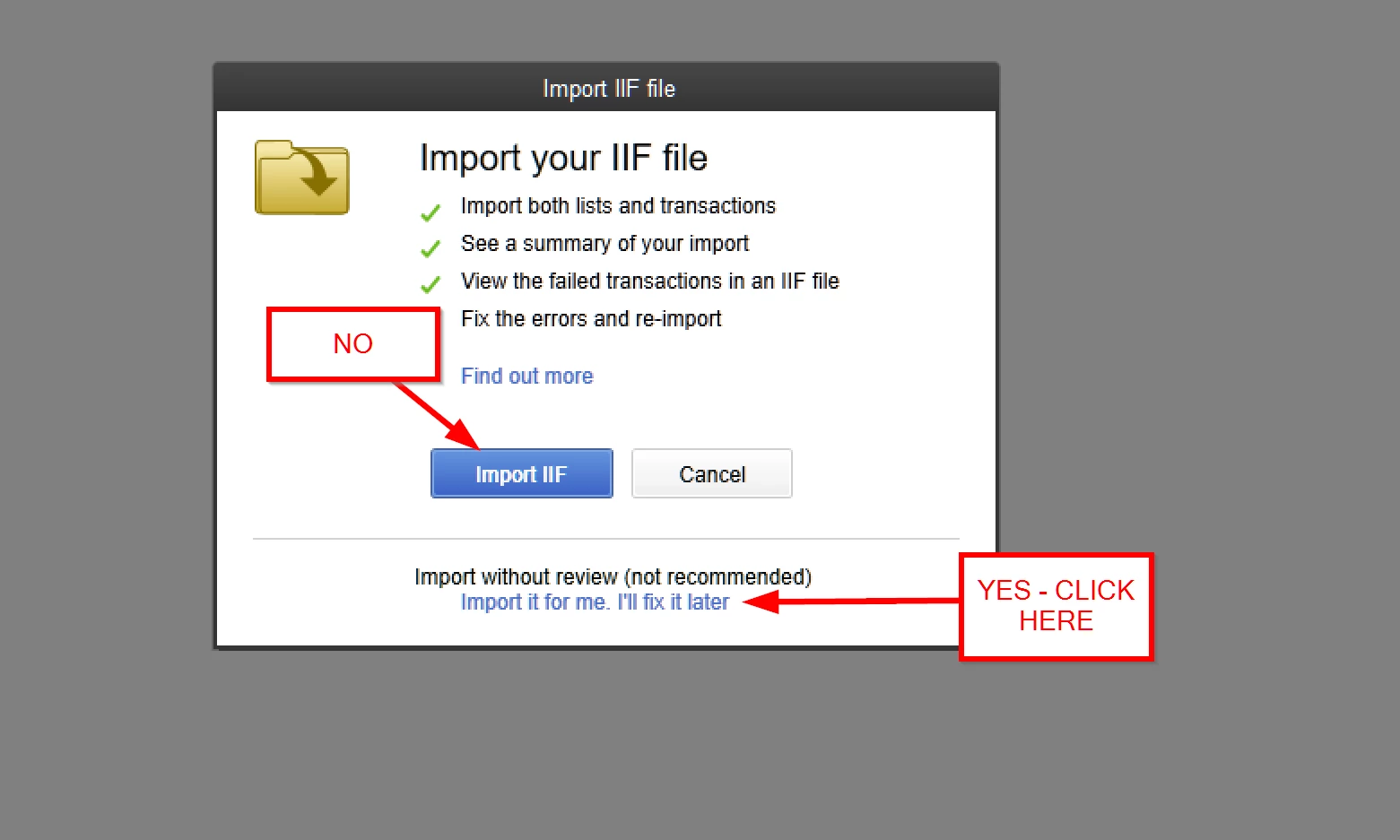
The import fails for QB ONLINE records when when using the Import IIF button.  You need to use the "Import it for me. I'll fix it later" option.

Once this was done the account no longer had the lightning bolt in the accounts list & I had the option to setup bank feeds for this account again.


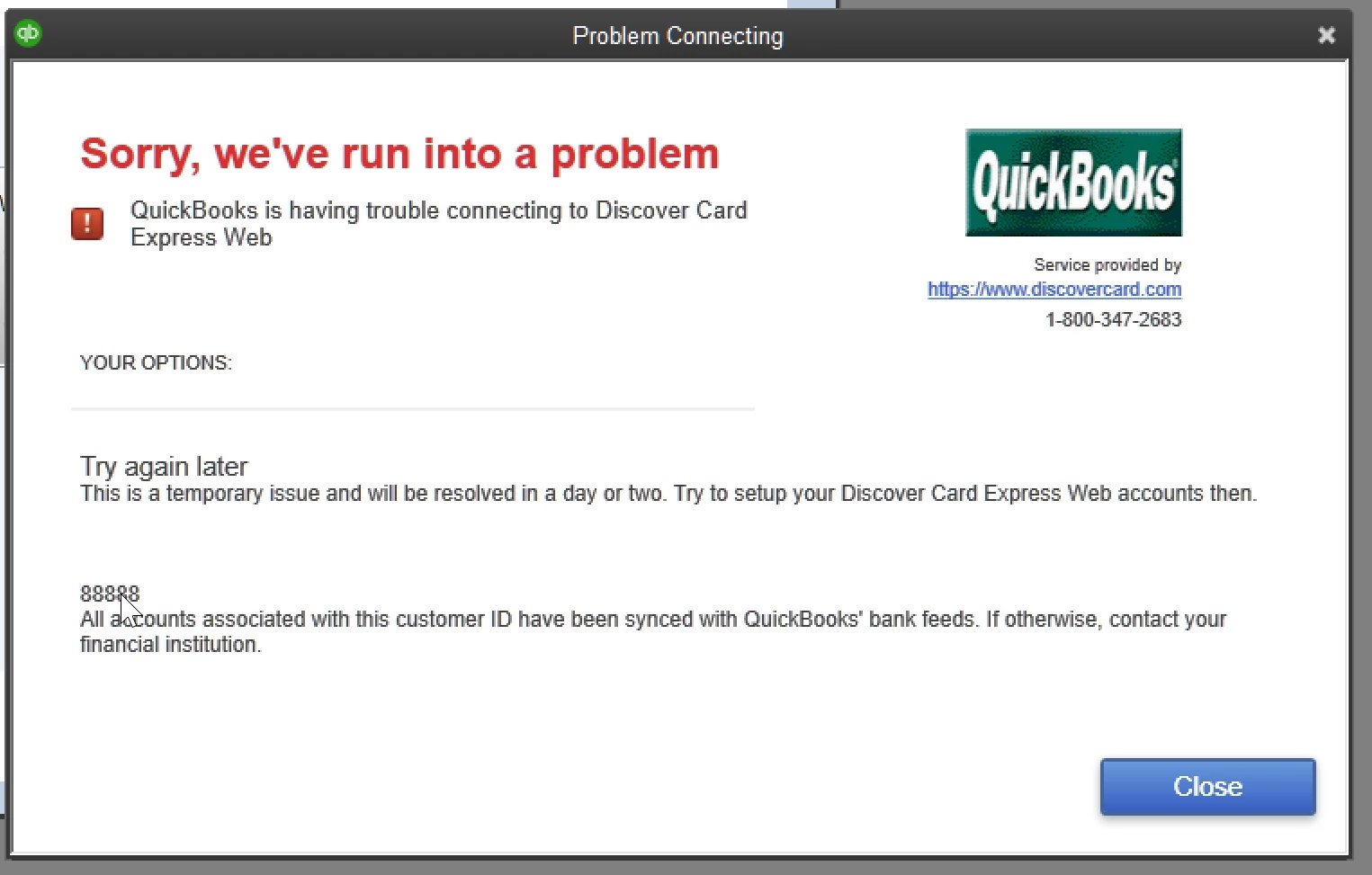
When trying to setup the bank feed I was receiving an 88888 error.


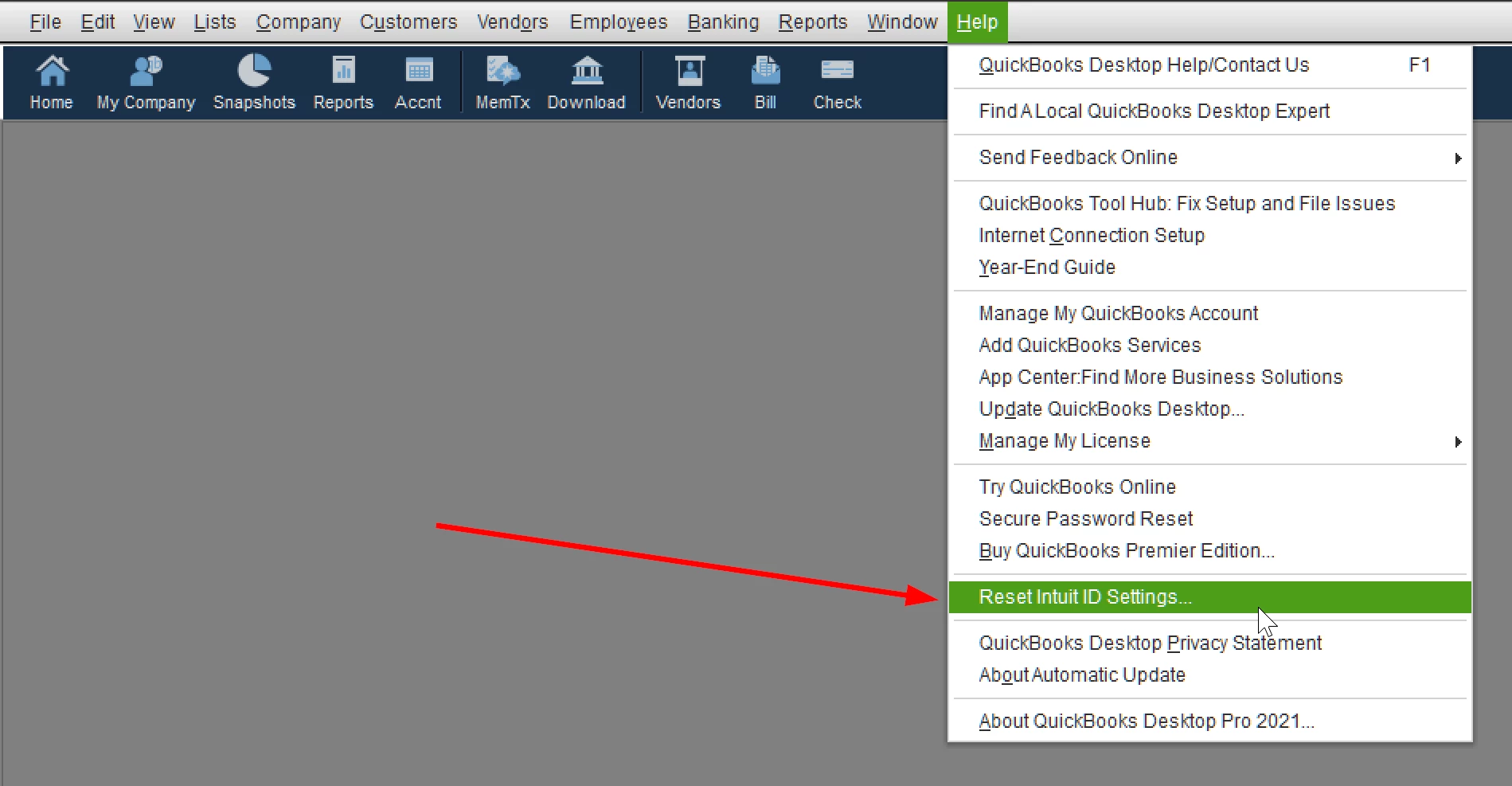
To resolve this I "Reset Intuit ID Settings" from the help menu.

Once done I closed QBDT & re-opened it.  I then logged back into Intuit from the Company > My Company menu.  I was then able to connect my discover card bank feed & download transactions.


I hope this will help others with this issue.

6 replies

July 9, 2022

Thanks for joining this conversation, @Paying Customer.


The error message you're getting indicates an issue with your financial institution which is the Discover Credit Card. You'll want to reach out to your bank and verify if there are conducting system maintenance at the moment.


Since performing the rebuild and verifying data utilities were unable to fix the issue, I highly recommend giving our Customer Care Support. They'll be able to do a screen-sharing session and see what's going on on your end when accessing the bank feeds center. They can also perform other troubleshooting steps if necessary. 
 

Here's how:

  1. Open QuickBooks.
  2. Go to Help, then select QuickBooks Desktop Help.
  3. Select Contact Us.
  4. Give a brief description of your issue, then select Let's talk, and then choose a way to connect.

Just in case, I'm also adding these articles for future reference:


I'm always around to lend a hand if you have more questions about QuickBooks or any bank-related concerns. Just tag my name in the comment section so I can assist you further. Take care and have a good one.

July 9, 2022

Hi @LollyNino_C, I've reached out to Discover & they are not performing any maintenance.  I am able to setup a test company & connect a new account to the Discover Card Express Web bank feed without issue.  This would indicate to me that things are fine on the Discover Card side of things.


Do you have any other suggestions, aside from contacting customer care?  They've never resolved an issue for me and just point me to the same support articles I've already found myself & ask me to run a rebuild again.


I suspect the problem is that Discover turned off their old feed on 6/30 and my QB account was still connected.  This is preventing QB from deactivating the bank feed.

 
July 10, 2022

Banking issues can be challenging. I’d feel the same way you do in your situation, Paying Customer.


We'll need to take a better look at this. I'd still recommend contacting our support team. They'll be able to access your account in a secure environment and in the meantime they can suggest other workarounds for you to try. Also, they have the necessary tools to check on your account and verify on what's causing the issue. This is also to ensure that your account is in a secure place since the Community is a public forum.


Additionally, the following write-up provides lists of bank feeds errors and a step-by-step process on how to resolve them in QuickBooks Desktop: Fix OL and OLSU Bank Feeds errors in QuickBooks Desktop.


Please let me know if you have any other questions. I'm always here to help and provide you additional assistance. You have a wonderful day!

July 15, 2022

I am having the same issue and have tried all the same suggestion to no avail. If you do find a solution please share it in this forum.

Thanks

July 16, 2022

Thanks for bringing this to our attention, @Seeping Springs11.


If you're dealing with network issues, company file damage, and performance problem. We can also utilize the QuickBooks Tool Hub to fix the common errors in QuickBooks Desktop.


To begin, launch the Quick Fix my Program tool from the Tool Hub to terminate any QuickBooks processes that are running in the background. 


To download and install the Tool Hub, follow the steps below:


  1. Close your QuickBooks.
  2. Download the QuickBooks Tool Hub file.
  3. Open the QuickBookstoolhub.exe file. It gets saved in the download folder.
  4. Follow the on-screen steps to install and agree to the terms and conditions.
  5. Click Finish.
  6. Double-click the icon on your Windows desktop to open the tool hub.


 Then we'll run the Quick Fix my Program tool.


  1. In the Tool Hub, select Program Problems.
  2. Select Quick Fix my Program.
  3. Start QuickBooks Desktop and open your data file. 


 I'm adding this article for the additional steps outlined in this article: Solutions for When QuickBooks Stops Working.


Then, let's run the Verify and Rebuild utilities suggested by my colleague above. Then, we can try to disconnect an account in the Bank Feed


If none of these troubleshooting steps work for you, I recommend contacting our support team to look into the problem further.


Keep me posted on how this turns out. I want to make sure that everything is taken care of.

July 17, 2022

Hi @ChristineJoieR ,


Unfortunately the steps you've outlined did not resolve the issue.  In addition to the Quick Fix my Program option in the QuickBooks Tool Hub I tried the QuickBooks Program Diagnostic Tool.  I am still receiving the same error when trying to disconnect the bank feed that I reported in my original post.  Verify & rebuild, as well as the File Doctor do not find any issues with the company file.


Please let me know what else we can try.


Thanks!

July 21, 2022

I'm having the exact same issue with Quickbooks Pro 2020 (after the most recent update, I couldn't use bankfeeds with my Discover card.)

July 27, 2022

I couldn't have explained it any better! Same problem here.

July 27, 2022

@Stumpy23 This is how Intuit forces us to keep buying products or move to subscriptions. They're forcing everyone to QBOnline. 


-Incredibly frustrated

July 29, 2022

It appears QBDT is still connected to my Discover account at some level.  From the Bank Feeds screen, if I select the Discover Card Express Web account & select Manage Accounts, a pop is displayed indicating my Discover Card is linked & the balance of $840.27 is current.


August 3, 2022

We have been dealing with the same exact issues, errors and non-fixes.

Rose-A
August 3, 2022

I understand how frustrating and upsetting it is dealing with baking errors, bhb_jr.


We're very committed to fixing this for you. We'd like to hear more about your experience to resolve this error and continue with the next steps.


To do that, I'd encourage you to reach out to our QuickBooks Support to have this thoroughly investigated. All bank-related concerns are directed to our phone support for security purposes.


Agents have the necessary tools to look into your account and sort everything out. To ensure we address your concern on time, check out our support hours. Here's how to get in touch or chat with us:


  1. Go to https://quickbooks.intuit.com/learn-support/en-us/contact.
  2. Choose your QuickBooks Product.
  3. Select your QuickBooks version.
  4. Give a brief description of your issue and click Continue.
  5. Then choose a way to connect.


You'll want to check out our QuickBooks Desktop articles. This will provide us with resources for any other QuickBooks-related concerns. I'm sure this will guide us in doing a specific task in the program.


I'm always around to lend a hand if you have more questions about QuickBooks or any bank-related concerns. Just tag my name in the comment section so I can assist you further, bhb_jr. Take care and have a good one.

Paying CustomerAuthorAnswer
August 6, 2022

I've been able to resolve this issue. 


I was able to deactivate the bank feed using Solution 3 in the instructions here.  I edited my IIF to include only the HDR and QB ONLINE account for my discover card.


The import fails for QB ONLINE records when when using the Import IIF button.  You need to use the "Import it for me. I'll fix it later" option.

Once this was done the account no longer had the lightning bolt in the accounts list & I had the option to setup bank feeds for this account again.


When trying to setup the bank feed I was receiving an 88888 error.


To resolve this I "Reset Intuit ID Settings" from the help menu.

Once done I closed QBDT & re-opened it.  I then logged back into Intuit from the Company > My Company menu.  I was then able to connect my discover card bank feed & download transactions.


I hope this will help others with this issue.

AlcaeusF
August 16, 2022

Hello @Paying Customer,


I have reviewed the solution you’ve shared and it's correct and accurate. Thank you for sharing your inputs to help address the issue.


We love to see members supporting one another! Have a great day.

August 23, 2022

This solution is now not working - with the workaround the lightning bolts are still there because QB ignores the IIF upload since the newest QB update makes it so that the "list or transaction is not supported by the IIF import process". Doesn't matter if you click to ignore errors because it will just ignore the N lines on importing.