Solved
What happend to the "review" and "confirm" buttons under Transactions? I now just see Add and don't know what to do with that...
Original commenter did not share additional details


Thanks for visiting us today, @acphoto71. I'd be delighted to provide information regarding the banking page interface in your QuickBooks Online (QBO) account.
Your default view is based on what you told us when you first set up QuickBooks. Rest assured, your accounts or data won't be affected when switching between them at any time.
Based on your statement, it seems that you have switched the view of your QBO account to the Accountant view. In this view, you can see the Add button, while in the Business view, you can see the Review or Confirm button. See these screenshots below for your visual reference:
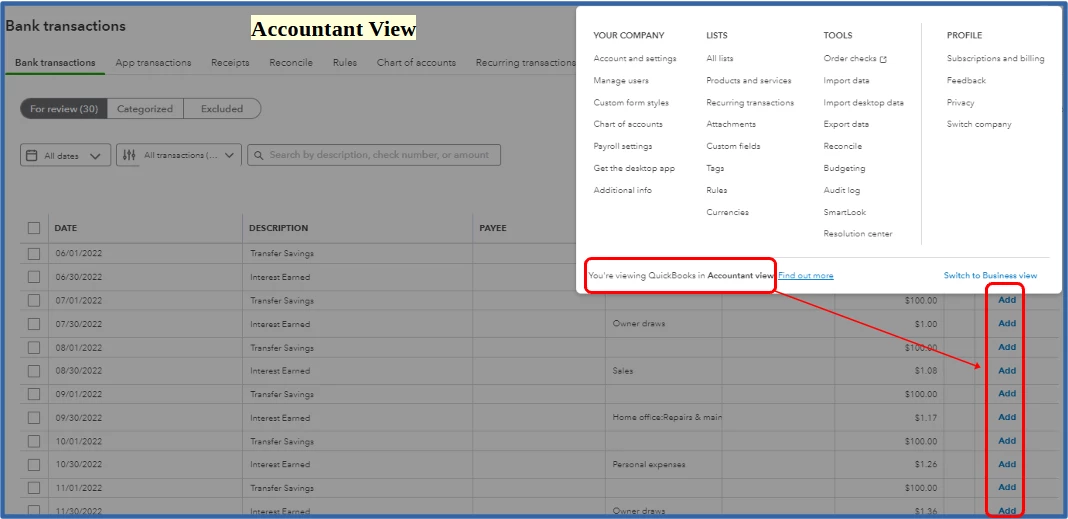
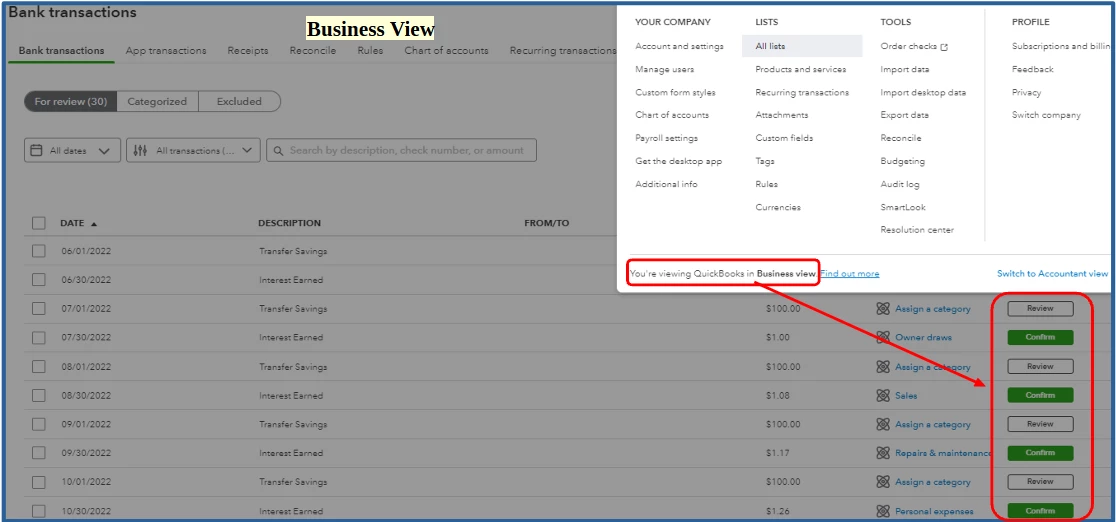
If you want to change your display interface, just follow these simple steps:
Importantly, the process of categorizing your online transactions stays the same with both views. Here's an article for more details: Categorize online bank transactions in QuickBooks Online.
Furthermore, you can visit this article that'll help you speed up the review process of your online bank transactions: Set up bank rules to categorize online banking transactions in QuickBooks Online.
I'm always around and ready to help if you have more questions about managing your bank transactions in QBO. Just click the Reply button to add your comment so I can assist you further. Have a great day!
Enter your E-mail address. We'll send you an e-mail with instructions to reset your password.