November 28, 2021
Solved

What I find frustrating is not being able to enter in a description of an expense when I'm reviewing my transactions. It seems I can only at a tagline.

  • November 28, 2021
  • 1 reply
  • 0 views
Adding a description can be done through the register, but where is that register? It's not easily accessible. I have to dig through menus each time to find it.
Best answer by JessT

Hi Johnlox,


We are unable to change the description of the transactions on the Banking page to retain the details provided by your bank. You can only change them in your register.


Other users want to see and copy bank details into the memo, so they don’t have to edit their transactions.
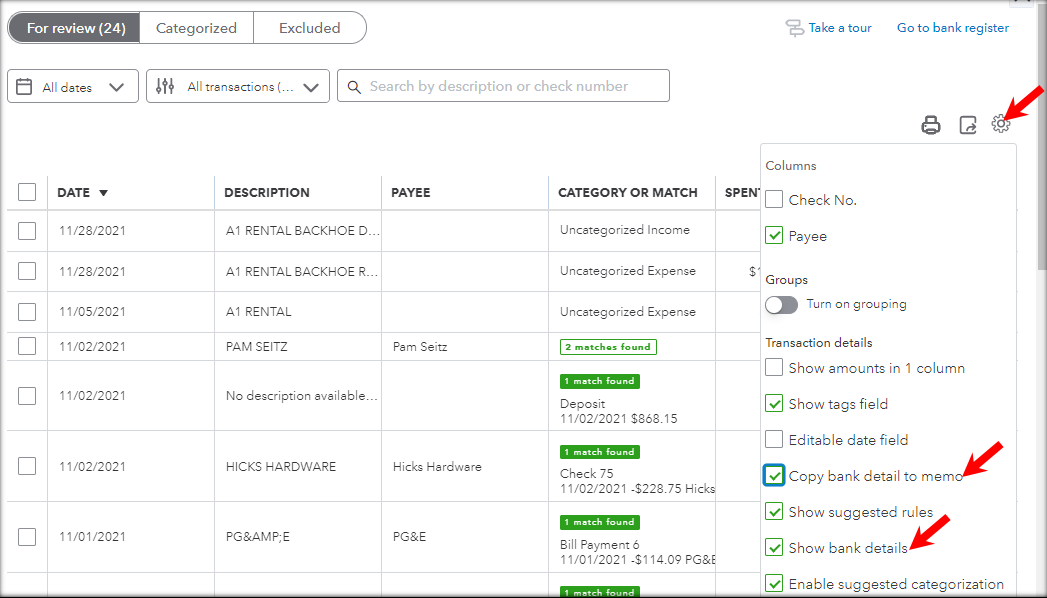


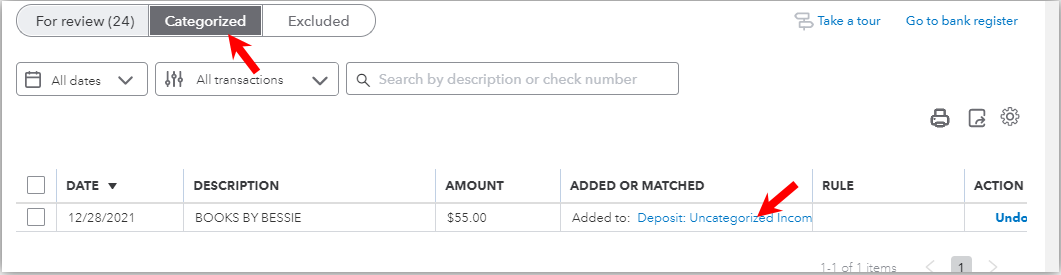
If you don’t want to use bank details and want to enter your own description, you can go to the Categorized section and click added transactions to enter your own details. This way, you don’t have to go through menus, but directly open and edit categorized transactions.


Hope this helps. Please let me know if you have other questions about your bank transactions. Take care!


1 reply

JessT
JessTAnswer
November 28, 2021

Hi Johnlox,


We are unable to change the description of the transactions on the Banking page to retain the details provided by your bank. You can only change them in your register.


Other users want to see and copy bank details into the memo, so they don’t have to edit their transactions.


If you don’t want to use bank details and want to enter your own description, you can go to the Categorized section and click added transactions to enter your own details. This way, you don’t have to go through menus, but directly open and edit categorized transactions.


Hope this helps. Please let me know if you have other questions about your bank transactions. Take care!