July 25, 2021
Solved

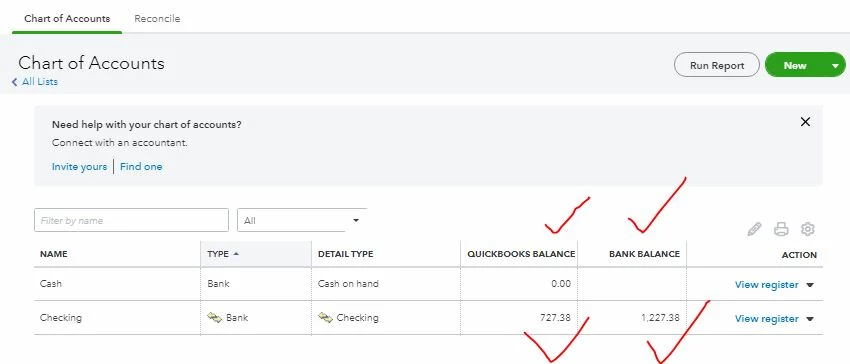
What's the difference between quickbook balance and bank balance of the bank register?
  • July 25, 2021
  • 2 replies
  • 0 views

Any help is greatly appreciated?

Best answer by JonpriL

Hello @ramkaji1999-gmai,


In QuickBooks Online, there are factors that affect the balance of your bank accounts. Among these factors are mainly your downloaded bank transactions.


The QuickBooks balance is affected by all your transactions in the register and the ones you haven't reviewed yet. While the bank balance is solely determined based on the transactions on the register.


Now to fix this and if you want to make sure they're equal, let's consider categorizing and matching your downloaded transactions based on your bank statement. You can do so by following the steps outlined in this article: Categorize and match online bank transactions in QuickBooks Online.


On top of that, I've also included this reference helpful with the resources needed while working with bank feeds and reconciling accounts: How to reconcile your accounts so they always match your bank and credit card statements?


Don't hesitate to post again here if you have other questions or concerns with QuickBooks tasks and navigations. I'm always around happy to help. Take care and stay safe!

2 replies

JonpriLAnswer
July 25, 2021

Hello @ramkaji1999-gmai,


In QuickBooks Online, there are factors that affect the balance of your bank accounts. Among these factors are mainly your downloaded bank transactions.


The QuickBooks balance is affected by all your transactions in the register and the ones you haven't reviewed yet. While the bank balance is solely determined based on the transactions on the register.


Now to fix this and if you want to make sure they're equal, let's consider categorizing and matching your downloaded transactions based on your bank statement. You can do so by following the steps outlined in this article: Categorize and match online bank transactions in QuickBooks Online.


On top of that, I've also included this reference helpful with the resources needed while working with bank feeds and reconciling accounts: How to reconcile your accounts so they always match your bank and credit card statements?


Don't hesitate to post again here if you have other questions or concerns with QuickBooks tasks and navigations. I'm always around happy to help. Take care and stay safe!

March 7, 2023

Hello,


I am having the same issue that is listed above and have tried all troubleshooting steps, including speaking with QuickBooks multiple times. The account I'm referencing is a new account as of 1/1/23, therefore there aren't many transactions to sort through to begin with. I have verified/reconciled all transactions and checked for any pending and still can't get the balances to match. Any ideas what could be going on? It seems as though the balances should match at all times assuming the bank transactions are being downloaded daily. 


Thanks.

Candice C
March 7, 2023

Hey there, @nikkiricha11


Thanks for joining in on this thread. Allow me to point you in the right direction to get some answers as to why the balances aren't matching. 


Since you've spoke to our support and none of the troubleshooting instructions worked for you, I recommend having your accountant review both balances. They'll be able to give you advice on how to fix this or at least an answer to why this is occurring. 


Keep us updated on how the call goes with your accountant. We're always here to have your back. Best wishes! 

July 21, 2023
Original commenter did not share additional details
Bryan_M
July 21, 2023

Hello there, @Darleny99. 


Is there something you want to share with us here, or do you need help managing your QBO account? If so, please feel free to share it here. We'll be happy to assist you.


Know that you're always welcome here anytime. Thank you, and have a good day!

