August 3, 2023
Solved

When linking to my bank that changed to 3fa, it creates a whole new account rather than just linking the present account. How can I stop this from happening?

  • August 3, 2023
  • 1 reply
  • 0 views
Original commenter did not share additional details

Best answer by AlcaeusF

I can manually download them with the QBO file from the banking website. I have to remember the last date of or I get duplicates. The error I get when I try to link after going through all the 3fa is attached. It is because QBO says that the accounts are already linked.


Hi David,


Thank you for keeping in touch with us here in the Community space. Allow me to chime in and lend a hand with linking your bank to QuickBooks Online.


Since QuickBooks detected you have linked accounts (including your personal savings account), I recommend reviewing your chart of accounts. Check your existing bank profiles to determine if they are in your bank feeds.


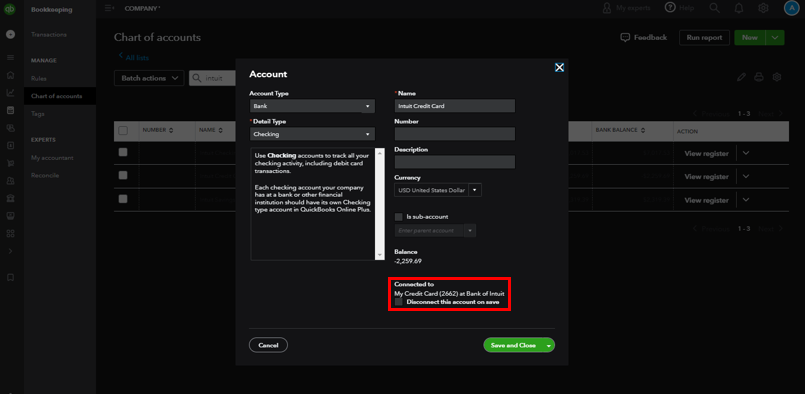
If connected, you can disconnect them to reconnect using the new bank security. It may be the reason why you're getting the error message when trying to link the account.


Here's how to check:
 

  1. Click the Gear icon in the upper-right corner.
  2. View QuickBooks in Business view (switch if necessary).
  3. Click the Gear icon again.
  4. Select Chart of accounts.
  5. Find the account.
  6. Click the drop-down arrow below the Action column.
  7. Select Edit.
  8. Check if it's connected to bank feeds.
  9. Put a checkmark on the box next to Disconnect this account on save.
  10. Hit Save and Close.


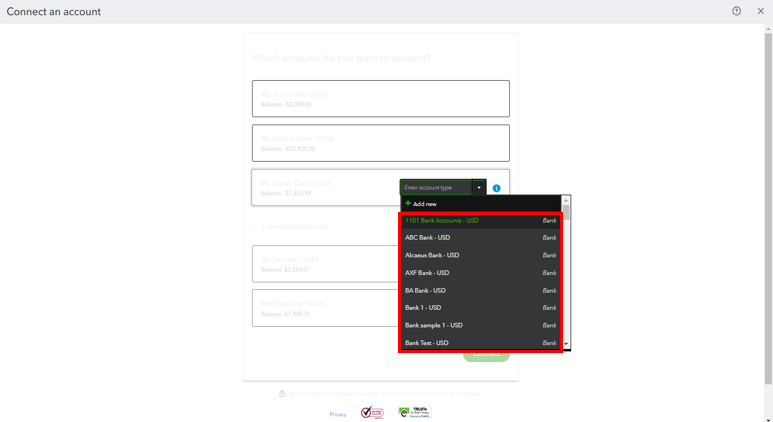
When linking a bank account, select an existing account instead of creating a new one. You can click the drop-down and scroll down (see screenshot below). 


Also, note our system automatically downloads your recent transactions when you reconnect your bank. For transactions you no longer need to add, exclude them in Banking.


Bank errors often block QuickBooks from downloading new transactions. For the links to fix specific download errors, check out this link: What to do if you get a bank error or can't download transactions in QuickBooks Online.


Thank you for being a part of our community. Let us know if you need more assistance linking your account to QuickBooks. Also, keep connecting, sharing, and learning with fellow members. Take care.

1 reply

AlcaeusF
August 3, 2023

Hi there, david375.


I'm here to help fix the issue you're having with your bank connection in QuickBooks Online (QBO).


If your bank account is already connected to QBO, there's no need to link it again. This is the reason why it creates a new account.


Instead of doing that, all you need to do is to update your bank login credentials within QBO. Here's how:


  1. In QBO, go to the Banking menu at the left pane.
  2. Proceed to the Banking tab.
  3. Select the bank account you'd like to update, then click the Pencil (edit) icon.
  4. Tick Edit sign in info, then enter your new credentials.
  5. Hit Update.


To keep your transactions organize, you can use these articles as your guide: Categorize and match online bank transactions in QuickBooks Online.


To ensure your account is balanced and accurate, I recommend performing a reconciliation on a regular basis. Refer to this article for future reference: Reconcile an account in QuickBooks Online.


Please let me know if you have follow-up questions about this or anything else. I'll be here to help. Keep safe.

david375Author
August 8, 2023

The "Edit Sign-in Info" doesn't come up. It asks me to link, but when I click that, I am shown that I am already linked. I don't want the personal accounts linked just the business. It shows what the attachment shows below.  I get an error when I try to connect. The bank says the problem is with the way QBO is trying to handle the accounts.

August 8, 2023

Hi there, david375.


Before we proceed, could you please tell me what error message you get when you try to link your business account? And could you please tell me the name of your financial institution?
 

In the meantime, let's isolate this issue by connecting your business account using a private window or other supported browsers. This ensures a seamless connection and avoids technical glitches or errors. Additionally, it helps prevent conflicts with browser extensions that could disrupt the bank's connection.


You can also refer to this article and consider manually uploading bank transactions as a workaround: Manually upload transactions into QuickBooks Online.


I'm also adding this link to learn more about connecting bank or credit card accounts to QuickBooks Online.


Feel free to come back to this thread to add more details or if you have follow-up questions about banking. I'll be happy to assist.
