July 21, 2021
Question

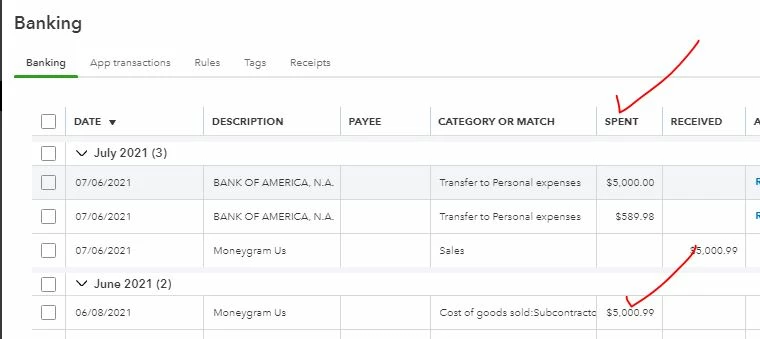
Why quickbook couldn't recognize vendor in the banking tab?

  • July 21, 2021
  • 1 reply
  • 0 views

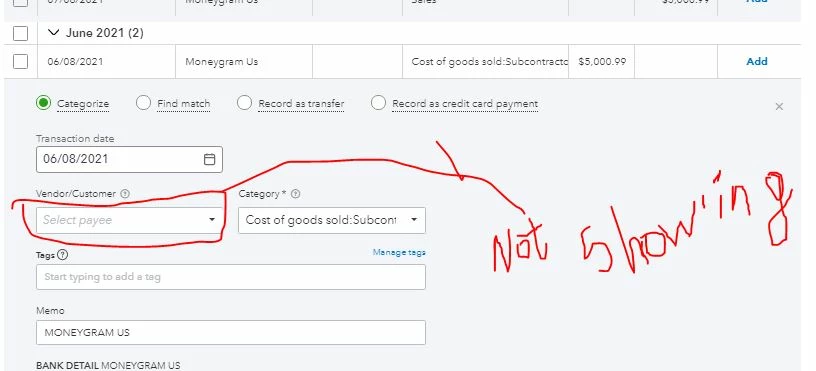
I could see  in many tutorial videos which were able to recognize vendor in the banking tab , but in my account it is not recognizing vendor?
hHelp is greatly appreciated.

1 reply

MJoy_D
July 21, 2021

Let's resolve the error you're having to add your vendors successfully, @ramkaji1999-gmai


A regular browser's cache stores temporary internet files from your browsing history. However, as it collects too many files, this may cause performance issues in your account. This might be the reason why you don't have this Vendor dropdown from your Banking page. 


First, you'll have to sign in to your QBO account using a private browser. This helps isolate the issue since it doesn’t store data in the cache. Here are the following keyboard shortcuts: 


  • Safari: Command + Shift + N
  • Mozilla Firefox: CTRL + Shift + P
  • Google Chrome: CTRL + Shift + N 
  • Microsoft Edge:  CTRL + Shift + P


If it works, here's how to clear cache and cookies to fix issues when using QuickBooks Online. Restart your browser right after. 


You can also try to categorize your bank transactions using other supported browsers (Firefox, Google Chrome, Safari, Microsoft Edge) if the steps above didn’t work.


Refer to the following article for more information about downloading, reviewing, categorizing, and matching your latest bank and credit card transactions: Categorize and match online bank transactions in QuickBooks Online.


I'm always here if you need help or assistance with your bank transactions. Let me know by leaving a reply below. Take care and have a wonderful day!