Hi, @ElenaP1. I'd be glad to share some insights about disconnecting a personal bank account from QuickBooks Self-Employed (QBSE).
In QBSE, disconnecting the bank accounts connected to online banking will remove all the categorized transactions. You can hide this instead. Doing so will not delete them. I'll guide you on how:
- In your QBSE company file, go to the Gear icon and select Manage Accounts.
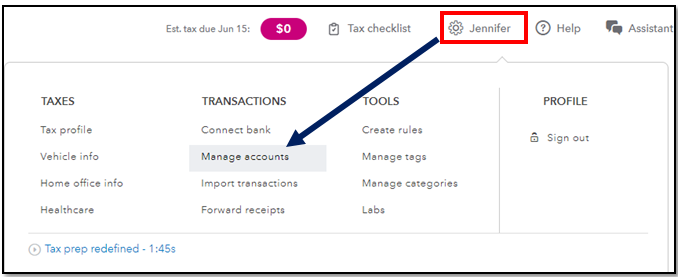
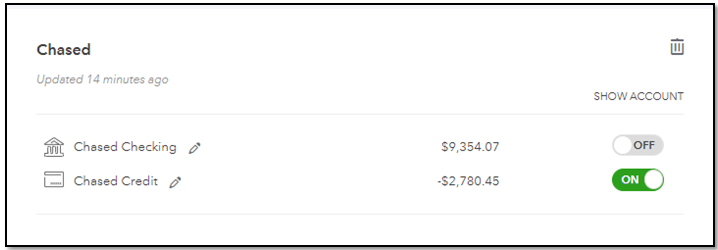
- From there, look for your personal bank account.
- Then, under the Show Account column, turn off the button to hide the account.
You can also check this article that details the process and for additional information: Delete bank and transaction data in QuickBooks Self-Employed.
After that, you can now connect your business account. Here's how:
- Select the profile ⚙ icon and then select Connect bank.
- In the search box, enter the name or URL of your bank. Then select Continue. If you've already connected an account before, select Connect another.
- Enter the sign-in info you use for your bank's website.
- When you’re ready, select Connect securely.
QuickBooks automatically downloads your latest transactions and categorizes them for you. I've added this helpful resource that you can use as a guide to ensure your transactions are in the right account: Categorize transactions in QuickBooks Self-Employed.
If you have any other concerns about disconnecting accounts in QBSE, feel free to leave a reply below. I also encourage you to add updates on how the steps work. Have a good one and take care.

