

October 15, 2022
Question

Inconsistency between bank balance and "in Quickbooks"

  • October 15, 2022
  • 1 reply
  • 0 views

Hello,


I've setup another bank account with my business banking provider to deal with a direct debit to do with my virtual office. I've synced it with QuickBooks just like the main business account is also synchronised.


I've only made 2 transactions so far. 1 was £33 into the account to pay for the direct debit. The other was the £33 being taken out of the account by the direct debit. It is showing that I have £27.50 in QuickBooks available now. I don't understand why I'm being shown the cost of the service without VAT.


I've attached a screenshot below. Those are the only two transactions in the list whether categorised or excluded.
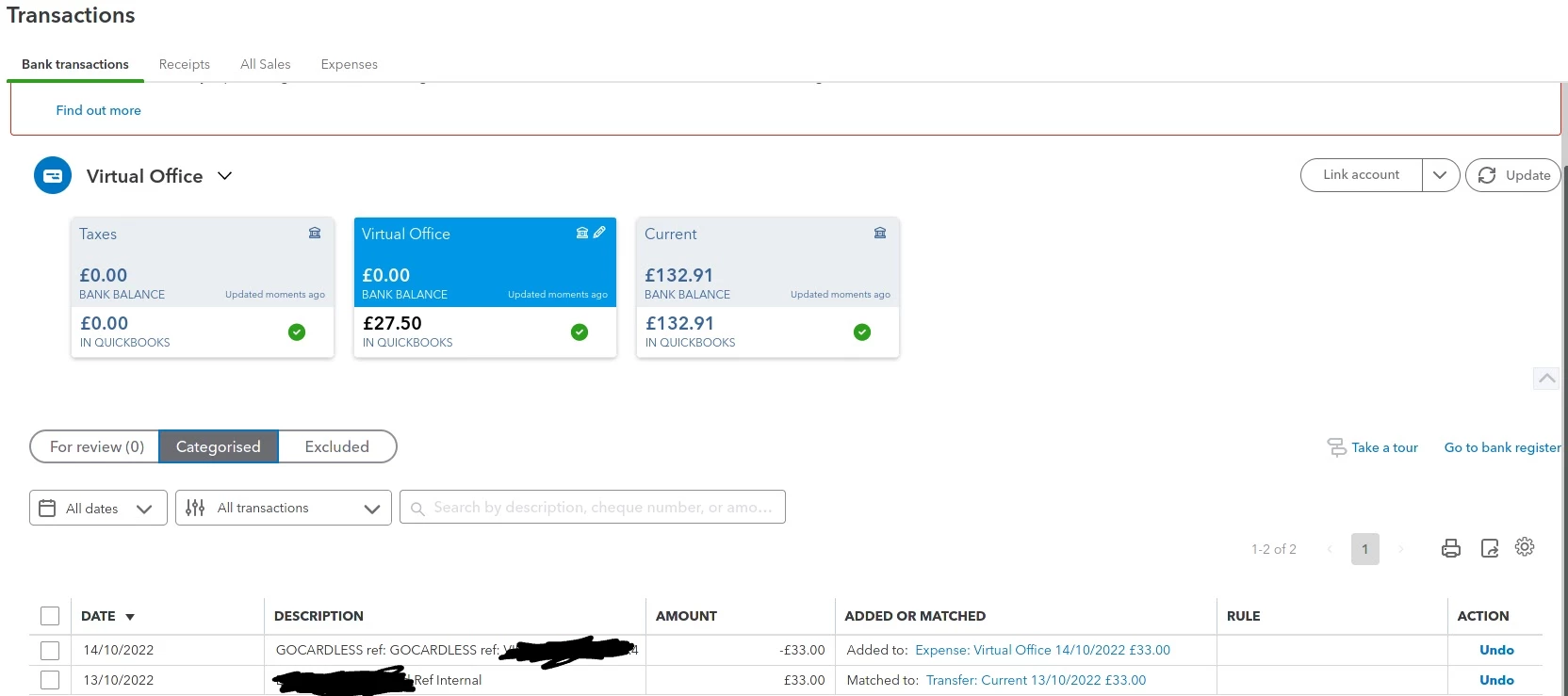
 

Any explanation as to why QuickBooks is behaving like this would be appreciated.

1 reply

October 15, 2022

Hi @danfon.


I can share some insights about In QuickBooks' inconsistency balance.


In your case, I suggest checking the cleared and reconciled transactions in the bank register. There might be fees that have been recorded in the account register earlier, which deduct the matched or added transactions. In addition, the In QuickBooks balance will also depend on the added or matched transactions.


You can consider removing the entry in the bank register that inhibits inconsistency in the current In QuickBooks balance. Here's how:

  1. Go to the Gear icon and then select Chart of account.
  2. Find the bank in question and select View register/Account history.
  3. Click the transaction and hit Delete.


I'll add the reference on how to match and categorise bank transactions in QuickBooks Online. This will help you review these transactions after being downloaded or imported.


Additionally, you can check these articles to learn more about keeping transactions and accounts accurate.


I'm always around if you still need assistance, danfon. Keep well.