

April 20, 2021
Question

Issue Reconciling - Paid Invoices are showing up in my reconcile window as PAYMENTS

  • April 20, 2021
  • 3 replies
  • 0 views

Hi, I am struggling to find a solution to this problem. In my reconcile window, I have several invoices showing up as PAYMENTS. Some of these invoices have been paid by the client through quickbooks online payment and some have been received manually. Deposits are made as a lump sum which show up in the reconcile window as well as my bank statement. In the reconcile window, the invoices show up as payments as well as the lump sum deposits. 


Why are individual invoices showing up in the reconcile window if they have been already paid, matched and linked to a deposit? The invoices are showing up as payments and as an Accounts Receivable. It would make sense that only the deposits show up in the reconcile window and NOT the individual invoices. Any help would be much appreciated. I have called QBO support 5 times and was hung up on all 5 times. Support has not been great :(
3 replies

MariaSoledadG
April 21, 2021

I wish I could make it better, but let me share with you a few information about transactions that are showing on the reconcile page, grsingh.


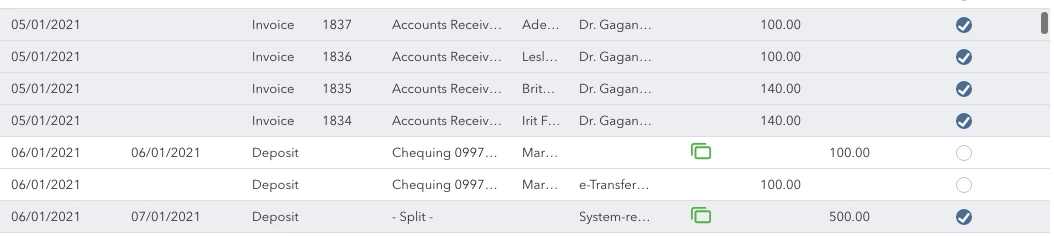
You'll have to make sure that you have linked the deposit to the correct invoice so both transactions won't show up on the reconciliation window. To do this you can drill down the transactions one by one. Then, you'll also want to sort them by clicking the Payment and Deposit column so you can easily distinguish which transactions aren't linked to deposit. I've attached a screenshot for your visual guide:


Also, make sure that you've filtered the correct Reset Statement ending date to ensure that you're reconciling the correct period. 

Please read this article for more information: Fix issues the first time you reconcile an account in QuickBooks Online.


For your reference, you'll want to generate a copy of your reconciliation report: How do I view, print, or export a reconciliation report?


Please touch base with us if there's anything else that you need help with about reconciliation. We're always right here to assist you further anytime. 

grsinghAuthor
May 2, 2021

All of the invoices are linked to an invoice. Invoices shows payment ID since payment was collected through QBO online payment. Still the problem persists. 


Is there any other way to correct this issue? Everything seems to have been done correctly so it seems like a technical issue? Please advise. 

May 2, 2021

Thanks for getting back to us here, @grsingh.


I understand how the payment should post for you to reconcile smoothly. With this, I recommend contacting our Customer Care Support. They have the tools that can check your account and assist you further with the posting.


Here's how to reach out:


  1. Go to Help at the top.
  2. Scroll down and select Get help from a human.
  3. Choose Callback.


Check out this article to learn more about our QuickBooks Payments FAQ


In case you need help with other payment tasks, click this link here to go to our general topic with articles. Look for responses that fit your concern.


I'll be around for you if you have any other questions about payments. Take care and have a great weekend ahead.

July 18, 2022

We had exactly the same problem and eventually found the solution under the "products and services" item you use on the invoice.  We discovered that you have to make sure they are allocated to the correct income account and NOT your bank account as the income account. We changed it to services in this case and this removed all the invoices from showing in the reconcile window as a payment.  Hopefully the picture below will make  sense.

March 2, 2023

YES! So thankful someone was finally able to figure out the answer to this!

March 10, 2023

I have the same issue. How to fix it?

AlcaeusF
March 10, 2023

Hello, rosemaboot6988-g.


Thanks for joining this conversation. Allow me to jump in and help ensure this is taken care of for you.


If you already followed the steps shared by my colleagues in this thread and the issue persists, I highly suggest contacting our Support team. They have tools such as screen-sharing (remote access) that can pull up your account in a secure environment and check the cause of this odd behavior. They can also perform other troubleshooting steps if necessary.


Here's how to reach them:


  1. In QuickBooks Online (QBO), go to the Help (question mark) icon at the top right.
  2. Select Contact Us.
  3. Enter your concern, then click Let's talk.
  4. Choose a way to connect with us.


To learn more about fixing reconciling issues in QBO, consider checking out this article: Fix issues the first time you reconcile an account in QuickBooks Online.


I also recommend visiting our website for more tips and other resources you can use in the future: Self-help articles.


Please post again or leave a comment below if you have additional questions about this or anything else. I'm always here ready to help. Take care.