


Ami_D
May 24, 2022

#AMA: Ask QuickBooks Experts Anything About QB Time
  • May 24, 2022
  • 3 replies
  • 0 views


Join our QuickBooks Experts for an #AMA session all about QuickBooks Time. They'll be able to answer your questions on:


● Setting up and tracking time with QuickBooks Time for the first time.
● Connecting QuickBooks Time with your QuickBooks account.
● Resolving common issues and errors.

...and more!


To Participate:
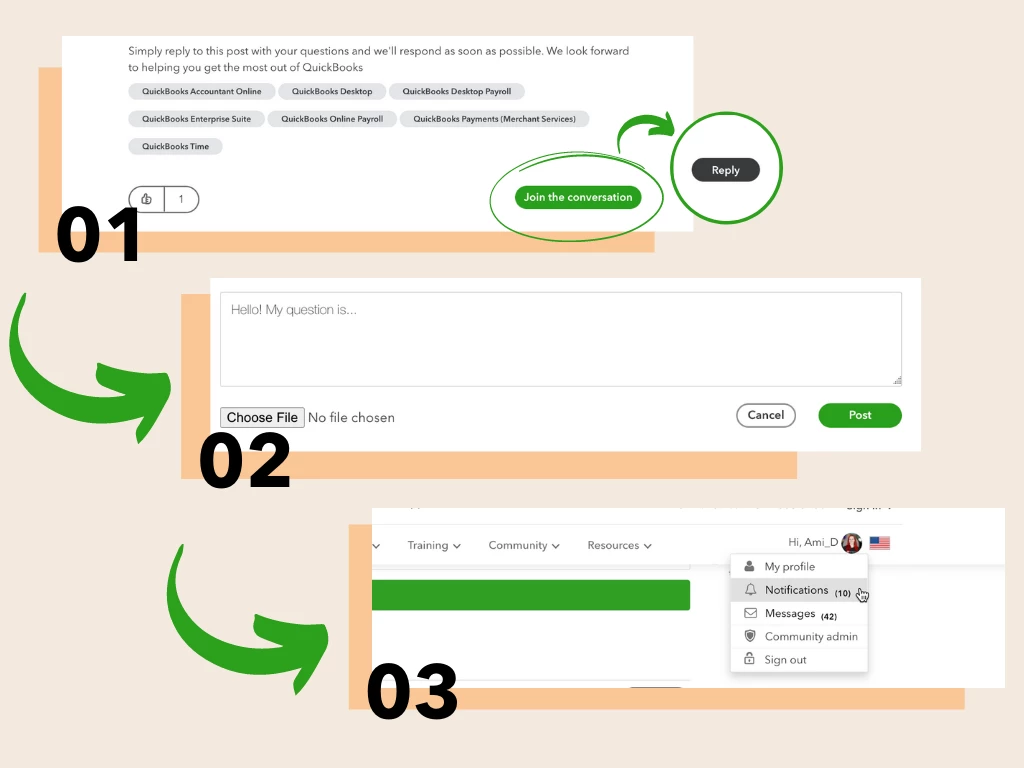
 

  1. Press Join the Conversation to log in to the community. Once logged in, press Reply.
  2. Write your question as your reply to the post. Press Post to submit.
  3. Keep an eye on your notifications for a response from one of our QuickBooks experts.


QuickBooks Experts will be online from 8am - 10am PT to answer your questions live!

3 replies

May 24, 2022

Hi,

Trying to take certification.Is there any free materials to study 

Also if I take quickbooks online test.Do I need to know all the versions means simple,essential everything 

Tori B
May 24, 2022

Hi there, @van21


Thanks for taking the time to swing by our AMA live event. It's great to have you here with us. 


You'll need to know each level of QuickBooks Online for the certification test. However, please know that QuickBooks Online Advanced will be its own test, and you'll need to take it separately. You can use the link that I've included below to access the training hub we have available. Within this training hub, there are self-paced modules that cover:


  • Which topics are on the certification test.
  • Sample test questions to give you an idea of what may be asked.
  • A wide selection of self-paced and webinar-based product training to get you up to speed.


Here's the link: 


Please don't hesitate to reach back out if you have any additional questions or concerns. I've got you covered. Take care! 

May 26, 2022

Thanks. Can i please get more detailed information about certification for QuickBooks online? How many certifications are there? What are the topics? How many questions? What is the score to pass the test?

May 24, 2022

are you offering this type of event in future?


MonicaM3
May 24, 2022

@sanjayk 


Welcome to Ask Me Anything! Great question. This is the last session of this particular series, but stay tuned. We are working on other events where you can come to get your questions answered and take advantage of our experts.


Keep an eye out on the Community Home page for details.


Enjoy your day!

CaitPHG
May 24, 2022

My subcontractor uses our TIME App to clock in/out of the jobs. Why isn't it showing up on the Project Time Activity. I've read different threads about this, but I just need some straight to the point clarification. Regardless of if they are an Employee or Sub, tracked for 1099, etc, please just tell me how to get the Time Activity to the Project. Even when im Approving his Time it doesn't show up in the Project, and reads the attached ERROR Code. I set him up a "dummy" Employee profile, just to be used for TIME Tracking purposes, but it still isnt showing up in Project.  I read that we can track subs, as long as the box "Track 1099" is NOT checked. I tried that, but his time still doesn't show. Do I perhaps not have something connected correctly from TIME (QBO dashboard) and outside QB Time/"T-sheets"? 

Thank you, 

Caitlin P - PHG

May 24, 2022

Thanks for joining our AMA session, CaitPHG.


I was able to locate your account on my end and review some of its activity. From what I'm seeing, there's a team member with 2 accounts, and they're tracking time in the unlinked account. This prevents their data from syncing into your QuickBooks Time project activity.


To fix this, you'll want to get in touch with our Customer Care team and request that they merge both accounts so their time entries appear correctly in your books. You can get in touch with them using any of the options available on our Contact page. Also be sure to review their support hours so you'll know when agents are available.


Please feel welcome to send a reply if there's any additional questions. Have a lovely day!

CaitPHG
May 24, 2022

Thank you! I will contact them now.