


Ami_D
April 19, 2022

Ask Your QuickBooks Questions | Community Drop-In Session
  • April 19, 2022
  • 9 replies
  • 0 views


Do you have a question about QuickBooks but haven't gotten around to reaching out to us yet? Join us for a Live QuickBooks Community Drop-In Session where QuickBooks Experts will be online to answer your questions live.


Topics include, but aren't limited to: Invoicing, Payroll, Account Management, Product Features, and more.


To participate:
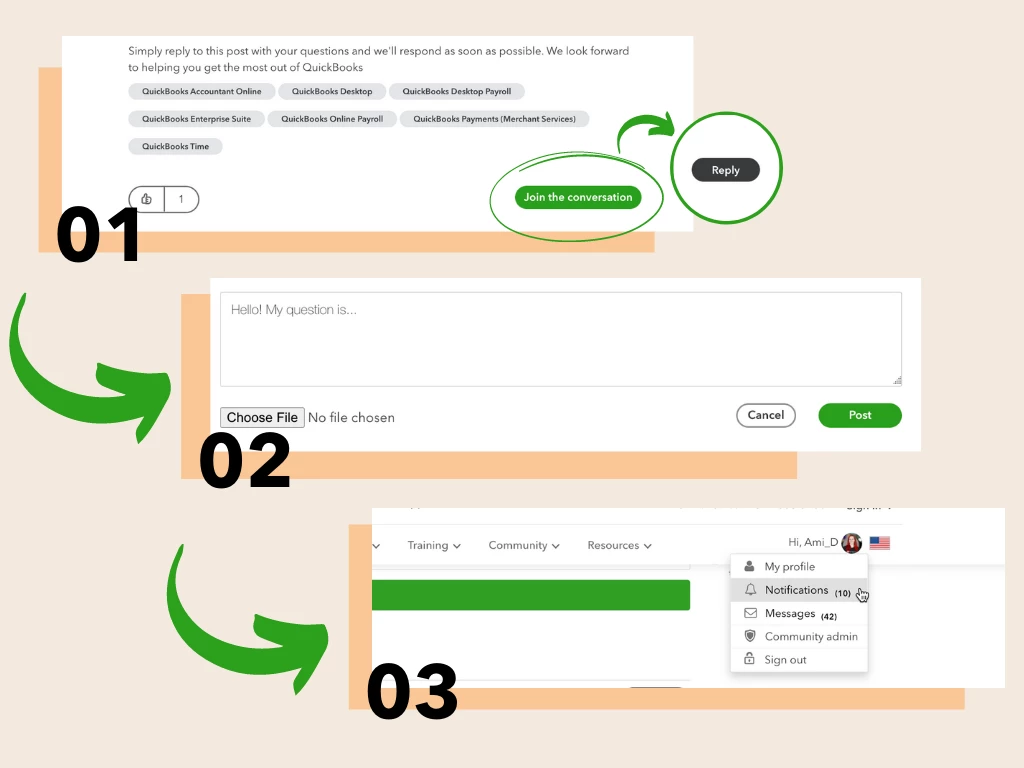
 

  1. Press Join the Conversation to log in to the community. Once logged in, press Reply.
  2. Write your question as your reply to the post. Don't forget to let us know what product you're using! Press Post to submit.
  3. Keep an eye on your notifications for a response from one of our QuickBooks experts!


We look forward to helping you get the most out of QuickBooks

9 replies

April 19, 2022

Which QuickBook program would be the best for me to use, I am using it to log client expenses and expenditures, money in and money out.

MonicaM3
April 19, 2022

Hi @Mauimona 


Welcome to the Community! 


All QuickBooks products will keep track of income and expenses. The best product for your client will depend on what type of business they have and what level of detail you want to track. 


I recommend checking out our QuickBooks Product and Pricing page for details on each product. Take a look and let me know if you have any additional questions. I'll be here to help!


April 19, 2022

I had already submitted my question, have not had an answer or response of any kind so wanted to know how long does it take to get a question answered?

April 19, 2022

Never mind my question about how long it would take to answer a question. I see that my responses are coming via my email account. Thank you!

April 19, 2022

I'm sorry to send so many questions, will all other attendees questions be posted so we'd all be able to see what the answers are, so that we gain some knowledge from the responses. 

MonicaM3
April 19, 2022

Hello @Mauimona 


All questions and replies will be in this thread. You will have to refresh the page periodically to see any new posts. The page won't automatically update/refresh.


I answered your original post:

Hi @Mauimona 


Welcome to the Community! 


All QuickBooks products will keep track of income and expenses. The best product for your client will depend on what type of business they have and what level of detail you want to track. 


I recommend checking out our QuickBooks Product and Pricing page for details on each product. Take a look and let me know if you have any additional questions. I'll be here to help!

April 19, 2022

I used Chase bank online to send a rent check. Incorrect payee so they cancelled it. The refund came back. QB auto set as "transfer from uncategorized asset" and gave me option to "record transfer". Does that seem correct or should I categorize it some other way, like "bank refund"?

April 19, 2022

Thanks for joining our Drop-In Session, Stincil.


When working with rejected or failed bank transfer payments, you'll initially need to confirm where the failed payment is in your books.


Here's how:

  1. In the left navigation bar, use your + New button.
  2. Choose Bank deposit or Record bank deposit.
  3. Review the QuickBooks Payments section.
  4. Locate the payment on your list. If you see it, it isn't deposited yet. If you don't, it's been deposited.


Next, you'll want to create a service item to track the rejected transfer:

  1. Use the Gear (⚙️) icon, then go to Products and services.
  2. Choose New, then service, and enter "Rejected bank transfer" for its name.
  3. In your description, enter "Bank transfer payment received rejected by the bank".
  4. If the deposit is already deposited, pick which bank account you deposited into for your Income account. Or if you haven't made the deposit yet, use your Undeposited Funds for its Income account.
  5. Select Save and close.

Next, you'll need to create an invoice and remove the original payment from the prior invoice.

I'd also recommend working with an accounting professional to make sure everything's being entered correctly. If you're in need of one, there's an awesome tool on our website called Find a ProAdvisor. All ProAdvisors listed there are QuickBooks-certified and able to provide helpful insights for driving your business's success.

Please feel welcome to send a reply if there's any additional questions. Have a lovely day!

April 19, 2022

Does this apply to a payment we've made that was returned or only to a payment made to us and returned?

April 19, 2022

I just purchased a restaurant and the current inventory. How do I record the current inventory for food, alcohol and non-alcohol in order to align COGS at the end of the month?

Tori B
April 19, 2022

Hi there, @HudG2022


Thanks for swinging by our drop-in. It's great having you here with us. 


Before we begin with some steps, would you mind sharing which product you're using? 


I look forward to your reply. Chat with you soon! 

April 19, 2022

We use QuickBooks Essentials.

April 19, 2022

I want to send bulk invoices to the customer..which subscription should I go for,QBO or QBD..

Fiat Lux - ASIA
April 19, 2022

@whitejulian69221 wrote:

I want to send bulk invoices to the customer..which subscription should I go for,QBO or QBD..


@whitejulian69221 

Do you need this feature?

https:// quickbooks.intuit.com/learn-support/en-us/help-article/sales-taxes/create-send-multiple-invoices-quickbooks-online/L46eRjDDv_US_en_US?uid=l26f5k3p


Consider using QBO Advanced. You can use a lower plan but you will need additional manual work later.

https:// quickbooks.grsm.io/US

https:// quickbooks.grsm.io/us-promo


April 19, 2022

I have tried Quick book free 30 days trial version but was not able to send the invoices....it was showing delivery failure..

Have consulted the customer care too for this but they were not able to address my concern.. what could be the reason for it.

I have tried all best possibilities vto send the invoices but it was not delivered..

Kindly need your valuable guidance for it....

April 19, 2022

I work for a construction company, and we have several jobs per customer. In QB desktop, I used to add the jobs as subcustomers, since you could look at the customer list and see what each customer owed per job and a list of the jobs. Should I put those jobs as projects in QB online? Can I link projects to the subcustomer? Also is there a way to pull up a customer and get the same view I used to before- tells me which jobs are owing and which are paid? Is there a view that I can search for a customer and see all of the projects or subcustomers? I have over a 100 customers and some of those customers have over 30 jobs, or subcustomers.

April 19, 2022

Hey @Notauserid


Thank you for joining our drop-in session! Once you have QuickBooks Online Plus or Advance, you can convert your sub-customers to track customer jobs by switching them into projects and using the job cost feature. You would need to turn on the project feature first to do so. This article list step by step how to convert a sub-customer into a project. There are also instructions on making a sub-customer with an existing project and moving specific transactions to a project as well.


To answer your other questions, once you open the Project tab from the left menu, you will be able to search for the different jobs or customers with the dropdowns as seen below.


If you need to see a report, you can select one of the projects, and the next page will highlight an overview, and there is a Project Reports section that will share more information, as seen here.


Here is a handy article that shares common Projects FAQ to learn more about Projects in QuickBooks Online. If you have any questions, dont hesitate to let us know! Take care for now.