


Ami_D
May 3, 2022

Ask Your QuickBooks Questions | Drop-In Session
  • May 3, 2022
  • 4 replies
  • 0 views


Do you have a question about QuickBooks but haven't gotten around to reaching out to us yet? Join us for a Live QuickBooks Community Drop-In Session where QuickBooks Experts will be online to answer your questions live.


Topics include, but aren't limited to: Invoicing, Payroll, Account Management, Product Features, and more.


To participate:
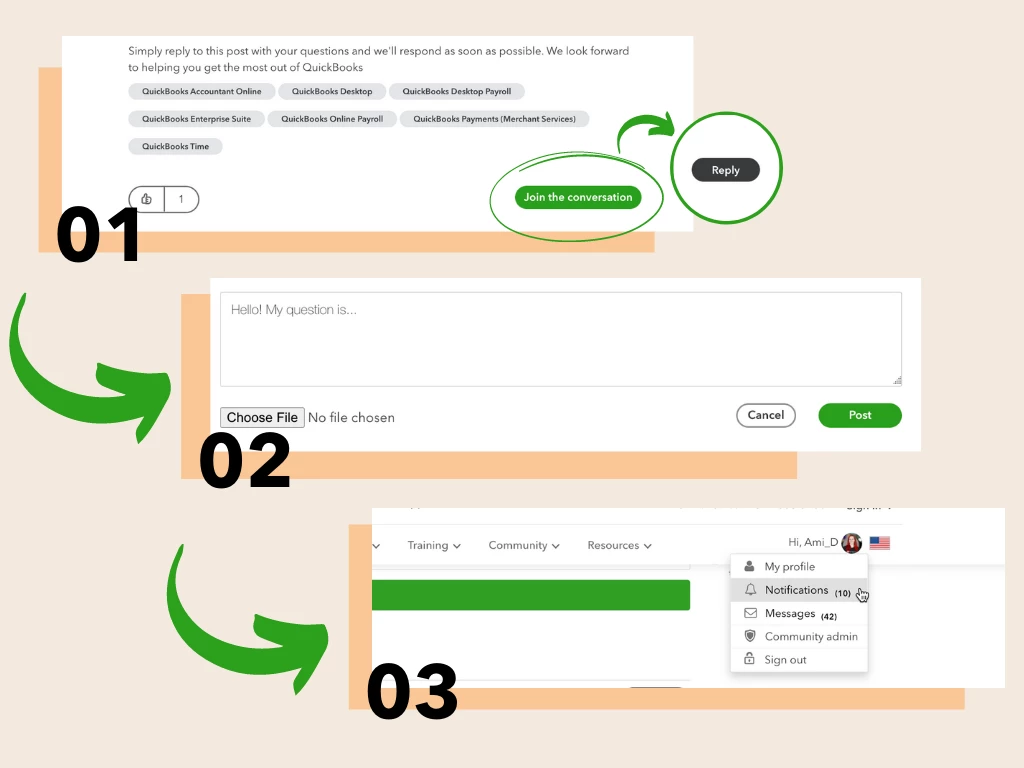
 

  1. Press Join the Conversation to log in to the community. Once logged in, press Reply.
  2. Write your question as your reply to the post. Don't forget to let us know what product you're using! Press Post to submit.
  3. Keep an eye on your notifications for a response from one of our QuickBooks experts!


We look forward to helping you get the most out of QuickBooks

4 replies

May 3, 2022

In a recent webinar, I ask how to keep track of my business and personal use. I was told I need 2 accounts/subscriptions. Can I have an essential account and a self-employed account?


And when i sign in, can I easily jump between accounts? 

MonicaM3
May 3, 2022

Good Morning @JunTangPhotography 


Thanks for taking advantage of our Community Drop-in this morning. I’m glad you’re here and I’m happy to help.


Great news! You CAN have an Essentials account and a QBSE account. For convenience, you can use the same user ID/email for both and quickly switch between the two when your logged in. 


To add a QB account:


Visit the QuickBooks pricing page and select the subscription option you want. This opens one of two experiences:


  • If you're signed in to QuickBooks, you’ll be asked to confirm the account you want to sign in with. If the account displayed is the one you want to use for the new company file, select Yes, that’s correct.
  • If you haven’t signed in recently,  you’ll be asked to create an Intuit account. Don't fill this out unless you want to connect your new company file to a new account. Instead, look for the Adding a company to an existing account? section and select the Sign in link. Sign in with the user ID and password you already use for QuickBooks.


May 3, 2022

Hi MonicaM3, thank you. I think I did that successfully. However, when I sign in and select the self-employed account (which I label as jun tang personal, I get a white screen, with no details of the account.


I've attached a screen recording. I think there is a bug. Please help.

May 3, 2022

Hello,

I have Qkbks On-line Plus. I process 200+ supply bills for my plumbing company each month. When I try to import the bills, Qkbks tells me I cannot Import into Accounts Payable. Is there a way I can import these bills to a different liability account? 

Melanie

May 3, 2022

Hello Mecha,


Thank you for visiting us today! What you are needing is possible, but you would have to integrate with a third-party application to do this. Luckily, we have a QuickBooks App Store where you can view many of these applications that integrates with us. Feel free to go through the features, ratings, and reviews to choose the one that will work best for your company. If you have any other questions, don't hesitate to let us know. We will be here, ready to help! Tae care for now. 

May 3, 2022

Why do i need a Third party app?


both accounts are quickbooks. im not trying to use a third party?

May 3, 2022

i just opened a new qb file for a building i bought (rental) as it is a seperate LLC. Can you walk me through how to record the sale transaction? i bought it cash with $ from a trust account - so it is an investment for the trust. How do i record it in Trust's qb file?

May 3, 2022

Hey  alinaapteker,


Thank you for reaching out to us, and congratulations on this venture! For this situation, it would be best to work with an accountant to see the best practices for this type of investment. If you don't have an accountant, we offer a ProAdvisor service where you can connect with an expert within your area. Simply enter your zip code and browse through the options! Many of them offer a free consultation as well! 


Let me know if you have additional questions! Our team will be happy to help! 

May 3, 2022

Hi! I am using QBD 2019 & trying to prepare to move over to QBO. I have several questions.

1. We did have a QBO account but we cancelled it in 2016. Can I create a new one? Or if I am able to use the old one, I'd rather not have that data in with the new data.


2. Can I import/move over data only from the beginning of this year & leave 2021 & prior in QBD? If so, how easy is it do?


3. I've watched a few of the QBO tutorials on moving from QBD to QBO-one discussed just importing in lists, would that be the way to go if just wanting to import 2022 data?


4. Sales tax-we file and collect sales tax in 8 states. Is this relatively simple (like on QBD), because in 2016, it really wasn't an option that was useful, hence we went back to QBD.


I'm sure I have more, but this is just a starter.

Thanks!

Fiat Lux - ASIA
May 3, 2022

@TRAZ wrote:

Hi! I am using QBD 2019 & trying to prepare to move over to QBO. I have several questions.

1. We did have a QBO account but we cancelled it in 2016. Can I create a new one? Or if I am able to use the old one, I'd rather not have that data in with the new data.


You should open a new blank QBO account.

 https:// quickbooks.grsm.io/US

https:// quickbooks.grsm.io/us-promo


2. Can I import/move over data only from the beginning of this year & leave 2021 & prior in QBD? If so, how easy is it do?


The built-in converter tool will migrate the whole data. If you only need to migrate some portion of data, you should run the Condense Data utility to remove the old transactions. Otherwise you have to purchase a 3rd party conversion service.


@TRAZ