Are you thinking about converting from QuickBooks Desktop to QuickBooks Online? Wondering if this is right for your business?
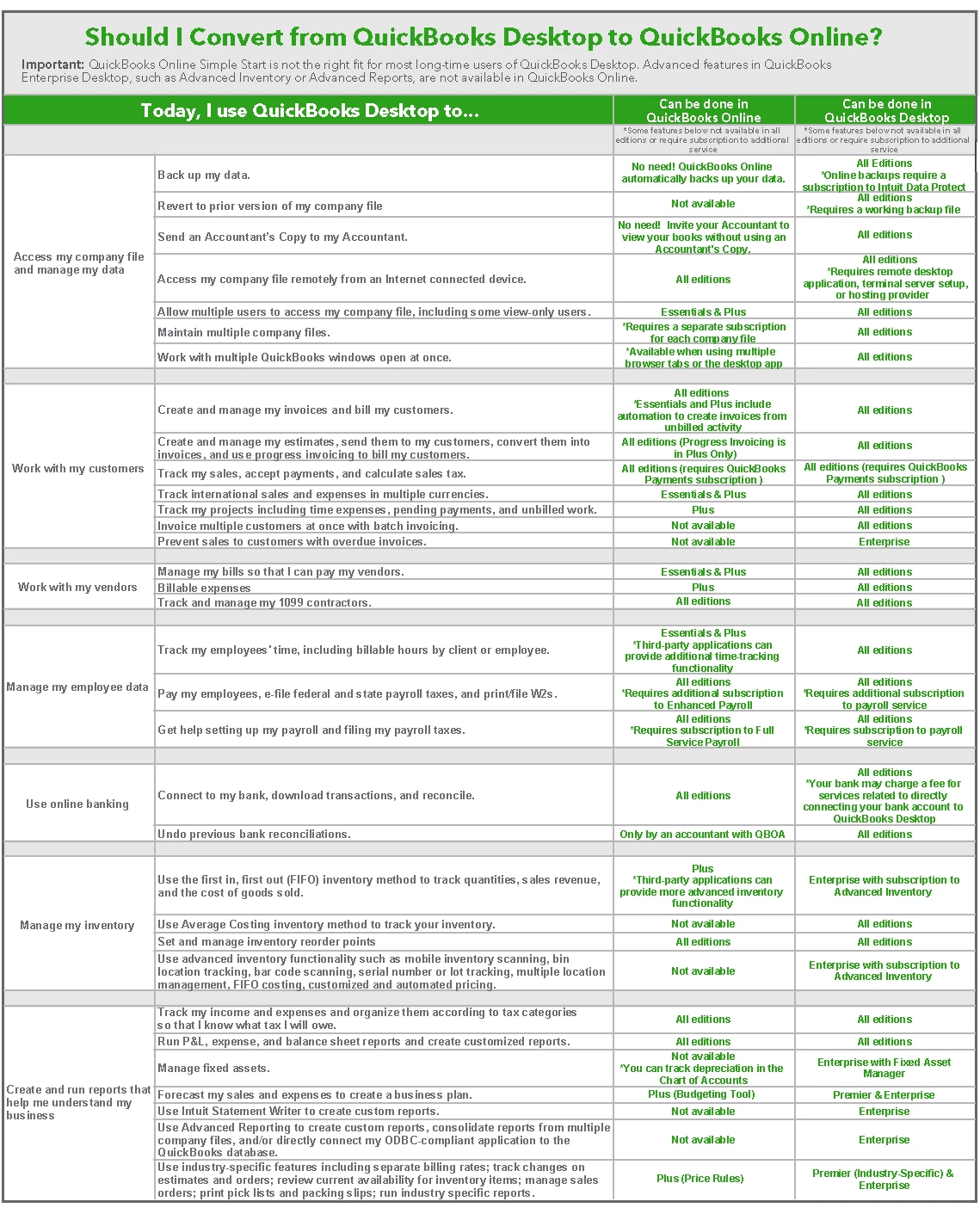
More than anything, we want folks to find the right accounting software that fulfils their specific needs. The QuickBooks Guide to Converting QuickBooks Desktop to QuickBooks Online is a full-service hand-book for anyone converting from QuickBooks Desktop (Pro or Premier) to QuickBooks Online. If you're still deciding and just need a quick reference, download our Quick Conversion Reference (attached to this article) and use this lean version of the guide to help you decide if converting is right for you (or your client).
The Quick Conversion Reference briefly outlines the features and benefits available for the QuickBooks Online and QuickBooks Desktop product lines. Identify which tasks and features you need for your business from the left-hand column and see whether it can be done in either Online or Desktop on the right.