Solved
Can someone help me to record a BAC's payment into my account from Paymentsense for charges incurred from Elavon for cancelling my contract with them? New to QB. thanks
Original commenter did not share additional details


Thanks for reaching out to the Community, @allerbeck.
You can deposit the payment with the expense account you used for charges incurred from Elavon.
Here's how:
1. Click the Plus (create) icon at the upper right.
2. Pick Bank Deposit under Other column.
3. Go to the Add funds to this deposit section.
3. On the Received From column, select the name where you get the payment from.
4. On the Account column, choose the expense account you used for charges.
5. Enter a Description and the Amount, then hit Save and close.
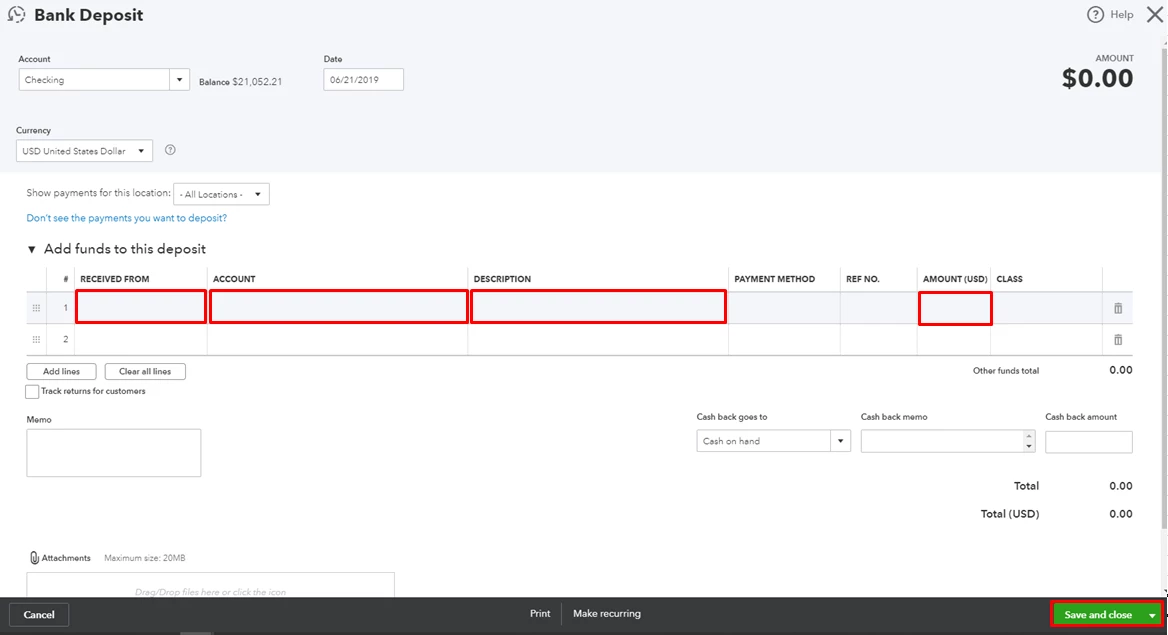
That should record the BAC's payment from Paymentsense. For future reference, consider checking out this article: What are Bank Deposits in QuickBooks?
Please let me know how it goes or should you have any follow-up questions. I'm always here to help. Have a good one!
Enter your E-mail address. We'll send you an e-mail with instructions to reset your password.