April 28, 2022
Solved

Hi, I would like to delete unwanted customers, how is this done? Thanks

  • April 28, 2022
  • 2 replies
  • 0 views
Original commenter did not share additional details

Best answer by jamespaul

Hello, border_plumbing-.


I hope you're doing well. I'll lay down the steps to help you manage those unwanted customers from QuickBooks Online. 


We can inactivate those unwanted customers from the Customers list. Here's how it is done: 
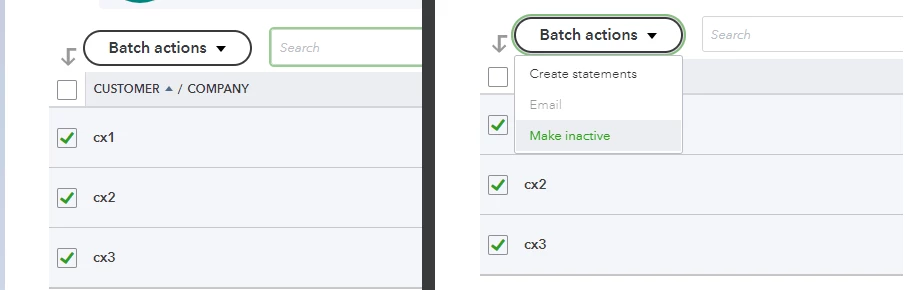
 

  1. Go to Customers & Leads (or Sales), then click the Customers tab.
  2. Check the unwanted customers from the list.
  3. Click the Batch actions button.
  4. Select Make inactive


Those inactivated profiles aren't removed completely from the system but they won't show up when you create a transaction. Also if they have existing open invoices, QuickBooks creates an adjusting entry to zero-out the balances. 


If you need more details on managing your customers in QuickBooks, feel free to take a look at this article: Add and manage customers in QuickBooks Online.


Looking to see how much you've made or spent so far? We can utilise the Reports feature to see the numbers. Take a look at this article if you'd like some pointers on how to use the reports: Run reports in QuickBooks Online.


I'm more than happy to work with you again in managing your customers. Want to record invoices or other sales transactions? Let me know and I'll get back to you again. 


2 replies

jamespaulAnswer
April 28, 2022

Hello, border_plumbing-.


I hope you're doing well. I'll lay down the steps to help you manage those unwanted customers from QuickBooks Online. 


We can inactivate those unwanted customers from the Customers list. Here's how it is done: 


  1. Go to Customers & Leads (or Sales), then click the Customers tab.
  2. Check the unwanted customers from the list.
  3. Click the Batch actions button.
  4. Select Make inactive


Those inactivated profiles aren't removed completely from the system but they won't show up when you create a transaction. Also if they have existing open invoices, QuickBooks creates an adjusting entry to zero-out the balances. 


If you need more details on managing your customers in QuickBooks, feel free to take a look at this article: Add and manage customers in QuickBooks Online.


Looking to see how much you've made or spent so far? We can utilise the Reports feature to see the numbers. Take a look at this article if you'd like some pointers on how to use the reports: Run reports in QuickBooks Online.


I'm more than happy to work with you again in managing your customers. Want to record invoices or other sales transactions? Let me know and I'll get back to you again. 


Fiat Lux - ASIA
April 29, 2022

@border_plumbing- 

If you need to remove it completely and it doesn't have any transaction history, you can utilize a deleter tool.

https://transactionpro.grsm.io/qbo
