Solved
How do i delete incorrectly entered employee payments entered after saving draft?Its for a payment 20th Nov which does not come up in history for deleting?
Original commenter did not share additional details


Hi, Did as instructed but there is still no option to re enter correct payment details for 20th November?
Hi @l-bigwood,
Thank you for your prompt reply, as well as providing us an update on your issue. Let me lend you a hand and get this resolved.
After you delete your payroll draft, the screen will go back to the Is all employee pay correct? page. This is where you can edit and enter your employee's correct payment details.
You can refer to the following screenshots for your reference:
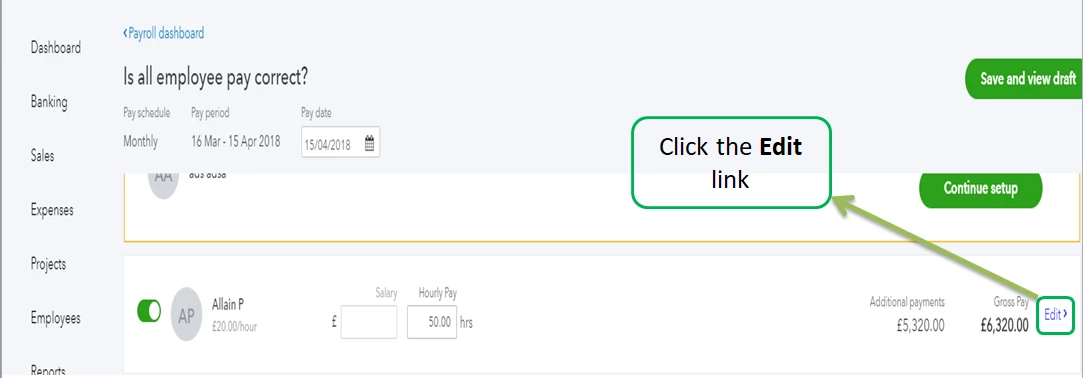
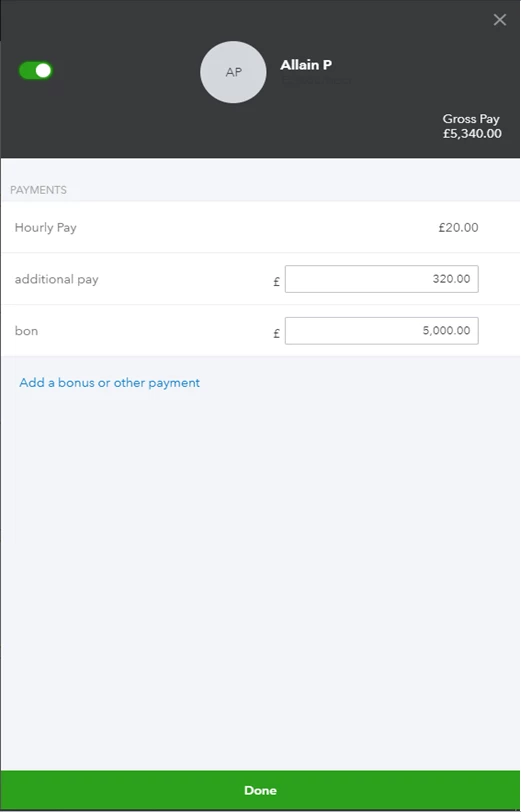
In case you want to delete a whole pay run, check out this article: Deleting a pay run in QuickBooks Online Standard Payroll. Here you'll find a list of some things you need to know when you delete a payroll. It also includes a short video that can serve as your guide.
If you have other questions in mind, post them below. I'll get back to you as soon as I can.
Enter your E-mail address. We'll send you an e-mail with instructions to reset your password.