Hi Rowan Bramley!
Thanks for the reply. Let me help you in downloading the badge.
It seems that you're in the Marketing tools section already. From there, you should see the Digital ProAdvisor Badges with a Download button. Please refer to this screenshot on how it looks like: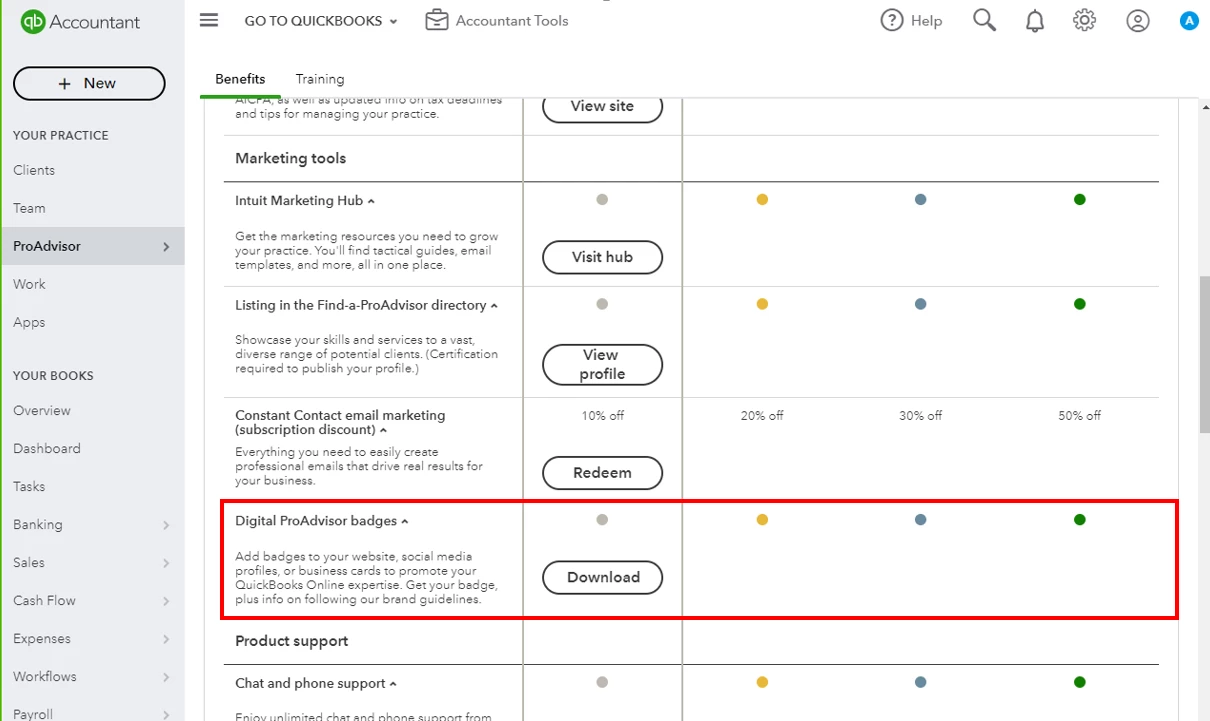
Once you clicked it, a ZIP file will be downloaded with the badge and the PDF file for the guidelines.
If you still can't find it, it's probably because of the temporary internet files. You'll want to use an incognito window and check it from there. Here are some of the keyboard shortcuts:
- Google Chrome: Ctrl + Shift + N
- Safari 11 or newer: ⌘ + Shift + N
- Mozilla Firefox: Ctrl + Shift + P
- Microsoft Edge: Ctrl + Shift + P
Also, you'll want to clear the cache and make sure the browser is up-to-date to fix issues in QuickBooks Online.
If you need articles and references in managing your business, please visit this page: QBOA Articles.
Need more assistance? Keep on posting here and we'll respond as soon as we can.

