June 24, 2020
Solved

How to Assign Class to Ledger Account

  • June 24, 2020
  • 4 replies
  • 0 views

There is a setting in Company Preferences / Accounting that allows Classes to be assigned to accounts. Creating new accounts, however, I can't see the option to assign a class when creating a new account in the ledger. 

Best answer by Mark_R

Hi there, @afwright.


The Class Tracking feature only allows you to assign classes into income and expense accounts. Thus, assigning to assets and liabilities accounts isn't available.


Here's how you can assign classes to income or expense accounts:


  1. Go to the List menu, then select Chart of Accounts.
  2. In the Account drop-down, click New.
  3. Select the income or expense account type, then click Continue.
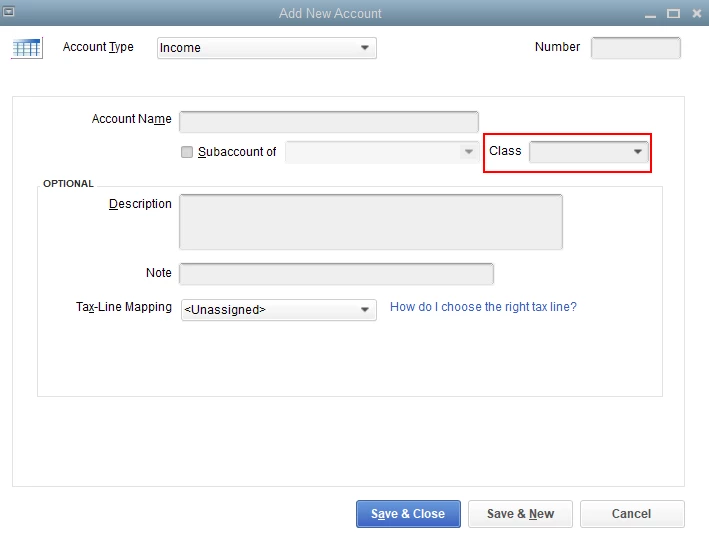
  4. Enter the information and choose the Class from the drop-down.
  5. Click Save & Close.

I'm adding this article for more details: Set up and use class tracking in QuickBooks Desktop.


Just in case you want to run reports by class, feel free to check out this article for more guidance: Filter, sort, or total reports by Class.


Keep in touch if you need any more assistance with this, or there's something else I can do for you. I've got your back. Have a good day and stay safe.


4 replies

Mark_RAnswer
June 24, 2020

Hi there, @afwright.


The Class Tracking feature only allows you to assign classes into income and expense accounts. Thus, assigning to assets and liabilities accounts isn't available.


Here's how you can assign classes to income or expense accounts:


  1. Go to the List menu, then select Chart of Accounts.
  2. In the Account drop-down, click New.
  3. Select the income or expense account type, then click Continue.
  4. Enter the information and choose the Class from the drop-down.
  5. Click Save & Close.

I'm adding this article for more details: Set up and use class tracking in QuickBooks Desktop.


Just in case you want to run reports by class, feel free to check out this article for more guidance: Filter, sort, or total reports by Class.


Keep in touch if you need any more assistance with this, or there's something else I can do for you. I've got your back. Have a good day and stay safe.

November 21, 2020

QB pro 2019 does not have this option

October 20, 2020

I can't get a class assigned to my current chart of accounts. i have my preferences set correctly. there should be a drop down where the red circle is. help!!!!!

October 20, 2020

Thanks for joining this thread and providing an additional screenshot, @InterlakenGolf.


It could be that the class tracking feature wasn't turned on yet or assigned to your accounts. This is why you're unable to see the Class drop-down list.

You can check this out by following these steps:


  1. Go to the Edit menu and select Preferences.
  2. In the Accounting section, click Company Preferences
  3. Make sure that the Use class tracking for transactions and Assign classes to boxes are checked. 
  4. Click OK.


Once done, go back again to the Chart of Accounts and add the class to your account. You can follow the steps provided by my colleague above.


If you're still getting the same issue, you can update QuickBooks Desktop (QBDT) to its latest release. Doing this can help you clear minor issues in your company file. 


You can also run the Verify and Rebuild Data tools in QBDT to identify its cause and fix it.


Our doors are always open to help you with any QuickBooks-related concern. All you have to do is click the Reply button and enter your concerns. Take care, and have a great day.

November 21, 2020

I run quickbooks pro 2019 and do not have these options

June 30, 2021

Can someone confirm if Desktop Premier 2019 has the Assign Classes to Accounts function?  I have selected Use Class Tracking but I do not have the option to Assign Classes to Accounts.   Is that in a later version of premier?


LieraMarie_A
June 30, 2021

Hi there, @Robyn261. I've got the information you're looking for about assigning classes to accounts.


The option to assign classes to accounts is only available in QuickBooks Desktop Enterprise. In the meantime, you may follow the workarounds provided by @ReyJohn_D.


Additionally, this write-up contains further information about managing the Chart of Accounts: Understanding chart of accounts in QuickBooks.


Feel free to come back here again if you need more help using the Class Tracking feature. I'm always available here to help. Have a good one.

October 6, 2021

Can I assign a class to income and expense accounts on Quickbooks Online?

September 30, 2024

Hello,


We followed the instructions below to assign 4 accounts to their respective classes.  All of these accounts are COGS (expense) accounts.  Once all of the accounts were assigned - we reran the P&L by class for the current month but none of the accounts were displayed in the appropriate class column on the report.  Are we missing something?  Shouldn't the accounts now be classified by class on the report?  We are using QuickBooks desktop version 22.  Thank you!!


-Ajax Glass accounting team