

September 12, 2018
Solved

Inventory and COGS

  • September 12, 2018
  • 3 replies
  • 0 views

I have an e-commence business, and have set up inventory with my estimated cost of final product for each item under inventory setup. I also buy raw materials to make the items and code those to COGS. So am I doubling the costs here? Should I do only one of the above things? Either enter the amount of each final product and not code raw materials to COGS or have the inventory item as zero cost and code raw materials to  COGS? 


I also have a couple products I buy and resell. When I purchase the items, should I enter those as an expense or COGS? And do I add the actual cost to the inventory item?   
Best answer by vpcontroller

QuickBooks Inventory functionality is very basic like buy gadgets and sell the same gadgets. It's really not designed for converting from raw materials to finished products process.
If you're buying/selling products, you can follow the above article link for more information.


The only workaround is if you're buying few material items and making the final product out of that, you can create known as Zero Bill in QBO.
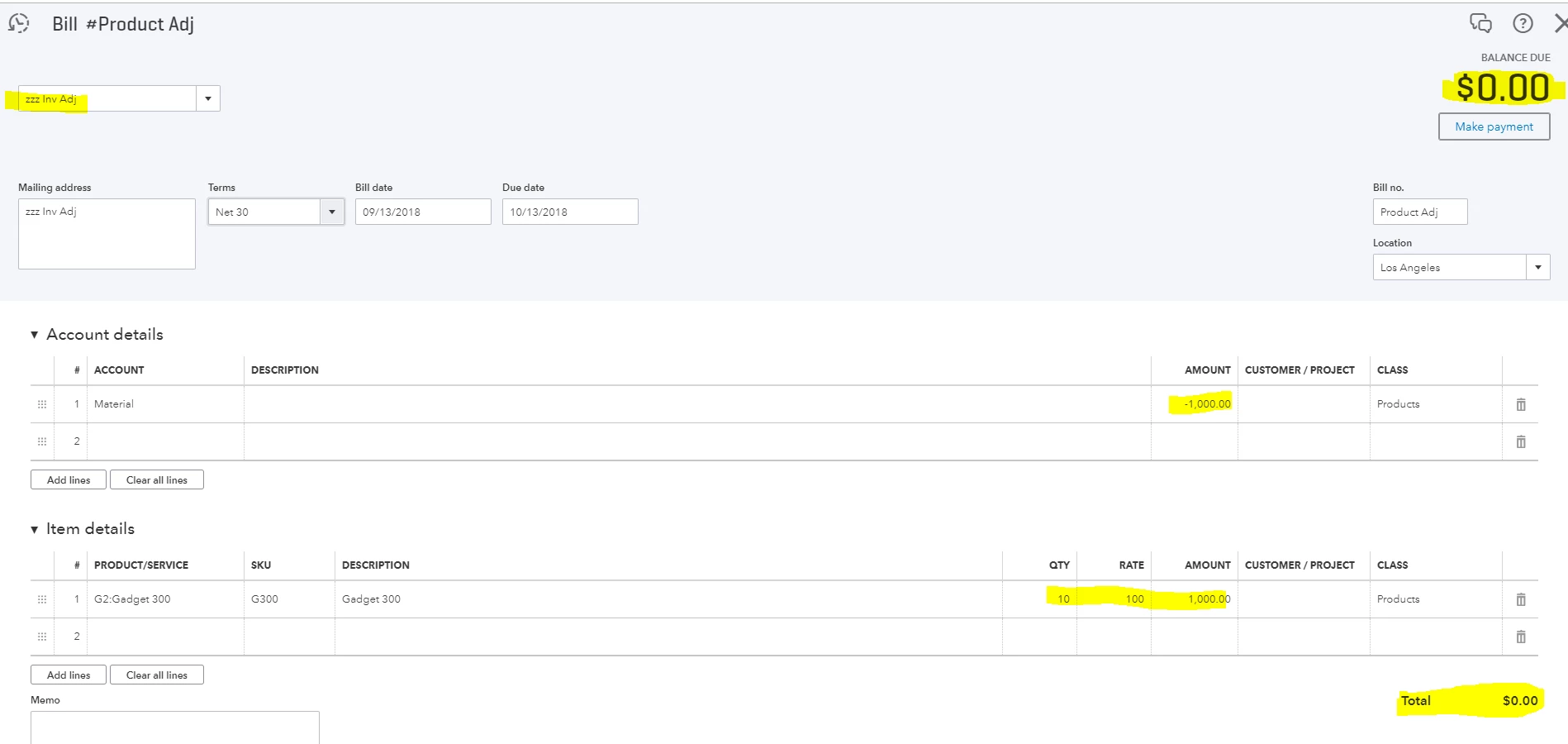
See example below with attachment for reference.


In this example, $1000 materials purchased and expensed to COGS (a separate account). Final product - produced 10 units. Average Cost is $100 per unit ($1,000 /10 = $100).

To enter Zero Bill:
Select create "+" sign on top > Vendors > Bill
For Payee, create a new one something like inv adj
Under account details section > select account originally used to purchase materials > enter negative amount -1,000.00. (This will reverse out previously entered COGS expense).
Under Item details section > enter product/service item, quantity and the amount same as above account details. In this case, $1,000. (This will add to the inventory item. When you create invoice or sale receipt, it will also post COGS at $100 each unit).
Entered Bill should zero out.


-

3 replies

vpcontroller
September 12, 2018

Just to clarify - do you have QuickBooks Desktop (QBDT) or QuickBooks Online (QBO) like Plus, Essentials or Simple Start)? 

Jenae85Author
September 12, 2018

QBO Plus.

September 12, 2018

Hi Jenae85,


I can share a bit of information about inventory setup in QuickBooks.


How exactly did you enter your raw materials in QuickBooks Online? Once you set up your first inventory item, the program automatically adds two accounts to your Chart of Accounts.


They are the Inventory Asset (Other Current Asset) and Cost of Goods Sold.  Generally, COGS is affected only when you sell the items. This account isn’t meant for the items you use to create your products, such as raw materials.


For more details about how inventory works in QuickBooks, check out these articles:

If the items you bought are used to run your business or part of your inventories cost, you can record them as expenses. However, for those you buy and resell, you can directly add them to your Products and Services List.


Here’s how:

  1. Go to the Gear icon at the top then pick Products and Services.
  2. In the Products and Services window, select New.
  3. Click the product or service type.
  4. Enter the new product or service information.
  5. Choose Save and close.

If you want to replenish these items in the future, you'll have the option to use the Expense or Bill functionalities. Just make sure to use the item details field so you can select which one you need from the list. This way, the program will recognize an increase in volume.


To answer your last concern; yes! You can enter the actual cost so that the program can automatically calculate the COGS amounts upon the sale of your items.


That's it! Don't hesitate to let me know if there's anything else you need help with. I'm here to help anytime.

vpcontroller
September 13, 2018

QuickBooks Inventory functionality is very basic like buy gadgets and sell the same gadgets. It's really not designed for converting from raw materials to finished products process.
If you're buying/selling products, you can follow the above article link for more information.


The only workaround is if you're buying few material items and making the final product out of that, you can create known as Zero Bill in QBO.
See example below with attachment for reference.


In this example, $1000 materials purchased and expensed to COGS (a separate account). Final product - produced 10 units. Average Cost is $100 per unit ($1,000 /10 = $100).

To enter Zero Bill:
Select create "+" sign on top > Vendors > Bill
For Payee, create a new one something like inv adj
Under account details section > select account originally used to purchase materials > enter negative amount -1,000.00. (This will reverse out previously entered COGS expense).
Under Item details section > enter product/service item, quantity and the amount same as above account details. In this case, $1,000. (This will add to the inventory item. When you create invoice or sale receipt, it will also post COGS at $100 each unit).
Entered Bill should zero out.


-

December 21, 2018

In the case of buying materials to sell one product, wouldn't another workaround be to simply create an assembly item from  all  those materials and sell that? You can have double sided COS/inventory items.

August 14, 2019

vpcontrollers workaround seems to be consensus as the best way of handling accounts here.


Would say though, that if you want a more dedicated manufacturing module then an app like Katana might serve you well. It will manage your material and finished goods inventory alongside your production schedule automatically and real-time.  


Then you can push invoices and bills directly to your QBO account.