January 15, 2025
Solved

Multiple payments on one sales receipt

  • January 15, 2025
  • 2 replies
  • 0 views

Is it possible to have two payment methods for one sales receipt?  For example, customer pays with cash and credit card.  I saw the answer for the Online version but it doesn't quite work in Desktop.

Best answer by BigRedConsulting

@AK1215  RE: Is it possible to have two payment methods for one sales receipt?


Yes, it is possible. When you do so, QuickBooks even puts up a nice message that says you don't need to - unless you want to include multiple payment methods. That Intuit reps do not know this is about their own product is both amusing and informs us all about the dismal state of training at Intuit.


To do this, create and use one or more "Payment" type sales items. As you create the item you can specify the type of payment it is, such as cash, credit card, or check.


Then use the payment item on the table of the Sales Receipt:
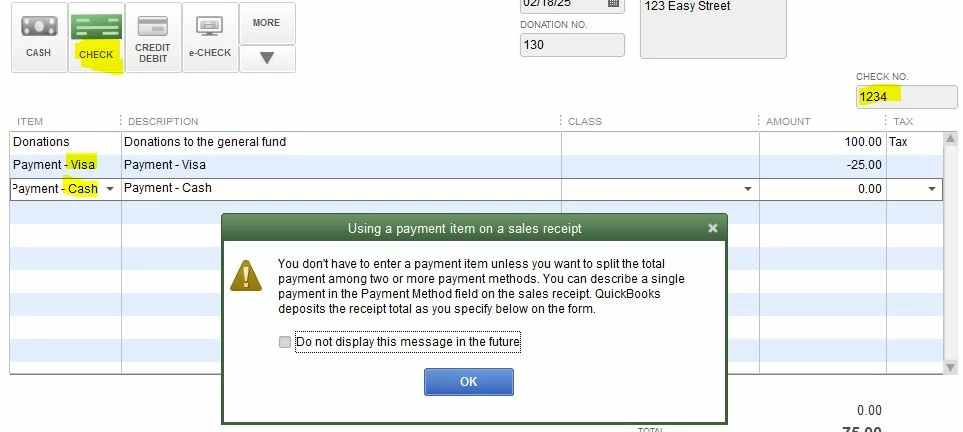
 

Above, I'm creating a Sales Receipt with three payment methods: Visa, Cash, and Check.  You can actually enter as many payments as you want.

2 replies

January 15, 2025

Currently, recording a single sales receipt with multiple payment methods is unavailable in QuickBooks Desktop (QBDT), AK1215. I can provide you with an alternative way on how you can achieve your goal within the program.


As a workaround, you can create service products for both cash and credit card payments and select your bank account or undeposited funds under the Income account based on where you want to deposit. Here's how:


  1. Go to the Customers menu, then select Enter Sales Receipts.
  2. Add the item along with the exact amount.
  3. For the partial cash payment, enter a negative amount based on the first payment method made by the customer.
  4. Click the dropdown tab beside the e-CHECK option and select Credit Card as the payment method.
  5. Under the DEPOSIT TO dropdown, choose the accounts or bank you want to deposit.


For more details on the process, see this article: Use and customize form templates.


In addition, you can utilize the Reports option to keep track of customers who still have an outstanding balance. Check out this article for more details: Understand reports.


Our dedicated Community team is on hand to offer tailored advice and support when handling payment processes to ensure accurate record-keeping of your finances. I'm always ready to assist and connect with you at a time that suits you best.

BigRedConsulting
February 18, 2025

@AnaRose_Q  RE: Currently, recording a single sales receipt with multiple payment methods is unavailable in QuickBooks Desktop (QBDT), AK1215. I can provide you with an alternative way on how you can achieve your goal within the program.


That's nonsense. It has been possible to include multiple payment methods on a Sales Receipt in QuickBooks Desktop since QuickBooks Desktop was launched in the last century. Of course, because after all, we're not dealing with poor, feeble QuickBooks Online.


Why do I know this when you, the Intuit employee and QuickBooks expert here offering your advice to others, do not?

BigRedConsulting
February 19, 2025

@AK1215  RE: Is it possible to have two payment methods for one sales receipt?


Yes, it is possible. When you do so, QuickBooks even puts up a nice message that says you don't need to - unless you want to include multiple payment methods. That Intuit reps do not know this is about their own product is both amusing and informs us all about the dismal state of training at Intuit.


To do this, create and use one or more "Payment" type sales items. As you create the item you can specify the type of payment it is, such as cash, credit card, or check.


Then use the payment item on the table of the Sales Receipt:


Above, I'm creating a Sales Receipt with three payment methods: Visa, Cash, and Check.  You can actually enter as many payments as you want.

AK1215Author
February 27, 2025

@BigRedConsulting THANK YOU!!!!  This is solution huge for me! Thank you for explaining it clearly and the screenshots certainly helped.  I have set up the payment methods and done a test sales receipt and it does EXACTLY what i need it to do!  I have done work-arounds for years on this issue and they are becoming more complicated.  This certainly streamlines the process.
