February 26, 2021
Solved

Entering accounts and class for PIER payment

  • February 26, 2021
  • 1 reply
  • 0 views

Hi all,

We've been informed by the CRA that we owe money for CPP after a PIER review. Looked into it; turns out they were right. This is for 2019. As this is split 50/50 employee/employer, how should I make the entry when I cut a cheque? It is a small amount so is it necessary to split it with the employee involved? How would this be done for 2019? I am assuming that the CRA will be able to correctly apply it to the employee's account. Any information on this would be helpful. This is for QB Desktop.


Regards, and TIA.

Best answer by Rochelley

Hello @TheKeeper20 ,


How you do this will depend upon whether you use the built-in payroll remittance filing system by using "Pay Payroll Liabilities", or whether you do it outside of that function in QB.


If you do use the pay liabilities feature to file your taxes, then you will have to use "Adjust Payroll Liabilities", and make an entry for the affected employee. 
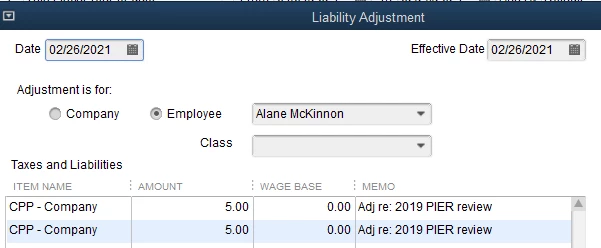


When there is a shortage discovered in a PIER review, the employer is responsible to pay both portions; the company's and the employee's.  This adjustment will affect your CRA Payable liability account as well as your CPP Expense Account.  When you go to make your next remittance using "Pay Liabilities", these amounts will be picked up.


If you are not using the "Pay Liabilities" module to make your remittances, but rather are writing a cheque to decrease your CRA payable liability account, then you would have to do the following:


1.  Create a JE to increase your CRA Payable account, and also to increase your CPP Expense account.
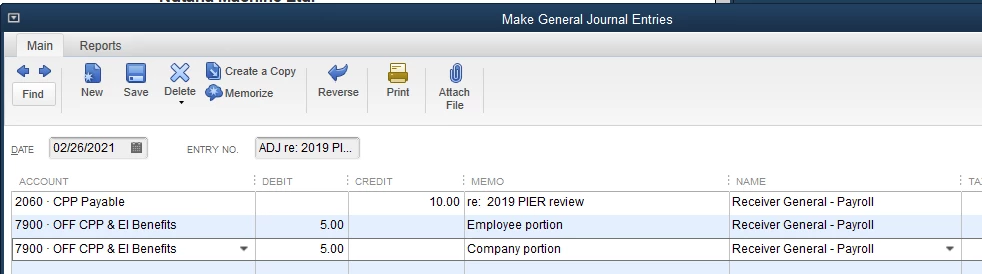


As this is being added to your payroll liability account to the CRA, you will pick it up when you write your next remittance cheque (or you can pay it right now just for the $10.00 amount).  Either way, when you write the cheque you will be posting to the payroll liability account, i.e. CRA Payable.
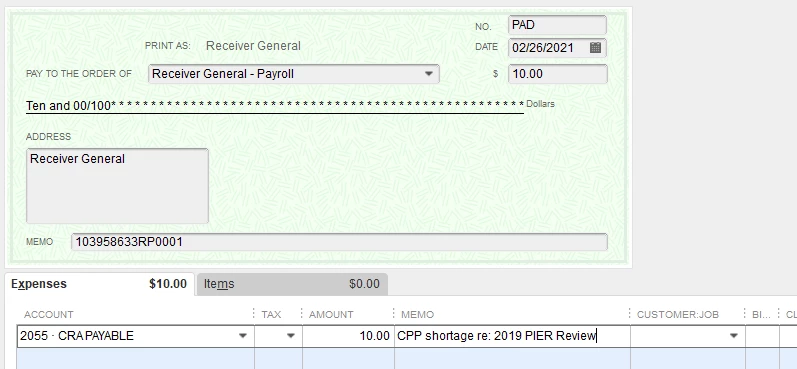


Now your CPP liability, CPP expense, and bank have all been affected correctly and you will have satisfied the PIER review.


Good luck!

1 reply

RochelleyAnswer
February 26, 2021

Hello @TheKeeper20 ,


How you do this will depend upon whether you use the built-in payroll remittance filing system by using "Pay Payroll Liabilities", or whether you do it outside of that function in QB.


If you do use the pay liabilities feature to file your taxes, then you will have to use "Adjust Payroll Liabilities", and make an entry for the affected employee. 


When there is a shortage discovered in a PIER review, the employer is responsible to pay both portions; the company's and the employee's.  This adjustment will affect your CRA Payable liability account as well as your CPP Expense Account.  When you go to make your next remittance using "Pay Liabilities", these amounts will be picked up.


If you are not using the "Pay Liabilities" module to make your remittances, but rather are writing a cheque to decrease your CRA payable liability account, then you would have to do the following:


1.  Create a JE to increase your CRA Payable account, and also to increase your CPP Expense account.


As this is being added to your payroll liability account to the CRA, you will pick it up when you write your next remittance cheque (or you can pay it right now just for the $10.00 amount).  Either way, when you write the cheque you will be posting to the payroll liability account, i.e. CRA Payable.


Now your CPP liability, CPP expense, and bank have all been affected correctly and you will have satisfied the PIER review.


Good luck!

February 26, 2021

Thank you Rochelley, that was just the kind of information I was looking for. Yes, we are using the "Pay Payroll Liabilities" feature. Unfortunately, the CRA wants the account settled before our next regular submission is due. I am going to assume that means I will have to use the second method you outlined. It's good to know that the employer is responsible for both portions in this case. 


Really appreciate your quick reply. Have an enjoyable weekend.


TheKeeper20 

February 26, 2021

Hello @TheKeeper20 ,


You can still use the first method, but when you go to Pay Payroll Liabillities, only enter the amount that you want to pay.  The difference will be what belongs to your regular remittance and can just sit there until you are ready to file and pay it.  See below:


Choose to "Review liability cheque and enter expenses/penalties before hitting next.  The liability cheque you are creating will come up.  Then change the From and To date in the cheque to the period to which this payment applies.  Maybe Dec 2019?  Then this amount will show up in the right periods in payroll liability reports.


Happy accounting! :)