

December 2, 2021
Question

Payroll

  • December 2, 2021
  • 1 reply
  • 0 views


I'm trying to generate an ROE for a commissioned salesperson.  The ROE shows the commissions paid for each paycheque, but nonetheless returns insurable hours of zero.


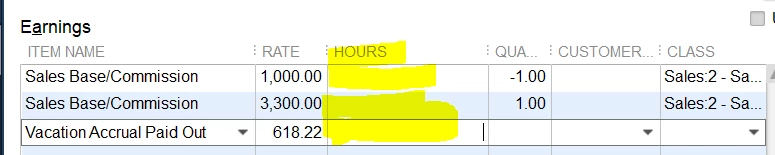
When I click through, I get taken to the individual paycheques.  I'm able to enter the Quantity, but not hours worked - see yellow fields, below.


Here is the Configuration of the Sales/Base Commission payroll Item:

 

The payroll item follows QB's recommended CRA default config.

Please help!

1 reply

December 2, 2021

Hi vdWater,


Welcome to Community!  Having the required elements listed when creating an ROE is essential to ensure the calculations are accurate.  In QuickBooks Desktop, you'd need the amount of hours worked during the pay period.  However, setting the pay type to 'commission' isn't an hourly pay type.  I suggest contacting us so we can work with you independently and walk through the process together for setting up the commissioned sales person and complete the ROE process.  I hope this helps!


Please don't hesitate to reach back out if you should have any other concerns or questions.  We'd be glad to assist!

vdWaterAuthor
December 3, 2021

I spoke to Enterprise support.  We tested different Payroll Items, and it seems to be a config problem.


Choosing "Commissions" as a Payroll item will prevent you from assigning hours.  This is at odds from (apparently) QBO's configuration , which "wants you to include hours so that it can calculate insurable earnings for ROEs later on.".  I also discovered that you can't substitute Quantity for Hours - the Quantity field will not roll through to the Hours.


Creating a "Wages" Item will allow use of the Hours field, but then will report the earnings in box 14A (Employment Income) and not 42A (Employment Commissions).


Support has escalated the problem.  As a workaround: generate the ROE, which will have the proper earnings but zero hours, then log in to the CRA ROE portal to enter the earnings and the hours (which are typically standard in any event).