

September 29, 2022
Question

Payroll Report Not Showing All Payroll Liabilities

  • September 29, 2022
  • 1 reply
  • 0 views

I am creating payroll reports by class, and the paychecks are all there, but not all the payroll liabilities. I'm trying to figure out how to include all payroll liabilities in this report. Even in the same paycheck, some liabilities will show in the class report, and some are vanished giving me an incorrect net pay. In the image below it shows the Federal Withholding and only two are showing their class association. HOW do I add a class to payroll liabilities? I tried Preferences, under Accounting I have it set to "Use class tracking for transactions" and in Payroll & Employees I checked "Job costing, class and item tracking for paycheck expenses" and to "assign one class per earnings item". Please help! Thank you.  
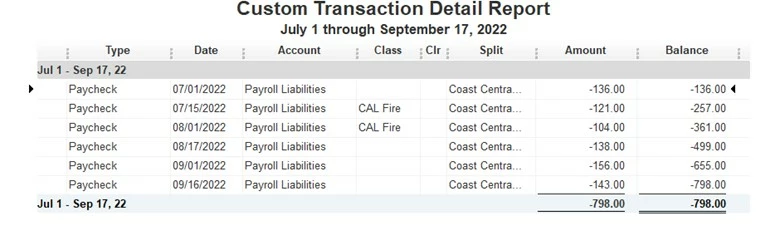
1 reply

September 29, 2022

Hi nwoodrow,


Welcome to Community!  It's important that you're able to view all of your payroll liabilities in QuickBooks Desktop.  I'd be happy to assist!


Initially, I recommend reviewing this helpful guide to review how class tracking has been set up.  In addition, the Payroll Summary report enables you to add a class filter so you can see the amounts you need.  This will let you compare the figures in the payroll report with the payroll expense account on the Profit and Loss, so you have a breakdown of your numbers. 


For more information about class tracking, follow these steps;

1. Click Help from the top menu bar 

2. Choose QuickBooks Desktop Help, or press F1 on your keyboard

3. Select the Help tab

4. Click Search to bring up the search bar

5. Use keywords to find related articles


Please don't hesitate to contact us if you require additional assistance.  Your success is our number one goal and we'd love to help!