Hi @BBK1
Provided the employee will have worked 32 regular hours in the week in which the STAT holiday occurs, you would record your regular STAT pay for the holiday. Then for the hours worked on the same day, you would use your OT payroll item which calculates the OT @ 1.5. Net effect is the employee gets pay @ a rate of 2.5 if they work on that day.
Here's an example using John Doe who earns a $60K salary. This is how I would enter the second week of their timesheet (he is paid Bi-Weekly):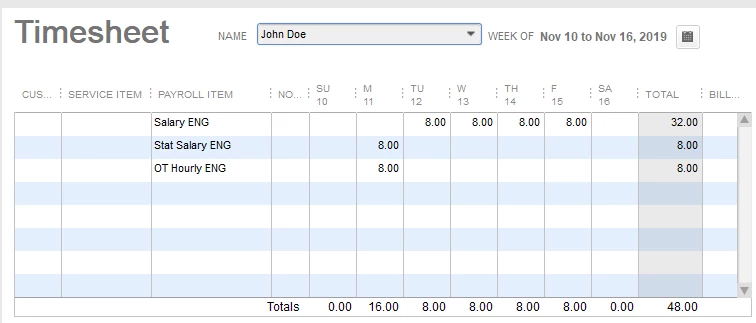
This will pull into the pay cheque like this:
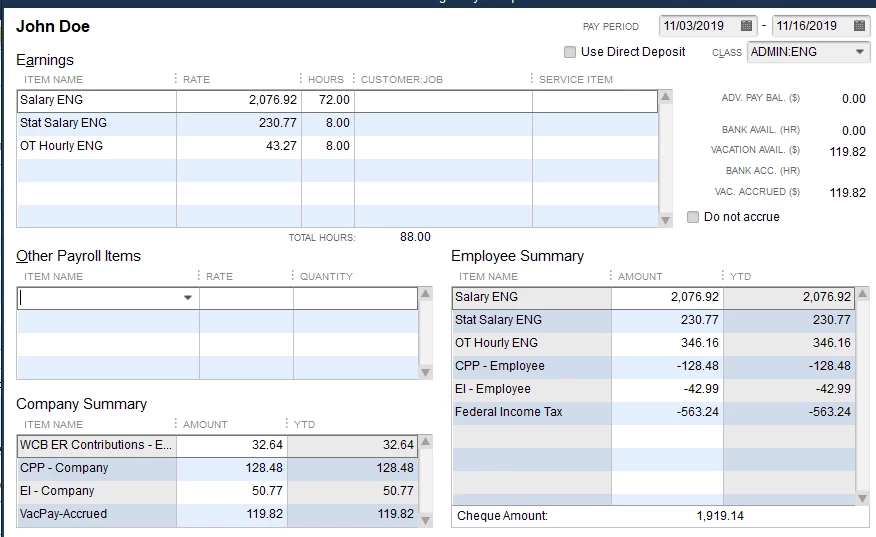
Note that the two salaried items have pulled the hours from the timesheet and adjusted it accordingly. The OT item must be an hourly item as the salary items will not allow you to calculate an OT rate. You should be able to just type the hours into the pay cheque if you don't do timesheets. Of course you would have to enter a regular hourly rate item into the employee's payroll info, and then the OT item so it will calculate correctly.
This is how you'd do it if you use Salary payroll items. Personally, I don't like the way QB handles salaries - very inflexible. I always convert Salaries to hourly rates and enter everything based on hours. Much simpler that way. But the example above will work as a hybrid between Salary items and Hourly items. Your STAT item could be hourly, for that matter, as well.
Hope that helps.

