January 20, 2022
Solved

Credit card refunds

  • January 20, 2022
  • 1 reply
  • 0 views

Okay So I have a vendor who charged our credit card lets say $5000. They billed us for $2000 and I have another invoice sitting on account for $1000.  So it looks like this

(5000.00)

-2000.00

-1000.00

So they now owe me $2000 back How do I post this $2000.00 Credit that they gave me on my credit card. 

I hope I explained that corretly.


So I have a credit sitting on my account for $5000. and they applied $3000 of it to outstanding invoice that are sitting on account and then send me a refund of $2000.00 to my credit card. So I am not sure how to apply this or post this.

Once I go and take the credit of $5000 and apply to the two invoices it leaves me with a $2000 credit sitting on the account and they sent me a refund but how to I clear this? 


Sorry I am explaining in many ways so anyone reading will hopefully understand my task.


Cheers

Sherry

Best answer by McBrideBookkeeping

yes it does today but yesterday the link did not say online. So maybe yesterday their was a clitch. 


thanks but this is not what I am looking for. I have $3000 over pd credit sitting in my account I have a bill for $2000 so I use up that $3000 credit toward the bill now I have $1000 credit sitting on my account so the Supplier give me a refund onto my credit card of $1000 How do I apply that refund to the $1000 sitting on my account.? 


Maybe I was not explaining properly.

Sherry


Hey Sherry Lynn,


This scenario can be frustrating I know but it happens so don't worry, this should help you resolve it.

Like the QB employee mentioned, If you don't' already have a Pro-Advisor on your team I'd suggest you find one you enjoy working with who can help you on demand & remotely if needed.


So this is your Scenario, right? (more or less, I left out some transactions to make it simpler)

A Supplier owes you $1,000, so next


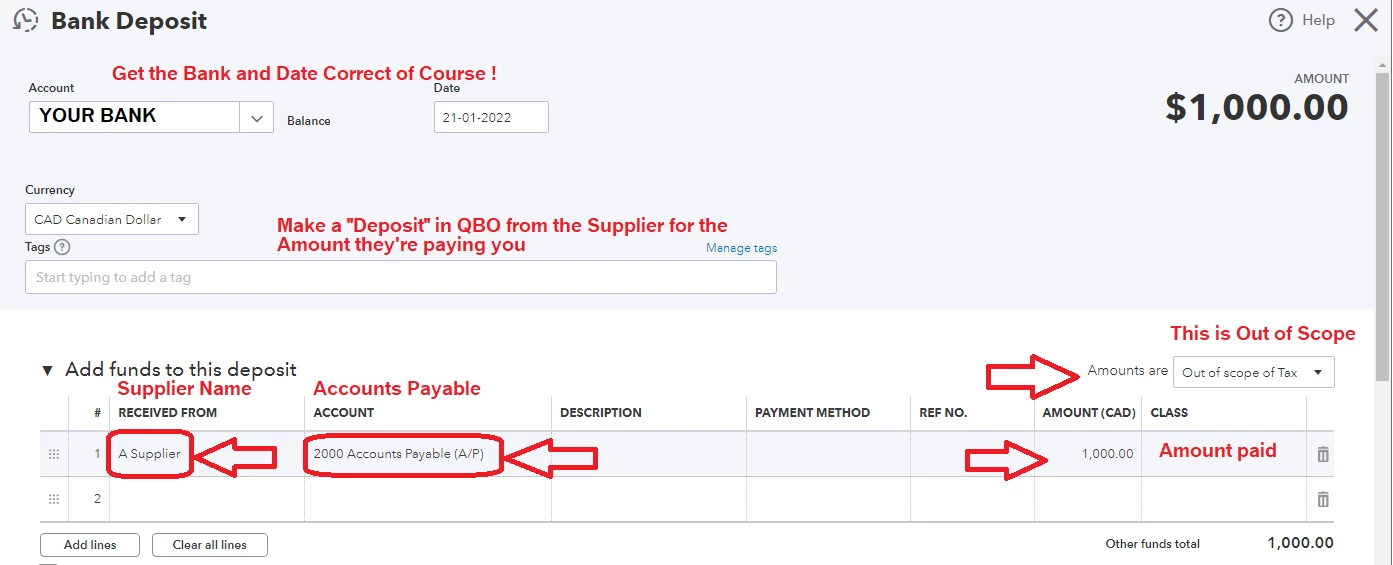
You need to Record the Deposit to "Accounts Payable" with the Name of your Supplier there.
(You can also use a Credit Card Credit instead of a Bank Deposit if the refund went to a CC instead of a Bank)

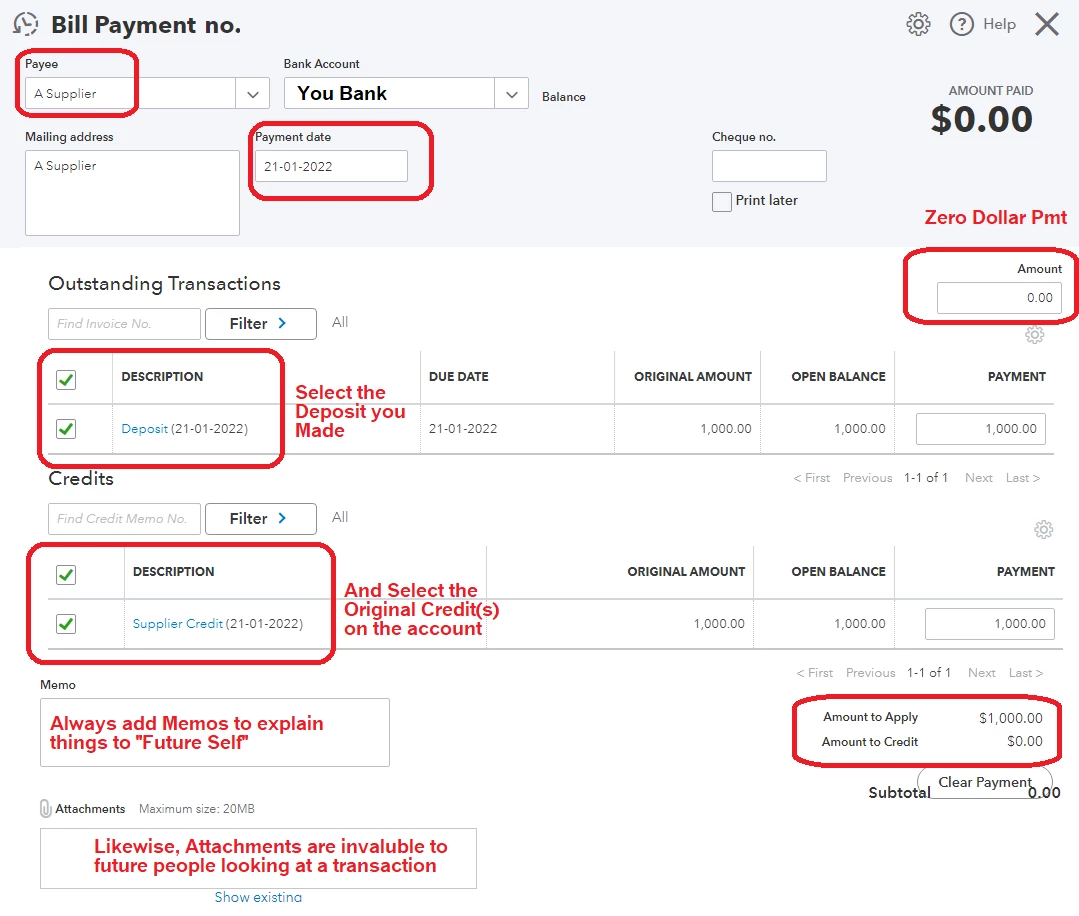
After that you can sometimes have the Supplier credit and deposit still show as "Outstanding" so we need to "Pay it off" theoretically.


Go to the Supplier Record and Click "Make Payment" Check off both the Deposit and the Credit on the Account, which should leave you with a $0 Payment Now check your supplier Screen and you should see a $0 balance.


I hope this helps get you on the right track

Please mark this answer as a helpful solution if it answers your question
Thanks
McBride Bookkeeping

1 reply

January 20, 2022

Hi Sherry Lynn,


Thanks for reaching out here.  It's nice to see back!  QuickBooks Online is a versatile program with the features you need for completing your bookkeeping tasks with peace of mind.  It's essential that you're recording the vendor refund accurately to keep your books aligned.  I'll be happy to provide the information you need, so you're on the right track with your work.


Recording supplier credits depends on how you've entered the initial purchase.  Here's a helpful article to assist you with handling supplier credits and refunds.  However, the best course of action would be to reach out to your accountant.  If you don't have one, we can help you locate a ProAdvisor in your area.


If you have any other questions, please don't hesitate to reach back out.  We're glad to help!


January 20, 2022

Thank you for your reply but the info you send me is for QB Desktop I am using QB online

January 21, 2022

Hello Sherry. Glad to hear from you again. Could you try to access the link again and let me know if it's showing QuickBooks Online?