Question
Liability Insurance / WCB expiry tracking for Vendors
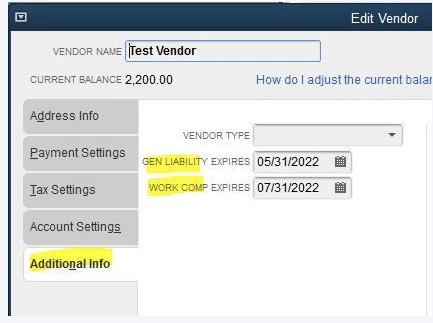
My company used to use Quickbooks Desktop Premier Contractor Edition, and it had the very useful ability to track expiration dates for our Vendor's Insurance & WCB (as in the below image). This was excellent as Quickbooks would give you a warning before making payments, entering bills, etc if either of the vendors WCB/Insurance was expired.
We recently upgrade to the Enterprise Contractor edition, and we lost this ability. The option to pick a vendor type is still there, but the sections to add expiration dates (the highlighted sections) are no longer there.
Is this functionality not available in Enterprise edition or is there a toggle or something that I can turn it back on with?