Keeping financial records accurate can be challenging, Benson. Let's work together to clear your balance and keep your financial tracking accurate.
First, I'd like to understand the specifics. Is the problem related to the cheque details or merely a printing error? In the case of incorrect information, I recommend deleting the cheque and creating a correct version. If it's a printing issue, can you provide more details?
Meanwhile, the discrepancies in your account balance are due to deleted payments, as the program only recognizes outstanding bills. In line with this, you'll want to re-enter the deleted payments to ensure accuracy in your account balance. You can use the audit log as a reference to recover the details of the deleted transaction.
Here's how:
- Locate the Settings menu and choose Audit Log.
- Select the appropriate User and Date filter.
- From the Events dropdown list, pick Deleted/Voided transactions.
- Find the deleted payments and click View.
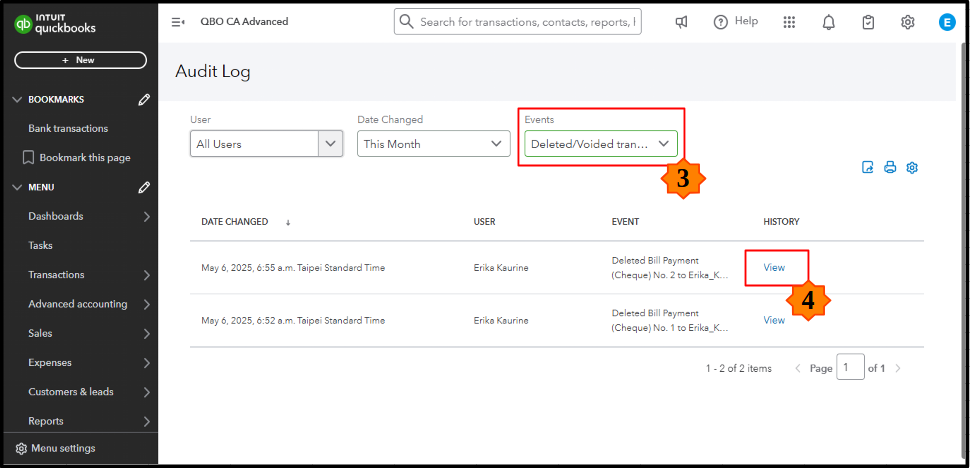
- You'll see the complete transaction information once the transaction history window appears.

Afterward, you can re-enter the deleted payments with their original transaction details. With all outstanding bills settled, your account's payable balance will now zero out. Moreover, consider consulting an accountant who can expertly guide you through this process to help you maintain precise accounting records and improve your financial confidence.
Finally, I've compiled some helpful guides to assist you in emailing your expense receipts and bills, along with instructions on how to pull up reports with supplier totals:
Have further questions about managing accounts payables? Drop a comment below. Our community is ready to provide the support and guidance you need.

