

April 21, 2023
Question

Purchase orders - additional ship-to drop down option missing

  • April 21, 2023
  • 1 reply
  • 0 views

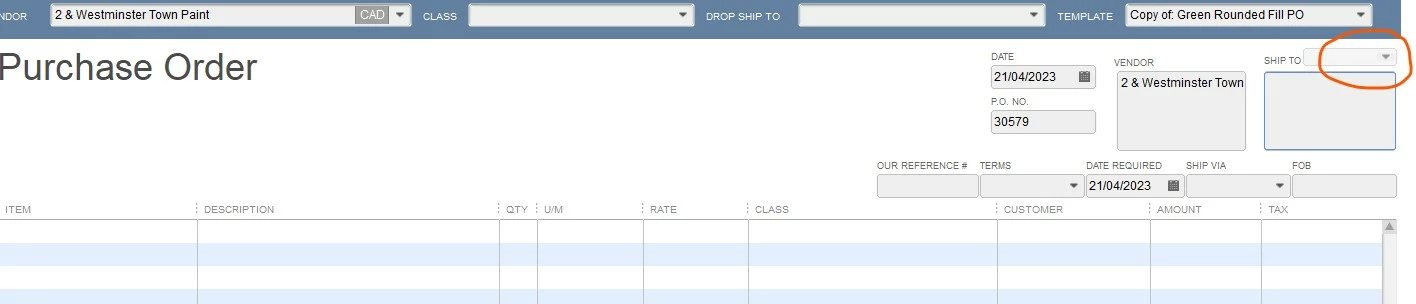
Hello - I used to be able to populate multiple ship-to addresses in a purchase order, and all of a sudden I can no longer do this.

The arrow for the "add new address" field has been greyed out. How do I fix this? Any help is appreciated.

Thanks!
 

1 reply

April 21, 2023

Hi LisaSWS,


Welcome to Community!  It's important that you're able to apply multiple ship-to addresses on your QuickBooks Desktop purchase orders, when necessary.  I'd be glad to help!


In review of the screenshot you've provided, along with navigating in my own QuickBooks Desktop account, the reason the ship-to field is grayed out, is because the required fields are empty.  I recommend completing the Item, Description and other fields.  Once you've entered the information, you should be able to populate the list of ship-to addresses.  


Feel free to let us know if the issue has been solved.  Your success is our number one priority and we're always happy to assist!

LisaSWSAuthor
April 21, 2023


Hi Trish,

Thanks for your reply. Unfortunately that is not the case for us. My coworkers and I have tried multiple attempts in various supplier accounts with different information and nothing has worked. I went through our company preferences etc. trying to figure out if some mysterious box has been unchecked somewhere and I could find nothing. We all did an update about 10 days ago, I wonder if this has something to do with it.


April 21, 2023

Thanks for getting back to me.  After selecting the Vendor enter the customer name in the DROP SHIP TO field, using the ▼ dropdown menu.  This should enable the SHIP TO menu.  However, your time is valuable and I encourage you to contact us for additional assistance, if you experience the same result.  


Let me know if this helps.