May 26, 2023
Solved

Project excel export without tax

  • May 26, 2023
  • 1 reply
  • 0 views

How do you export all project expenses to excel without tax added.  There is only an option for a Total column which includes tax.

Best answer by FateCandylaneT

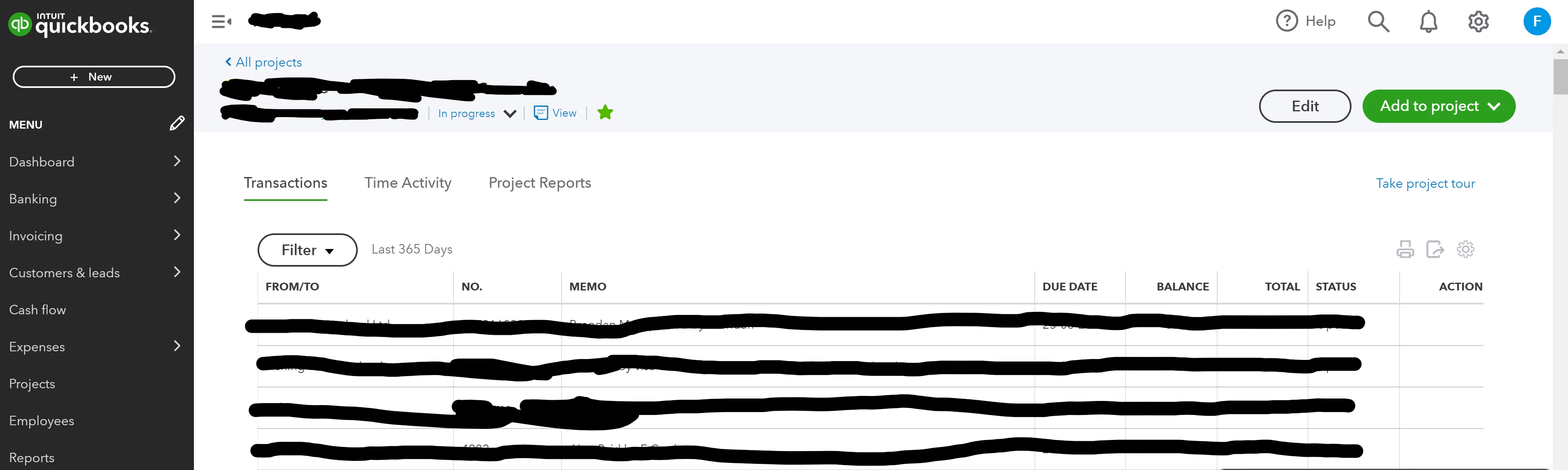
Hi,  here is a screen shot


We're glad to see you back here, FCL82. Allow me to share insights as to why you're unable to view the steps when exporting project expenses to an Excel file.


From the project you've created, the Overview tab can only be viewed and modified by the account's primary admin. With that, this concludes that you're in standard user access and aren't permitted to view them. You might want to consider reaching out to your primary admin and allowing you to assign admin access. 


You can share these steps on how to permit you as an admin:


  1. Go to Settings and select Manage Users.
  2. Find the user you want to modify and select Edit from the Action column.
  3. From the User type dropdown, choose Admin.
  4. Review the Admin user permissions, then click Save.
  5. Have the user sign out and sign in again to QuickBooks Online to see its updates.


Furthermore, if you want to charge projects for a fixed fee, you typically don't invoice for specific project expenses. Instead, you send customers an estimate for the entire project. You can convert the estimate into an invoice when the work begins.


Let us know in the comments below if you have additional questions. We'll be around whenever you need help. Have a good one!

1 reply

JaeAnnC
May 26, 2023

I appreciate you coming to the Community for assistance, @FCL82. Let me share information about exporting project expenses to Excel without the added taxes. 


Currently, we're unable to customize a report to remove the taxes added to the expenses. For now, you'll have to manually take them off from the Excel file after exporting.


Here's how:


  1. Go to Projects and select the specific project.
  2. Click the Overview tab.
  3. Select the amount in the Expense section. It will open the Transaction report of all project expenses.
  4. Click Customize and select Change columns.
  5. Check the boxes for Tax Amount and Taxable Amount, and select Run report.
  6. Click the export icon dropdown and press Export to Excel. It will automatically download the Excel file, and you'll have to remove the taxes manually from there.


After setting up projects, you may invoice customers for specific project-related expenses, including timesheets. This way, they can reimburse you for the costs you incur on their behalf when you perform work for them.


Feel free to get back to us anytime whenever you have additional concerns about managing your projects. I'll ensure to respond right away to your questions. Take care, and have a good day!

FCL82Author
May 29, 2023

Hi, i am using Quickbooks Online Plus, i dont see the overview tab.

May 29, 2023

Good day, @FCL82. Thanks for your response.


For me to better identify the issue, can you share with me the region of QuickBooks Online you're currently using right now? This might be the reason why you're not having the same preferences. You can also add a screenshot for additional reference.


Please know that the Overview tab will only appear once you select the project that you've created. 


Any additional info would be much appreciated. I'll be here to help you further. Have a nice day.