
Admin_MP
February 2, 2021
Solved

I have sent a invoice from zapier to QB but i am not able to see the invoice in QB. it shows that it was successfuly sent from zapier. plz tell me, where to find it ?

  • February 2, 2021
  • 1 reply
  • 0 views
Original commenter did not share additional details

Best answer by ReyJohn_D

I can help you locate the sent invoices from Zapier in QuickBooks Online (QBO), @Admin_MP.


If you connected Zapier in QBO, you'll see the created or sent invoices by the app in your Audit Log. This appears as a System Administration event.


Here's how to run your Audit Log:
 

  1. Click the Gear icon, and then choose Audit Log under Tools.
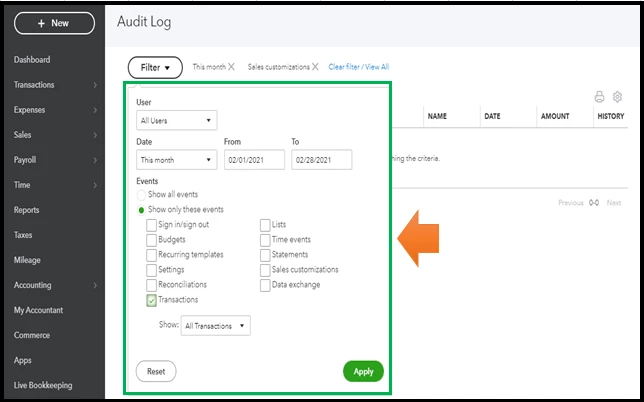
  2. From the Filter drop-down, select the right User and Date.
  3. Tick the Show only these events radio button.
  4. Check the Transactions box, and then All Transactions from the Show drop-down.
  5. Click Apply.
  6. You can select View in the History column to open the audit history. 


For more details, please see this article: Use Audit Log in QBO.


If you're still unable to see them, I suggest contacting Zapier support for further help. This is because QBO depends on the data sent by your app. Each software has varying time increments when sending transactions.


You'll want to customise your invoices to personalize the details you want.


I'm just a comment away if you need insights with managing your invoices in QuickBooks. You can lean on me anytime.

1 reply

ReyJohn_DAnswer
February 2, 2021

I can help you locate the sent invoices from Zapier in QuickBooks Online (QBO), @Admin_MP.


If you connected Zapier in QBO, you'll see the created or sent invoices by the app in your Audit Log. This appears as a System Administration event.


Here's how to run your Audit Log:
 

  1. Click the Gear icon, and then choose Audit Log under Tools.
  2. From the Filter drop-down, select the right User and Date.
  3. Tick the Show only these events radio button.
  4. Check the Transactions box, and then All Transactions from the Show drop-down.
  5. Click Apply.
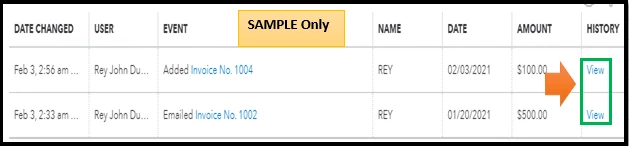
  6. You can select View in the History column to open the audit history. 


For more details, please see this article: Use Audit Log in QBO.


If you're still unable to see them, I suggest contacting Zapier support for further help. This is because QBO depends on the data sent by your app. Each software has varying time increments when sending transactions.


You'll want to customise your invoices to personalize the details you want.


I'm just a comment away if you need insights with managing your invoices in QuickBooks. You can lean on me anytime.
