Solved
I own a service company and I am purchasing a customer list from a competitor who is retiring. How do I record this purchase in QBO?
Original commenter did not share additional details


I can help you record your customer list purchase in QuickBooks Online (QBO), Brite. I'll guide you through the process.
Since the customer list is an intangible asset obtained from your competitor, you can create an asset account.
Beforehand, ensure you don’t have one in your chart of accounts to avoid duplicates.
Here's how to create an account:
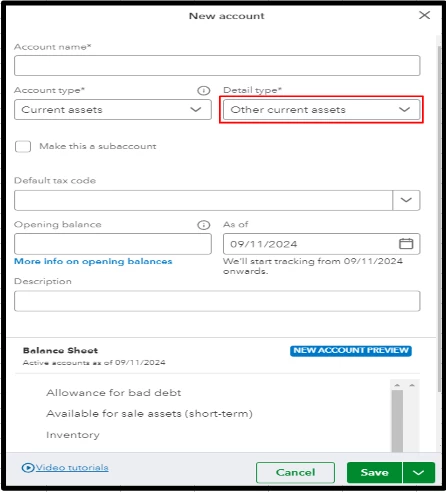
Then, make an expense or cheque and use the asset account created.
Furthermore, you'll want to organize your books and transactions by checking out this article: Reconcile an account in QuickBooks Online.
I'll be around if you need further assistance with purchase orders in QBO. I'm very eager to help. Take care always.
Enter your E-mail address. We'll send you an e-mail with instructions to reset your password.