June 23, 2020
Solved

Our company was registered in Singapore, but I may register QBO in Thailand. When I issue invoice, there is a "TH" under Singapore company address. How can I remove "TH"?

  • June 23, 2020
  • 2 replies
  • 0 views
Original commenter did not share additional details

Best answer by Rea_M

You can remove "TH" in your invoice once you register your company to the correct QuickBooks Online (QBO) region, @info1081. Let me share further details about this.


Every QBO program is uniquely designed based on the policy of each country. The "TH" term on your invoice indicates your company is under the Thailand version. I'd recommend signing up for a QBO SG version since your company was registered in Singapore. This way, you can remove it under the SG company address on the sales form. Before that, you'll have to print any necessary reports and cancel the TH subscription. Doing so will help you stop any billing charges for this account. Once canceled, proceed with the steps below.

  1. Go to the QuickBooks Online website.
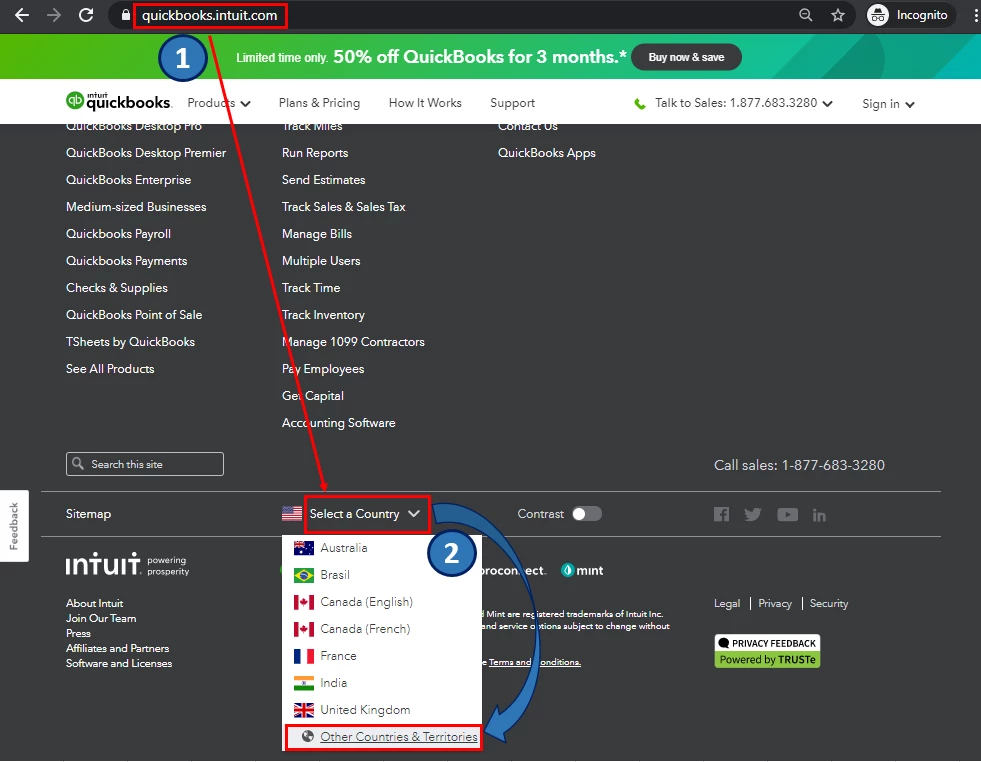
  2. Scroll down, then in the Select a Country drop-down, choose Other Countries & Territories.
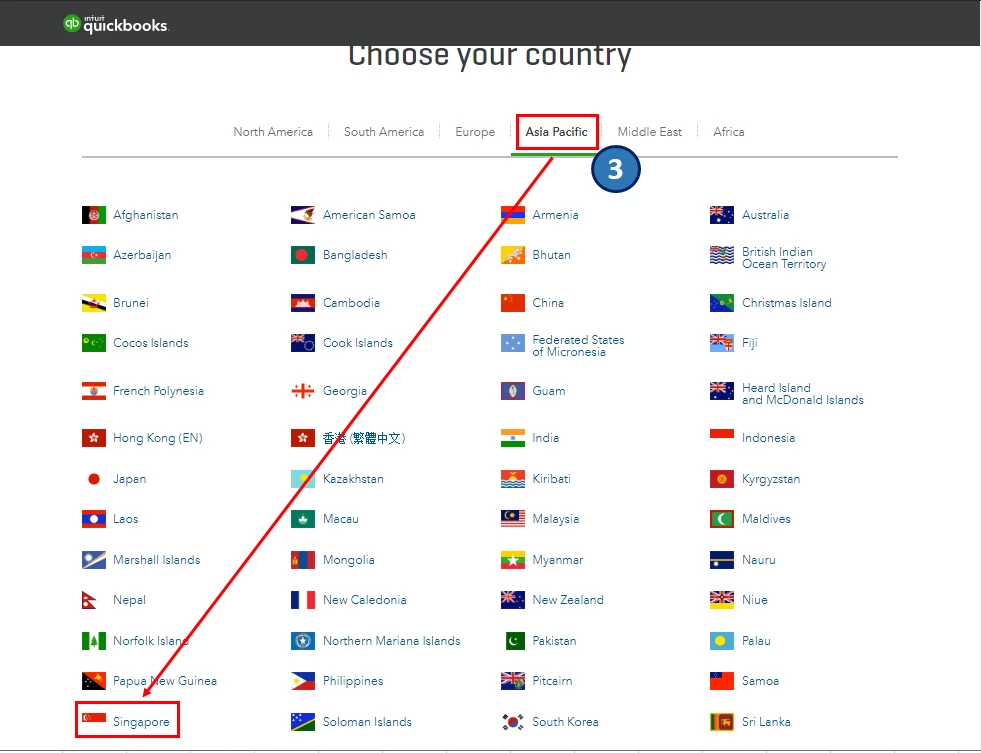
  3. Select Asia Pacific, then choose Singapore.
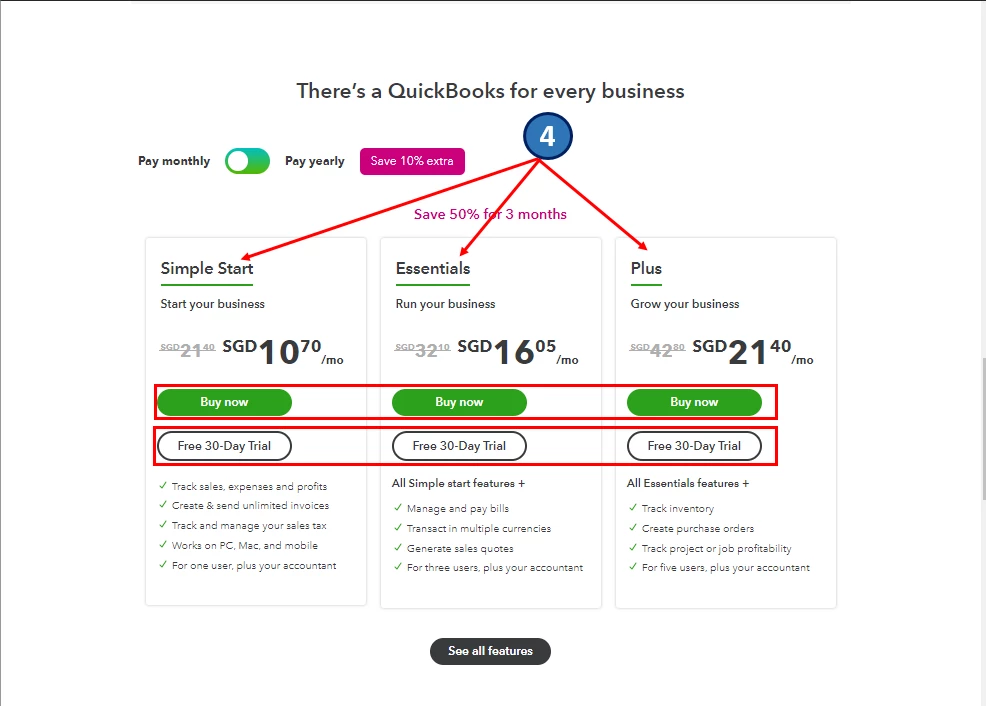
  4. Choose the right version for your business. Click either Buy now or Free 30-Day Trial.
  5. Enter all the needed information to complete the process.


I've attached screenshots below that shows the first to fourth steps.
 

To be guided on how to effectively manage your business in QBO, you can refer to this article: Help Articles for QuickBooks Online. It contains related topics about invoices, customers, income and expenses, and reports to name a few.


Additionally, you can personalise your invoices and add information that matters most to your business. This way, you can create attractive and professional-looking sales forms. To learn more about it, kindly check out this article: Customise invoices, estimates, and sales receipts in QuickBooks Online.


Please let me know if you have other concerns. I'm just around to help.

2 replies

Rea_MAnswer
June 23, 2020

You can remove "TH" in your invoice once you register your company to the correct QuickBooks Online (QBO) region, @info1081. Let me share further details about this.


Every QBO program is uniquely designed based on the policy of each country. The "TH" term on your invoice indicates your company is under the Thailand version. I'd recommend signing up for a QBO SG version since your company was registered in Singapore. This way, you can remove it under the SG company address on the sales form. Before that, you'll have to print any necessary reports and cancel the TH subscription. Doing so will help you stop any billing charges for this account. Once canceled, proceed with the steps below.

  1. Go to the QuickBooks Online website.
  2. Scroll down, then in the Select a Country drop-down, choose Other Countries & Territories.
  3. Select Asia Pacific, then choose Singapore.
  4. Choose the right version for your business. Click either Buy now or Free 30-Day Trial.
  5. Enter all the needed information to complete the process.


I've attached screenshots below that shows the first to fourth steps.
 

To be guided on how to effectively manage your business in QBO, you can refer to this article: Help Articles for QuickBooks Online. It contains related topics about invoices, customers, income and expenses, and reports to name a few.


Additionally, you can personalise your invoices and add information that matters most to your business. This way, you can create attractive and professional-looking sales forms. To learn more about it, kindly check out this article: Customise invoices, estimates, and sales receipts in QuickBooks Online.


Please let me know if you have other concerns. I'm just around to help.

Fiat Lux - ASIA
June 23, 2020

@info1081 

QBO Singapore version

https://quickbooks.grsm.io/Singapore


QBO Global version for Thailand

https://quickbooks.grsm.io/Asia-Pacific