August 19, 2024
Solved

We have 2 A/R accounts, A and B. We want to merge A with B and to delete the A account.

  • August 19, 2024
  • 1 reply
  • 0 views
Original commenter did not share additional details

Best answer by ErwinQ

I can definitely walk you through how you can merge 2 receivable accounts in QuickBooks Online, Bkim.


Before you continue, make sure you're in the Accountant's view. Then, let's go to the Chart of Accounts to merge the accounts.


To do that, follow these steps:
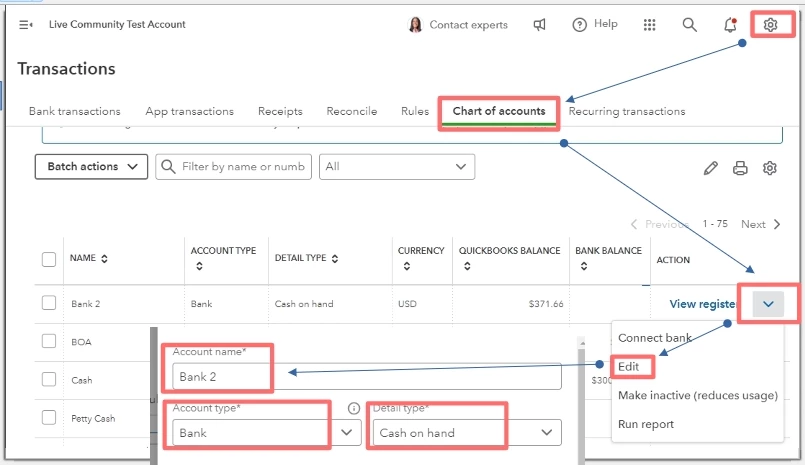
 

  1. Go to the Gear icon and select Chart of Accounts.
  2. Locate the account you want to keep. Then, select the Dropdown ▼ arrow in the Action column.
  3. Tick on Edit and note the Account type and Detail type. The details in the accounts you want to merge must be the same.
  4. Check if the account is a subaccount or a parent account. The names of subaccounts are indented in the Account name column of the Chart of Accounts list. If it is, note the parent account it's tied to.


Once done, let's proceed to the second account.


  1. Go back to the Chart of accounts.
  2. Find the duplicate account, select the Dropdown ▼ arrow under the Action column, and click Edit.
  3. Change the Account Name and Detail type so the duplicate account information matches the account you wanted to keep.
  4. When you're ready, select Save then choose Yesmerge accounts.
  5. Click on Save.


Keep in mind that merging accounts is permanent. You can't undo this later on. QuickBooks uses some accounts as the default for certain features.


For more information about merging accounts, check out this article: Merge duplicate accounts, customers, and suppliers in QuickBooks Online.


Also, please take note that there are special accounts that can't be edited or deleted. You can check this out to learn more: Manage default and special accounts in the Chart of Accounts.


If you require additional assistance with modifying your accounts receivable in QuickBooks Online, please feel free to click the Reply button below. I'm always here to lend a hand.

1 reply

ErwinQAnswer
August 19, 2024

I can definitely walk you through how you can merge 2 receivable accounts in QuickBooks Online, Bkim.


Before you continue, make sure you're in the Accountant's view. Then, let's go to the Chart of Accounts to merge the accounts.


To do that, follow these steps:


  1. Go to the Gear icon and select Chart of Accounts.
  2. Locate the account you want to keep. Then, select the Dropdown ▼ arrow in the Action column.
  3. Tick on Edit and note the Account type and Detail type. The details in the accounts you want to merge must be the same.
  4. Check if the account is a subaccount or a parent account. The names of subaccounts are indented in the Account name column of the Chart of Accounts list. If it is, note the parent account it's tied to.


Once done, let's proceed to the second account.


  1. Go back to the Chart of accounts.
  2. Find the duplicate account, select the Dropdown ▼ arrow under the Action column, and click Edit.
  3. Change the Account Name and Detail type so the duplicate account information matches the account you wanted to keep.
  4. When you're ready, select Save then choose Yesmerge accounts.
  5. Click on Save.


Keep in mind that merging accounts is permanent. You can't undo this later on. QuickBooks uses some accounts as the default for certain features.


For more information about merging accounts, check out this article: Merge duplicate accounts, customers, and suppliers in QuickBooks Online.


Also, please take note that there are special accounts that can't be edited or deleted. You can check this out to learn more: Manage default and special accounts in the Chart of Accounts.


If you require additional assistance with modifying your accounts receivable in QuickBooks Online, please feel free to click the Reply button below. I'm always here to lend a hand.
