February 1, 2021
Solved

Can we include a field like [Customer Name] in the email message setting so every email will be sent with the respective Customer company name on the email subject line?

  • February 1, 2021
  • 5 replies
  • 0 views
Original commenter did not share additional details

Best answer by ReymondO

Hey there, @Jun3.


The option to add another field to your invoice email message is unavailable in QuickBooks. As suggested above, you have to manually enter the specific customer/company name in the subject line in the Custom Form Style Settings.


Aside from the steps provided above, there is an easier way to edit the invoice's subject line. You can do it before sending the transaction to your customers. Just directly change the Subject details in your email invoice before clicking Send and close.
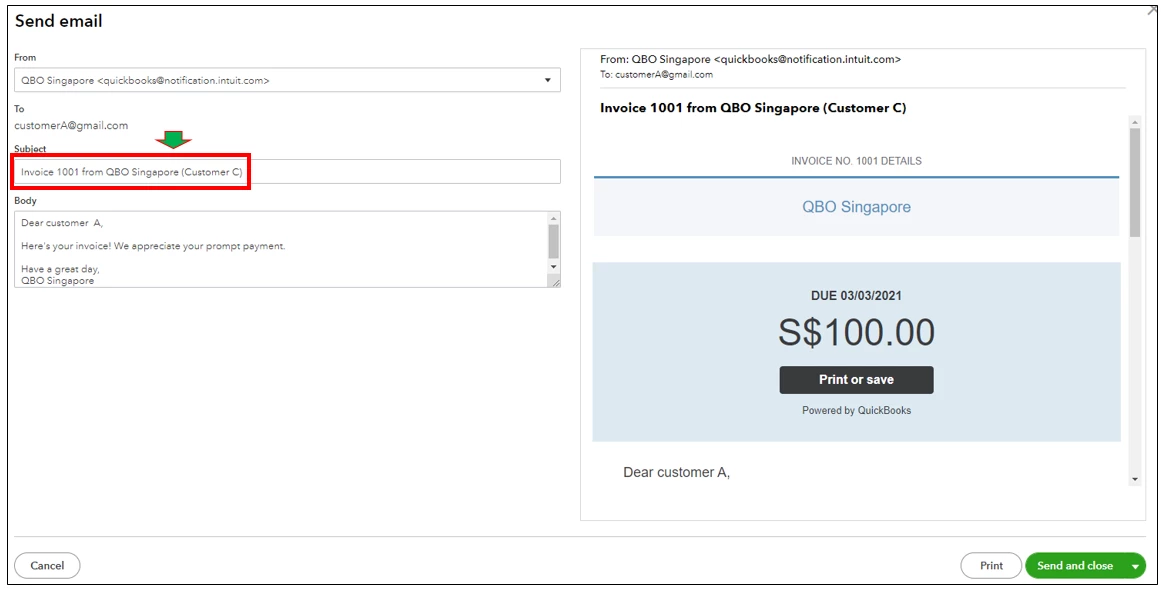
I can see how this option would be helpful for you and your business. Therefore, let me take note of this as a suggestion to improve your QuickBooks experience.


In the meantime, I recommend visiting our Firm of the Future site. This is where we share recent happenings and future developments, such as updates to newly added features.


The Community always has your back, so please let me know if you have any other questions. I'll be more than happy to help. Keep safe.

5 replies

February 1, 2021

Hi there, Jun3. 


Thank you for reaching out in the Community. Yes, you can customize the email message and add their name from there. I'll show you how to do it: 


  1. Go to the Gear icon.
  2. Under YOUR COMPANY, select Accounts and Settings.
  3. Choose Sales.
  4. On the Messages section, click the Pencil icon. 
  5. Below the Sales form menu, select Invoice.
  6. Enter the following text as your email subject line: Invoice [Invoice No.] and/or your customer company name. 
  7. Select Save.
  8. Tap Done


You can check out the Customise invoices, estimates, and sales receipts in QuickBooks Online article for additional resources. It contains complete information on how to change the layout, design, and data fields that show on the invoices.  


If there's anything else that I can help you with, please let me know in the comments below. I'll be here to lend a hand. Stay safe!

Jun3Author
February 1, 2021

Hi Ailene, 


We have more than 1 customer and want this setting to apply automatically to every customer. So similar to [Invoice No.] , is there a [Customer Name] or what is the placeholder for us to use so QBO will apply and insert the correct invoice no. & company name automatically? Your suggestion seems to mean that we have to type the specific customer/company name in the subject line in the Settings. 

ReymondOAnswer
February 1, 2021

Hey there, @Jun3.


The option to add another field to your invoice email message is unavailable in QuickBooks. As suggested above, you have to manually enter the specific customer/company name in the subject line in the Custom Form Style Settings.


Aside from the steps provided above, there is an easier way to edit the invoice's subject line. You can do it before sending the transaction to your customers. Just directly change the Subject details in your email invoice before clicking Send and close.

I can see how this option would be helpful for you and your business. Therefore, let me take note of this as a suggestion to improve your QuickBooks experience.


In the meantime, I recommend visiting our Firm of the Future site. This is where we share recent happenings and future developments, such as updates to newly added features.


The Community always has your back, so please let me know if you have any other questions. I'll be more than happy to help. Keep safe.

June 2, 2022

I too would like to strongly suggest that Quickbooks Online add more variables besides just [Invoice No.] to be used in the invoice email templates. I don't know why this issue is marked as "solved" when there definitely is not a solution to the original posters request. It is a shame that I cannot insert things like [PO Number] or [Tracking No.] to this email template and must have our bookkeepers and sales administrators manually insert these elements with copy and paste every time. A bit more flexibility would be nice. (and please no more comments from the Xero people suggesting we switch platforms). I need this to work in Quickbooks Online. 


Thanks!

Brad Bennett

Pacific Pickle Works

June 10, 2022

Yes, I'd like to be able to include Customer First name and Company name in the sales email template too. This would be a big time saver! Hoping it becomes available soon.

February 18, 2023

I’m in the same exact boat and actually shocked that this feature is not available. I manage marketing services for roughly 28 companies monthly and then have another 16 that need one-off services at least 10-15 times a year and I have to manually enter their company or personal name in the invoice’s message each time.


In my opinion the lack of this feature defeats the purpose of having an “automated invoicing option.” I mean if I can’t have specific customer related fields automatically generated in messages, is it truly automated? Because of this I have to manually send invoice message every month. I’ve considered sending general messaging without including their name, but my business approach is successful in part for having a personable approach. Little things like that add up.

I work in several email marketing programs from Sendy (open source) to Gmail mass email services, even Excel can do thus; ALL of these provide the ability to autofill using first name, company name or really any other specified tag as a key feature. It’s almost a mandatory and required feature for any program that offers the ability to communicate with multiple customers.

Does QuickBooks ever hire third-party developers, I’d bet my developer could at least give some insights, if not knock it out for QB. It might sound silly but I’d love to help make this happen so business owners can utilize this basic common sense feature.

The inability to auto-populate a customers Company Name or First Name in the message is really the only reason I’d ever consider looking at other solutions, aside from that I’m happy with everything else.

When looking at some of the more advanced features that QB offers it baffles me that something as simple as this is taking so long to add.

I keep my fingers crossed though, I don’t want to move services over something that I know QuickBooks is capable of adding to their “automated” capabilities.

July 28, 2023

We are seeking this feature as well and are shocked that we cannot embed a Company field name in the subject line. We could do that with FreshBooks from which we migrated to QBO. The delivery of invoices is critical and this is definitely not 'customer centric' for QuickBooks.

July 29, 2023

Hi there, @bsm007.


We recognize that each company has unique needs, and I can see how the feature you're looking for would benefit and empower your business.


Though we don't have a specific timeframe for when this will be made available, I recommend sending this request straight to our product engineers through feedback. It helps us improve the features of the program.


To send feedback, follow the below steps:


  1. Go to the Gear icon at the top.
  2. Select Feedback.
  3. Enter your comments or product suggestions. 
  4. Then select Next to submit feedback.


For future reference, check out this article to learn how to receive invoice payments in QuickBooks Online. 


If there's anything else you need help with, please let me know by commenting below. I'm always here to answer any questions you may have. Take care.

September 1, 2023

"We recognize that each company has unique needs, and I can see how the feature you're looking for would benefit and empower your business." blah blah blah... Such company-speak.

This issue/request has been ongoing for nearly 3 years with zero resolution. To even suggest to make an invoice for each customer is absurd. The most BASIC thing in any business suite is the ability to do things fast and accurately, not stopping with each invoice to add in the name of the customer, the contact's first name, etc. It is an absolute PITA and QB does nothing about it (except keep raising the rates with no added value for the increase). Here's the thing. The people that use QB are businesses. Businesses have lots of customers, sub-customers, contacts, etc. It is not rocket science to provide dynamic variables to be put into an email template. That is developer 101 stuff. Every single time I have to send invoices I am reminded how absolutely ridiculous this is to even have to make a request for this feature, never mind wait three years and still hear "we recognize how this would be valuable". Roll my eyes with the insincerity of that statement. What would really, really be helpful at this point, would be to actually implement something a ton of customers are asking for. Seems these basic but incredibly valuable and important features fall into the abyss called "Enhancements". It's about time QB provided some value-add or the recommendations here to look at xero.com may be fully warranted. So frustrating.

April 10, 2024

I am still looking for a solution to this problem.  Without manually adding the client name on every single subject line of every single invoice email....Can we include a field like [Customer Name] in the email message setting so every email will be sent with the respective Customer company name on the email subject line?
